

Lenovo Yoga Book 9i
Summary
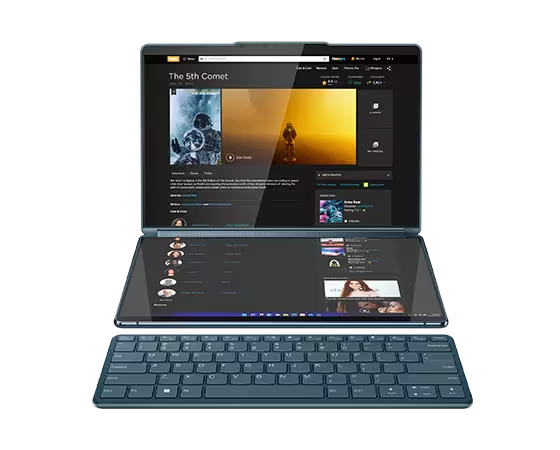
Lenovo Yoga Book 9i offers a glimpse of a bright future, albeit one that needs a few refinements and enhancements to fulfill its promise. The Yoga Book 9i, by itself, is very impressive. Unfortunately, it isn’t a complete solution by itself. The keyboard, mouse and pen, along with windows and cursor management, require a rethink to deliver a truly next generation consumer computing experience.
Note: At the time of this writing, Amazon was only selling a Chinese version of the Yoga Book 9i without a warranty. We suggest interested buyers look to Lenovo directly.
Lenovo Yoga Book 9i Review
Review: Lenovo Yoga Book 9i
Lenovo’s Yoga Book 9i offers a fascinating blend of innovative design and cutting-edge technology, particularly with its unique double OLED displays. It pushes the boundaries of what a laptop can be, offering a versatile experience that caters to both creativity and productivity. However, like any piece of technology, it’s not without its quirks. The virtual keyboard isn’t the best experience, and the physical keyboard, while close to magic when placed at the top of the lower display (and the lower display blanks out into a trackpad), isn’t as good as Lenovo’s usual best-in-class integrated keyboards.
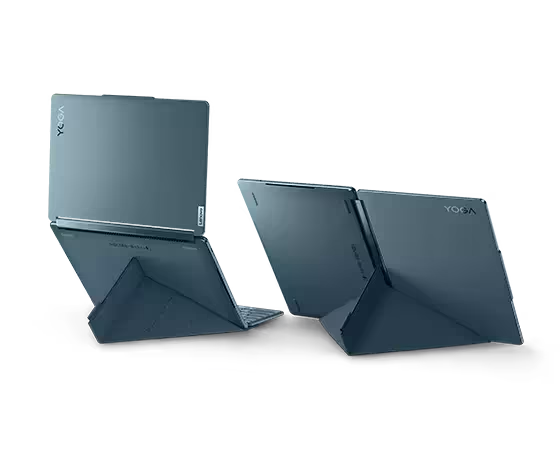
Lenovo recognizes the issues with the 9i, shipping the computer with a stand, keyboard, pen and mouse. Most laptops come in a box all alone, any technology they need packed into their compact form save for a power supply. That Lenovo sees the need to ship the Yoga Book 9i with a bevy of accessories clearly reflects a position that, on its own, the 9i doesn’t accommodate enough use cases.
I don’t see any software being implemented just for a device like the Yoga Book 9i. Its configuration is too flexible to convince developers that a top and bottom horizontal screen would make sense as a static or default configuration for their UI. Products like Adobe Photoshop already offer the flexibility of moving around pieces of the UI. The lower part of the 9i is ideal for the various tools that can clutter a Photoshop experience. Users can easily place the tools in the lower half and keep the image above.
As the scores below and the accompanying notes attest, the Lenovo Yoga Book 9i isn’t a run-of-the-mill design. So much so that I had to remove, add or modify some of the evaluation components. The dual display eliminated areas like built-in collaboration keys, and, well, the keyboard itself. And few laptops ship with a stand to transform them into dual portrait displays. Keyboard scores are based on the keyboard shipped with the 9i, not the virtual keyboard.

Serious Insights Laptop Evaluation
| Evaluation Area | Score | Notes |
| Display | 5.00 | The dual OLED displays are the stars of this show. Dual 13.3″ 2.8K (2880 x 1800), OLED, Glare, Touch, HDR 500, 100%DCI-P3, 400 nits, 60Hz, Narrow Bezel, Glass. |
| Input | 3.58 | Touch, pen, mouse and keyboard. Matching keyboard is OK. The mouse and pen could use an update to match the Yoga Book 9i aesthetic. |
| Performance | 4 | A perfect CPU match. 13th Generation Intel® Core™ i7-1355U Processor (E-cores up to 3.70 GHz P-cores up to 5.00 GHz). 16 GB LPDDR5X-6400MHz (Soldered). Integrated Intel® Iris® Xe Graphics. |
| Security | 1.88 | Facial recogniton and basic Windows security. No spill or drop protection. No encryption. No security slot. No tracking. |
| Collaboration | 3.5 | Decent camera and audio. 5MP IR/RGB Hybrid Camera with E-Shutter and Dual Array Microphone. No special collaboration features. |
| Connectivity | 3.75 | 3 USB-C ports with Thunderbolt. WiFi, Bluetooth. Not marked down for lack of physical Ethernet or cellular. . |
| Aesthetics | 5 | One pretty box. |
| Sustainability | 5 | Carbon Neutral Certified, ENERGY STAR® rated, and EPEAT® Gold registered,. Plastic-free packaging. FSCTM-certified paper wrap. The 9i is built with 90% recycled plastic in the power adapter case and 100% recycled aluminum in the top cover. |
| Software | 3.8 | Lenovo support software. Besides some basics associated with the camera for image improvement and lock/unlock, no other special software. However, all the magical bits aren’t listed, so I added a point for the software associated with dual-display management and the related peripheral management. |

What we like
Pros
- Stunning double OLED displays
- Versatile design with 360-degree hinge
- Solid performance
- Great audio
The Lenovo Yoga Book 9i stuns when it’s first turned on. The OLED displays offer astonishing vibrancy and depth. The roughly $2K laptop is best suited to creatives and those who like to create their own user experience. A little pricey for pure content consumption, but for those who own one, watching and listening to streams will become moments of pure pleasure when using the Yoga Book 9i.
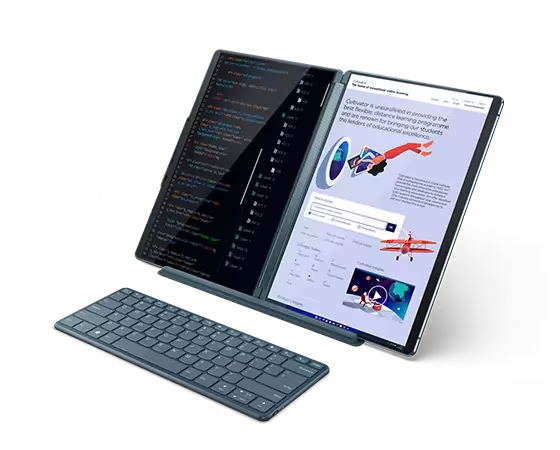
- Double OLED Displays: Undoubtedly, the standout feature of the Yoga Book 9i is its pair of stunning 13.3″ 2.8K OLED displays that deliver vibrant colors, deep blacks, and excellent contrast. It’s a joy to look at, whether you’re editing photos, watching videos, or simply browsing the web. The secondary display, located where you’d typically find a keyboard, is a matching touchscreen OLED that serves multiple purposes. It can function as a keyboard, a sketchpad for drawing or note-taking, or as a secondary display for a bigger canvas. The dual displays make the Yoga Book 9i unique in the laptop for now—but given its beautiful design, likely one that will be copied by many other manufacturers.
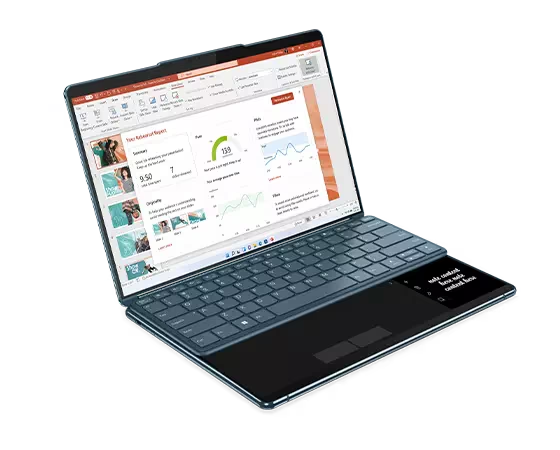
- Versatility: Thanks to its dual displays and 360-degree hinge, the Yoga Book 9i offers a level of versatility that’s hard to find in other laptops. Whether you’re using it in laptop mode, tent mode, or tablet mode, it adapts to your needs, making it a great choice for both work and play. With the keyboard on the secondary display, the Yoga Book 9i can emulate a traditional laptop (just don’t close the lid when the keyboard is in place). Keyboard awareness is very cool. Not flawless, but cool. Lenovo even offers a side movement for the virtual trackpad so the pen can be used for notetaking next to it when the keyboard is in place.
- Performance: Powered by Intel’s latest processors and equipped with ample RAM and storage options, the Yoga Book 9i delivers solid performance across the board. Whether you’re running productivity apps, editing videos, or playing games, it handles everything with ease.
- Audio: I have not heard a laptop with more impressive sound. The Bowers & Wilkins speakers reproduce the notes, screams, roars, and laughter emanating from the Lenovo Yoga Book 9i’s Dolby sound bar with clarity and depth.
- Webcam placement: Rather than eat away at pixels with a camera notch, Lenovo chose to create a camera bump that positions the camera well for video conferences and also creates a nice little place to grab the upper lid when opening the device.
When people see the Lenovo Yoga Book 9i, they can’t help but be impressed. The OLED screen draws in the eyes, the soundbar captures the ears and the keyboard and pen magic engages the imagination.

What could be improved
Cons
- Software needs refinement
- The stand is not a case
- The keyboard is shallow and does not include backlighting
- Pen and mouse are not rechargeable
As a general note, when making an impressive device, one that might be considered a production quality prototype to test a market, don’t ship it with subpar peripherals. I would love to have seen Lenovo offer a pen and mouse as sleek and innovative as the device they were meant to serve. Even if the Yoga Book 9i doesn’t become a long-term member of Lenovo’s product portfolio, new mice and keyboards could easily lend an air of coolness to other emergent designs. In other words, better-looking mice and pens should not be considered wasted engineering time.
- Software. Windows 11 was not made for a dual display like this one. It works impressively in many ways, but the magic sometimes wears thin. With the virtual trackpad, if the cursor is on the lower display, on the virtual trackpad, it just follows your finger around the trackpad. The cursor must be on the top display for the virtual trackpad to work. When the keyboard is in the lower configuration, with news and weather showing above it, those panels can’t be managed. They close together, and if something goes awry, like weather showing up on both panels, getting back to the news did appear possible as the panels offered no controls beyond the close “X.”
- Stand. The origami-inspired stand is sturdy and transforms the Yoga Book 9i into a dual vertical display workhorse. Some may come to see this configuration as the preferred one. Unfortunately, the stand does not double as a case, so it’s one more thing to carry with a laptop that demands one carry lots of things. The stand does act as a case for the keyboard.
- Keyboard. Of the input accessories, the keyboard aligns best with the Yoga Book 9i design aesthetic. It’s Bluetooth®, recharges via USB-C and performs magic, or at least initiates magic, when placed on the upper part of the lower display. In a flash, the 9i reconfigures itself into a laptop, accepts the keyboard in its traditional place, and displays a virtual trackpad below. Unfortunately, the keyboard isn’t as good as Lenovo’s best X1 series keyboards. The shallow keystrokes and lack of backlighting detract from this otherwise attractive keyboard.
- Pen. The pen runs on a battery that must be replaced. At a minimum, Lenovo should have included a USB-C chargeable pen. The design looks anachronistic next to the Yoga Book 9i. They’ve seen the Apple Pencil. It can be improved too. At least make it the design jumping-off point.
- Mouse. Ugg. Nothing special. Not rechargeable. It’s nice that buyers don’t NEED to look for a mouse to accompany the Yoga Book 9i, but the boring design may encourage them to do so anyway.
Lenovo Yoga Book 9i: The bottom line
The Lenovo Yoga Book 9i is a visually striking and versatile laptop that showcases the potential for dual OLED displays. However, its unconventional design may not be for everyone, especially those who prioritize portability and comfort for extended typing sessions. If you can look past its quirks, the Lenovo Yoga Book 9i offers a unique experience that’s hard to find elsewhere in the laptop market. The gorgeous screens and outstanding sound may be enough to hook some buyers despite the premium price.
Lenovo provided the Yoga Book 9i for review. Images courtesy of Lenovo unless otherwise noted.
Serious Insights is an Amazon Affiliate. Clicking on an Amazon link may result in a payment to Serious Insights. Serious Insights is not a Lenovo affiliate and receives no remuneration for clicks to their site.
For more serious insights on hardware and accessories, click here.
Leave a Reply