
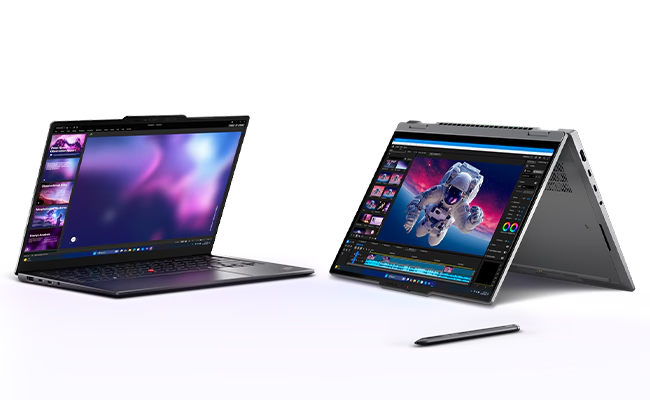
Lenovo ThinkPad X1 2-in-1 Gen 11
Summary
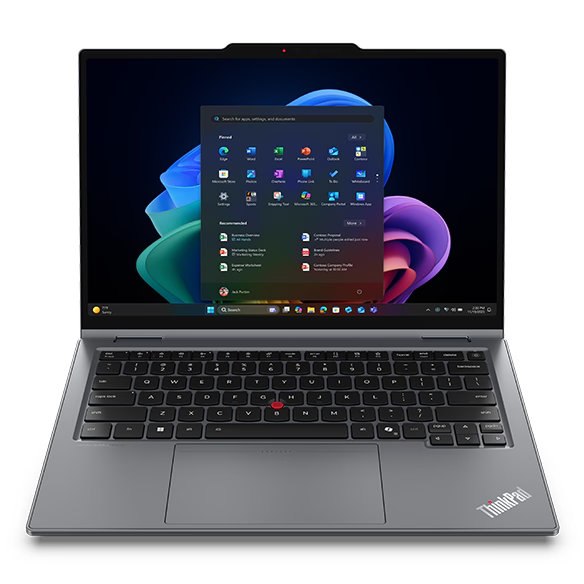
The Lenovo ThinkPad X1 2-in-1 Gen 11 Aura Edition is a faster, lighter, and more coherent premium business convertible. My 32GB, Core Ultra 7 355, 512GB WUXGA touch configuration improved on Gen 10 performance, port placement, and keyboard design, while the broader platform adds a third Thunderbolt 4 port, larger touchpads, higher-resolution cameras, a 58Wh battery, optional NFC, and up to 64GB of memory. Lenovo’s U.S. price started at $2,544.10 on September 21, 2026, compared with a stated estimated value of $2,678, although the exact reviewed configuration was not then listed as a ready-to-buy model. Official base-warranty options range from one-year courier/carry-in or onsite service to three-year configurations with one year of battery coverage; coverage varies by SKU and region.
Lenovo ThinkPad X1 2-in-1 Gen 11 Review
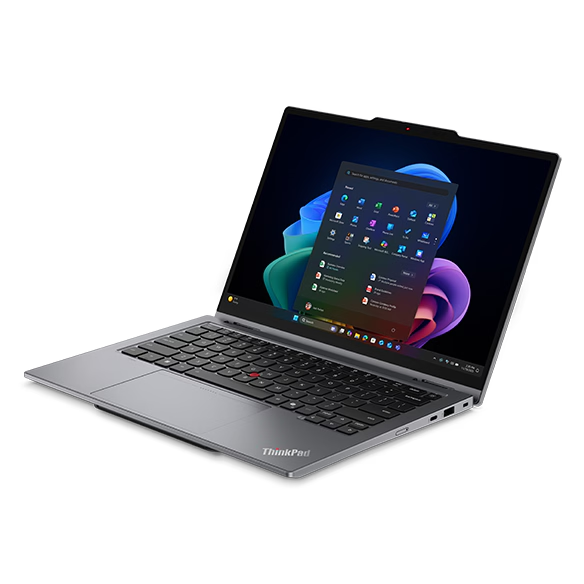
I liked the Lenovo ThinkPad X1 2-in-1 Gen 10 enough to keep finding reasons to travel with it, which makes the Gen 11’s job of replacing an average predecessor more difficult. It has to preserve the thoughtful balance among business security, convertible flexibility, a first-rate keyboard and travel-ready construction while making enough changes to justify another generation. Lenovo currently lists the ThinkPad X1 2-in-1 Gen 11 Aura Edition in the United States starting at $2,544.10, discounted from a stated estimated value of $2,678 as of September 21, 2026. That is premium-business-laptop territory before configuration choices push the price higher.
The Lenovo ThinkPad X1 2-in-1 Gen 11 succeeds because its changes concentrate on the points where a mobile computer meets work. I tested a configuration with an Intel Core Ultra 7 355 processor, 32GB of memory, 512GB of storage, and a 14-inch WUXGA IPS touch display. I found it faster than the Gen 10 review unit, better organized around its ports, and even better as a writing machine. Lenovo also moved the fingerprint reader into the keyboard’s power button. Those changes sound incremental on a comparison chart. Together, they make a familiar ThinkPad feel more deliberate.
Lenovo ThinkPad X1 2-in-1 Gen 11 Specifications (as reviewed)
| Specification | Value |
|---|---|
| Product | Lenovo ThinkPad X1 2-in-1 Gen 11 Aura Edition |
| Current U.S. price | Starting at $2,544.10; Lenovo estimated value $2,678 as of September 21, 2026; exact reviewed configuration not currently listed |
| Reviewed processor | Intel Core Ultra 7 355, 8 cores/8 threads, up to 4.7GHz P-core, 12MB cache |
| NPU | Intel NPU, up to 49 TOPS |
| Graphics | Integrated Intel Graphics, shared memory, rated up to 40 TOPS for the Core Ultra 7 355 |
| Operating system | Windows 11 Pro |
| Reviewed memory | 32GB LPDDR5X-8533, soldered, dual-channel, not upgradable |
| Platform memory options | 16GB, 24GB, 32GB or 64GB; up to LPDDR5X-9600 depending on configuration |
| Reviewed storage | 512GB M.2 2280 SSD; interface generation not supplied in review notes |
| Platform storage support | One M.2 2280 slot; up to 2TB; PCIe 4.0 or PCIe 5.0 Opal 2.0 options |
| Reviewed display | 14-inch WUXGA (1920 x 1200) IPS touchscreen, 16:10, 500 nits, 100% sRGB, 60Hz, low power |
| Other display option | 14-inch 2.8K (2880 x 1800) OLED touchscreen, 500 nits, 100% DCI-P3, 120Hz variable refresh rate, DisplayHDR True Black 500 |
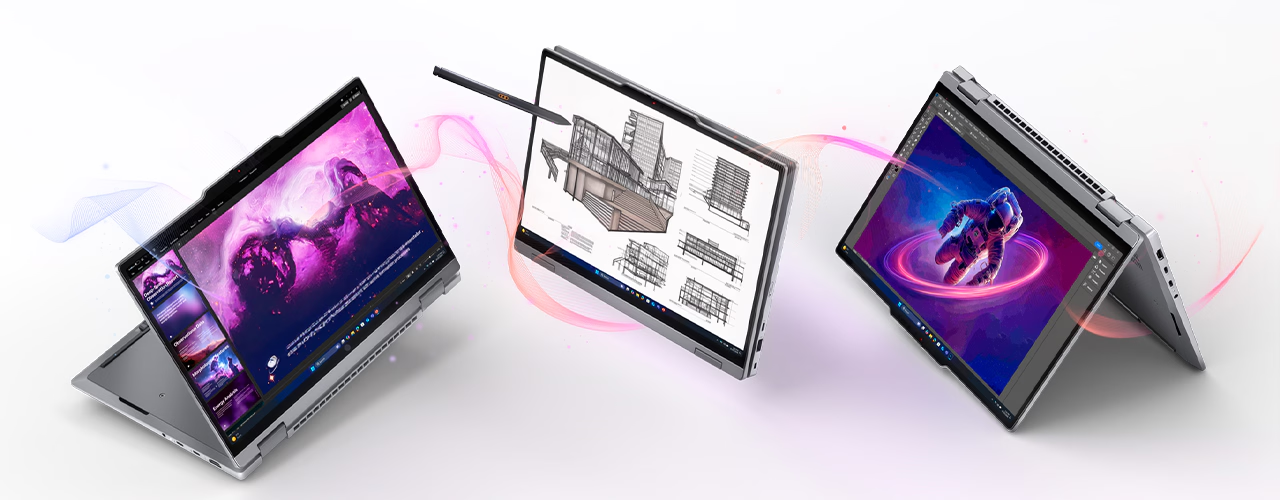
| Convertible modes | Laptop, tent, stand and tablet via 360-degree hinge |
| Pen | Lenovo Slim Pen 2 support with magnetic attachment, recessed pogo-pin charging dock, and tilt detection; U.S. product page says pen included, but official specifications allow no-pen configurations |
| Keyboard | Six-row, spill-resistant, backlit, 1.5mm main-key travel, 1.35mm travel on function row and G/H/B keys, Copilot key |
| Pointing devices | TrackPoint plus 3.15 x 4.72-inch conventional trackpad or 3.15 x 5.12-inch haptic touchpad |
| Camera options | 5MP + IR with privacy shutter, vHDR and temporal noise reduction; or 10MP ultrawide + IR with time-of-flight sensor and privacy shutter |
| Audio | Two 2W speakers with Dolby Atmos; dual 360-degree far-field microphones; Cirrus Logic CS42L45 codec |
| Battery | 58Wh rechargeable lithium-ion; Rapid Charge up to 80% in one hour under Lenovo’s stated off/standby/hibernation conditions |
| Wireless | Intel Wi-Fi 7 BE211, Bluetooth 5.4 with Bluetooth 6.0-ready hardware; optional 4G or 5G WWAN; optional NFC |
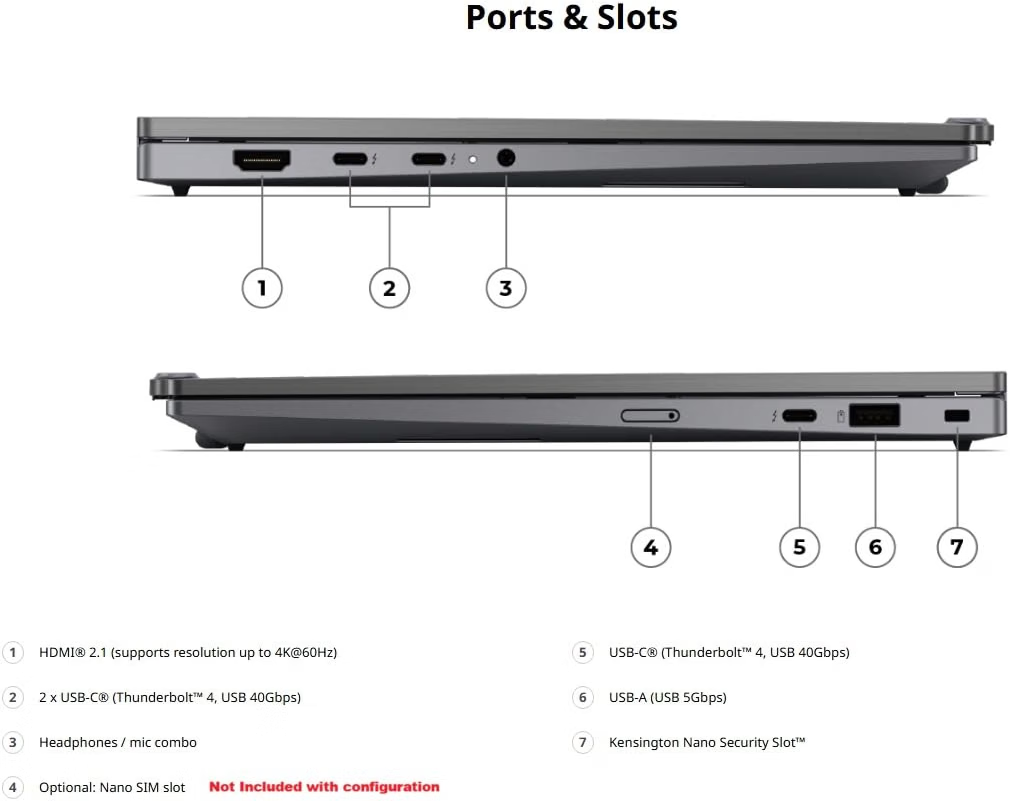
| Ports | One always-on USB-A 5Gbps; three Thunderbolt 4 with USB PD and DisplayPort 2.1; HDMI 2.1 up to 4K/60Hz; 3.5mm audio; optional nano-SIM |
| External displays | Up to three external displays plus the built-in display; HDMI up to 4K/60Hz and Thunderbolt up to 8K/60Hz subject to display-pipe limits |
| Security | Match-on-chip fingerprint reader integrated into keyboard power button, discrete TPM 2.0, IR camera for Windows Hello, camera shutter, optional human-presence detection, self-healing BIOS |
| Dimensions | 12.34 x 8.63 x 0.36/0.65 inches front/rear; 0.70 inches maximum |
| Starting weight | 2.52 pounds with conventional trackpad; 2.54 pounds with haptic touchpad |
| Chassis | Gray recycled-aluminum top and bottom covers; platform passed Lenovo’s MIL-STD-810H testing |
| Warranty | Configuration dependent: one-year courier/carry-in or limited onsite service, or three-year variants with one year of battery coverage; verify exact SKU |
What we like
Pros
- Faster, more responsive Intel Core Ultra Series 3 performance
- Better port placement with three Thunderbolt 4 connections
- Even better keyboard with power-button fingerprint reader
- Lighter chassis, larger touchpad and improved pen storage
- Higher platform ceilings for memory, cameras, displays and connectivity
The Intel Core Ultra 7 355 delivers the most important improvement in everyday use: the ThinkPad X1 2-in-1 Gen 11 feels faster than the Gen 10 unit I reviewed. This is not a simple clock-speed story. Both reviewed processors use eight cores and eight threads with 12MB of cache, while the Gen 11 chip lists a maximum P-core frequency of 4.7GHz, slightly below the Gen 10 unit’s 4.8GHz. The Series 3 chip raises the NPU rating from up to 48 TOPS to 49 TOPS, but that 1 TOPS increase does not explain the overall experience either.
Lenovo also redesigned the internal space frame, claims a 20% smaller system board and a 70% larger fan, and broadened the processor range to include a 16-core Core Ultra X7 368H. I can share that my lap was much cooler in day-to-day use when casually using it, and that the Series 3 chipset responded more quickly. While not a necessary upgrade for Gen 10 owners, Gen 11 is more refined, faster, and generally more capable, as you will read in the other comments on its positive aspects.
Port placement on the ThinkPad X1 2-in-1 Gen 11 improves the experience more than the raw number of connectors suggests. The ThinkPad X1 2-in-1 Gen 10 ships with two Thunderbolt 4 ports and a USB-A port on one side of the chassis, and a single USB-A port on the opposite side. Gen 11 distributes three Thunderbolt 4 ports across both sides, retains one always-on USB-A port, and keeps HDMI 2.1 and the 3.5mm audio connection. I found that arrangement easier to use because the power, dock, or display cable no longer has to approach from a single preferred direction.
The Gen 11 also supports two to three external monitors, in addition to the built-in display. Trading a USB-A connection for a third Thunderbolt port reflects how a modern premium laptop is likely to connect, charge, and dock without reducing the total number of high-speed data connections.
ThinkPad keyboards have long set a high standard, and this one is even better. Lenovo specifies 1.5mm of travel for the main keys and 1.35mm for the function row and the keys surrounding the TrackPoint. More important than the numbers, the keyboard feels settled, responsive, and built for sustained writing rather than occasional input between taps on the screen.
Moving the match-on-chip fingerprint reader into the keyboard’s power button is a small piece of industrial design with an outsized effect. Gen 10 placed the reader in a separate keyboard key and the power button on the edge of the chassis. Gen 11 consolidates both functions into a more natural location and removes another reason to feel around an edge when booting the computer.
Lenovo cut the ThinkPad X1 2-in-1 Gen 11’s official starting weight from 2.87 pounds to 2.52 pounds with the conventional trackpad or 2.54 pounds with the haptic touchpad. A reduction of roughly one-third of a pound is noticeable in a notebook designed to move between bag, meeting table, and tablet modes. The chassis is slightly wider and deeper than Gen 10 and reaches 0.70 inches at its thickest point, so this is not a victory in every dimension, but the weight reduction is the measurement that most directly serves mobility.
The conventional touchpad grows from 2.21 x 4.72 inches to 3.15 x 4.72 inches, while the haptic option grows from 2.78 x 4.72 inches to 3.15 x 5.12 inches. The supported Lenovo Slim Pen 2 also gains a recessed front storage position with pogo-pin charging, a more secure arrangement than attaching the earlier Yoga Pen to an exposed edge.
The rest of the official Gen 11 specification shows how much Lenovo changed beyond the reviewed configuration. Maximum memory increases from 32GB to 64GB, with platform speeds reaching LPDDR5X-9600; the reviewed 32GB configuration runs at LPDDR5X-8533, up from the 8400 MT/s memory in my Gen 10 unit. Camera options move from 1080p or 8MP to 5MP or an ultrawide 10MP camera with a time-of-flight sensor.
Battery capacity on the ThinkPad X1 2-in-1 Gen 11 increases from 57 Wh to 58 Wh. The Wi-Fi 7 controller moves from Intel’s BE201 to the BE211, which Lenovo describes as Bluetooth 6.0 hardware-ready, though it currently operates at Bluetooth 5.4. Gen 11 adds optional NFC and both 4G and 5G WWAN options, whereas Gen 10 offered no NFC and only a 5G option. These are configuration-level improvements rather than features present in every unit, but they give procurement teams and individual buyers a broader set of configuration choices to work from.
The system is also easier to service than its soldered memory suggests: the bottom cover removes with a Phillips screwdriver, though the single M.2 2280 SSD remains the only user-upgradeable component.
Sustainability
I give Lenovo a lot of credit for publishing product-specific material details rather than relying only on a corporate sustainability statement. Lenovo states that the Gen 11 is made from 75% recycled aluminum in the top cover, 90% recycled magnesium in the keyboard frame, recycled aluminum in the bottom cover and keyboard base plate, 85% post-consumer recycled content in black keycaps, 98% post-consumer recycled content in the speaker enclosure, and 100% recycled cobalt in the battery.
Lenovo also identifies recycled content in the battery frame, adapter, fan housing, pen, and several smaller holders, as well as plastic-free primary packaging made from FSC-certified paper. ENERGY STAR 9.0 replaces Gen 10’s ENERGY STAR 8.0 listing, while EPEAT Gold registration, RoHS compliance, and TCO Certified generation 10 remain part of the platform disclosure. The component and certification stories are solid. While they don’t offer a complete lifecycle analysis, they do provide more procurement evidence than generic environmental promises.
Qira and Copilot+: Lenovo’s AI Layer
Lenovo uses the ThinkPad X1 2-in-1 Gen 11 product page to tell two related but distinct AI stories. Lenovo Qira is Lenovo/Motorola’s cross-device personal AI. Copilot+ describes a class of Windows PCs and the Microsoft features enabled by their neural processing units. The reviewed Core Ultra 7 355 qualifies with an NPU rated at up to 49 TOPS, but the processor supplies capacity, not value. The real test is whether either AI layer reduces the effort required to find information, move among devices and complete work.
Lenovo describes Qira as a “Personal Ambient Intelligence System” that carries context across supported PCs, phones, tablets and wearables. Its ambitions extend beyond another chatbot window. Qira can build a personal knowledge base from conversations, documents and other material an individual chooses to share; maintain a conversation across Windows and Android devices; look at a shared screen or camera feed; summarize missed notifications; transcribe and translate; find saved documents, messages and email; create meeting summaries; and suggest a next action. Lenovo also lists connections with services including Gmail, Google Calendar, Slack, Outlook, Notion, Perplexity and Expedia. Lenovo states that personal data is stored on the device, with cloud services used when needed, and that information is not shared with advertising networks.

Microsoft’s Copilot+ features are more narrowly tied to Windows. Click to Do analyzes selected text or images and proposes actions such as copying, sharing, rewriting, or opening content in another application. Live Captions can process audio on the device and translate more than 40 languages into English or 27 languages into Simplified Chinese. Windows Studio Effects uses the NPU for capabilities such as automatic framing, standard eye-contact correction, background effects, and voice focus, although some effects remain processor/camera-dependent. Improved Windows Search adds semantic indexing so a description can retrieve a file without an exact filename. Agent in Settings interprets a plain-language request, suggests a fix, and, with permission, can change supported settings. Recall remains a preview feature that can save encrypted local snapshots and make past screen activity searchable; it is off by default, requires Windows Hello Enhanced Sign-in Security and consumes local storage when enabled.
Microsoft states that Copilot+ availability varies by device, region, language, Windows version, and update status, and some Click to Do actions require a subscription. Improved Search and Recall offer their broadest semantic support in a limited set of languages. Lenovo says Qira currently supports six languages, is available on eligible Lenovo PCs with at least 16GB of memory, and can be downloaded by eligible users, with preinstallation on supported devices coming later.
Owners will need to explore AI options and balance their use. Qira and Copilot+ overlap in some areas and may produce different results. Ultimately, it will be up to each user to determine which AI fits which workflow best.
What could be improved
Cons
- Premium pricing paired with configuration-dependent base warranty
- Soldered memory and a modest 512GB review-unit SSD
- Midrange Core Ultra 7 355 does not deliver the platform’s largest graphics gain
- Practical WUXGA display remains a 60Hz generational carryover
- TrackPoint looks dated
- Heavy pen users may find the new pen barrel less comfortable to grip than the prior generation’s Yoga Pen.
The X1 2-in-1 remains expensive, and its warranty does not become simpler at that price. Lenovo’s official specifications list one-year courier or carry-in service, one-year limited on-site service, and three-year variants with one year of battery coverage, depending on the SKU and region. Lenovo should make three years of coverage the uncomplicated base for a premium enterprise convertible, especially when the company expects organizations to view durability, manageability, and serviceability as part of the value proposition.
The reviewed 32GB memory choice is appropriate, but it is soldered to the system board and cannot be upgraded. That makes the purchase decision permanent even though Lenovo has raised the platform ceiling to 64GB. The 512GB SSD is similarly adequate without feeling generous. It can support a managed, cloud-centered workflow, but locally stored presentations, research, media, offline files, and application data quickly consume that capacity. Lenovo supports one M.2 2280 drive up to 2TB, and the SSD is the only meaningful internal upgrade path. I would make 1 TB the baseline storage option for a system in this price class.
The Core Ultra 7 355 improves the reviewed system’s overall responsiveness, but its graphics specification reveals why the processor choice matters. Lenovo rates the chip’s integrated graphics at up to 40 TOPS, compared with up to 64 TOPS for the Arc 140V graphics paired with the Gen 10 review unit. The larger graphics leap appears only at the top of the Gen 11 range, where the Core Ultra X7 368H includes Intel Arc B390 graphics rated at up to 122 TOPS.
The new basic core configuration does not diminish the gains I observed in common business work, but it keeps the reviewed configuration in thin-and-light territory rather than turning it into a graphics workstation. The naming hierarchy makes the entire generation sound transformed; the actual transformation depends heavily on the selected processor.
The ThinkPad X1 2-in-1 Gen 11’s 14-inch WUXGA display remains a very good work panel: 1920 x 1200 resolution, a 16:10 aspect ratio, touch, 500-nit brightness, 100% sRGB coverage and a low-power 60Hz design. It is also substantially the same practical choice available on Gen 10. The official screen-to-body ratio slips from 87.8% to 86.46%, and the 2.8K OLED option continues to deliver visual drama at the cost of higher power consumption and a higher price for the configuration. I still prefer WUXGA for long writing sessions and travel, but a premium generational update should offer a middle ground, perhaps a higher-resolution, low-power IPS panel or a higher refresh rate without requiring the OLED jump.
I know I make no fans among legacy ThinkPad aficionados or some members of the Lenovo engineering team, but I maintain my ardent opinion that the TrackPoint has had its day, regardless of its iconic stature. The trackpad still needs to support multiple types of touch, implemented as both visible buttons for the TrackPoint and gestures and taps for trackpad users, all of which complicate an experience that doesn’t need complication. I can imagine red paint on the keys, perhaps, or a round red power button, and, of course, maintaining the red dot above the “i” in ThinkPad. Give honor, but retire the feature.
The improved pen storage deserves one qualification. The front recess securely docks and charges the Slim Pen 2, a clear improvement over an exposed magnetic edge, but it requires a slimmer pen than the prior Yoga Pen. Users who annotate heavily may prefer the older pen’s fuller grip even while appreciating the Gen 11’s more secure storage and improved charging system.
Lenovo ThinkPad X1 2-in-1 Gen 11: The bottom line
The Lenovo ThinkPad X1 2-in-1 Gen 11 Aura Edition is a disciplined refinement of a business convertible I already liked. I found the Gen 11 review unit faster, the ports easier to live with, and the keyboard even better. The lighter chassis, larger touchpad, improved pen storage, higher-resolution camera options, third Thunderbolt 4 port, and broader memory and wireless choices make this a real platform update, not a renamed Gen 10.
I recommend the ThinkPad X1 2-in-1 Gen 11 for mobile professionals and organizations that value writing quality, security, manageability, pen input, and flexible docking enough to accept the premium. Gen 10 owners do not need to rush unless the lower weight, improved port arrangement, or Intel Ultra Series 3 performance solves a specific problem. Buyers coming from older X1 generations, however, will experience more consequential gains.
Lenovo provided the ThinkPad X1 2-in-1 Gen 11 for review. Images courtesy of Lenovo unless otherwise noted.
Serious Insights is an Amazon Affiliate. Clicking on an Amazon link may result in a payment to Serious Insights.
For more serious insights on hardware and accessories, click here.
If you found value in this review, please like it, leave a comment or share it with friends and colleagues. We appreciate you!
Leave a Reply