

Lenovo ThinkPad X1 2-in-1 Gen 10

Summary
The Lenovo ThinkPad X1 2-in-1 Gen 10 Aura Edition configuration reviewed here includes an Intel Core Ultra 7 258V vPro processor, Windows 11 Pro, 32GB LPDDR5X-8400MT/s soldered memory, a 512GB M.2 2280 PCIe Gen4 TLC Opal SSD, a 14-inch WUXGA IPS anti-glare touch display rated at 500 nits, integrated graphics, a 1080p FHD RGB+IR camera, Human Presence Detection, Lenovo Yoga Pen, Intel Wi-Fi 7 BE201 with Bluetooth 5.4, discrete TPM 2.0, vPro Enterprise, Evo certification, a 57Wh battery, a 65W USB-C Slim GaN adapter with 90% post-consumer content, and a 1-year courier or carry-in warranty.
Lenovo ThinkPad X1 2-in-1 Gen 10 Review

I rarely receive a laptop that I really like. I really like the Lenovo ThinkPad X1 2-in-1 Gen 10. It’s not perfect. It has still inherited some ThinkPad traits, like the pointer and buttons on the trackpad, but at least the trackpad is more refined. Other than that, the display, the finish, the details, the internals…all exemplary for its class, and this is not a word chosen for me by an AI (which did, however, correct my typo when I first committed it to this sentence).
The Lenovo ThinkPad X1 2-in-1 Gen 10 Aura Edition does not abandon the ThinkPad’s history in pursuit of a lifestyle device, even though I don’t think modern design needs to compromise functionality or build quality. That said, it refinements still fall into what most would call a serious business laptop with vPro Enterprise, Wi-Fi 7, Windows 11 Pro, and a discrete TPM 2.0.
Some of its refinements include a 360-degree hinge, pen support and a beautiful brushed grey exterior. I have to be honest, this review was written but didn’t get posted. That means that the Gen 10’s Intel Core Ultra 7 258V platform, integrated NPU support, Copilot+ PC positioning, and Lenovo’s Aura Edition are great, but not as great as the Gen 11 device with its Intel Core Ultra 7 Gen 3 CPU/GPU combo.
Regardless of generation, the X1 remains an outstanding choice, along with the X1 Carbon or one of Lenovo’s other recent Aura Edition designs. The Gen 10 X1 2-in-1 is not a workstation, not a tablet replacement, and not a consumer convertible repackaged for business. It is a premium mobile work system for people who value keyboard quality, security, manageability, pen-based markup, meeting performance, and enough local AI capability to support the next wave of Windows and business productivity features. I really like it, which is why it so often travels with me. Perhaps that’s why I delayed the review, to be able to fit in a few more adventures before returning it to the mothership.

What we like
Pros
- Excellent premium business convertible design
- Intel Core Ultra 7 258V with vPro Enterprise
- 32GB LPDDR5X memory
- Practical WUXGA 500-nit touch display
- Lenovo Yoga Pen included
- Strong security and manageability
- Wi-Fi 7 and Bluetooth 5.4
- 65W USB-C Slim GaN adapter with recycled content
- Good sustainability profile
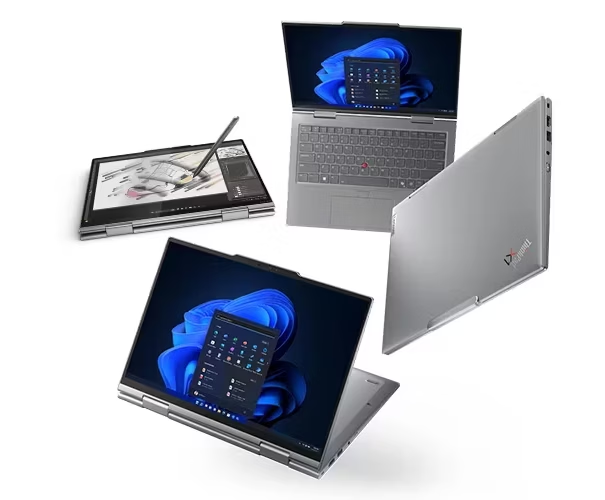
The Lenovo ThinkPad X1 2-in-1 Gen 10 Aura Edition keeps the convertible design focused on work rather than novelty. The 14-inch chassis, grey finish, backlit keyboard, fingerprint reader, touch display, and 360-degree hinge create a familiar X1 experience with added flexibility for markup, presentations, reading, and occasional tablet-mode work. The supplied configuration uses the 14-inch WUXGA IPS touch display rather than the OLED option. That choice gives the system a more pragmatic personality: 1920 x 1200 resolution, 100% sRGB coverage, 500 nits, anti-glare treatment, 60Hz refresh, and low-power tuning. A 2.8K display is also available at a premium. All display versions integrate a 1080p FHD RGB+IR camera.
The Intel Core Ultra 7 258V vPro processor gives the Lenovo ThinkPad X1 2-in-1 Gen 10 review unit the right silicon for a premium 2025 business convertible with an integrated Intel NPU supporting up to 48 TOPS. That makes the machine more than a conventional thin-and-light laptop with a new sticker or key.
The AI capability will matter most through Windows features, meeting enhancement, local inference supported by business software, and endpoint intelligence rather than sustained standalone model work. In tests, however, it ran a content embedding exercise in about 55 minutes, compared to a Lenovo P16 mobile workstation that ran the same task in under 22 minutes. Significantly more time, but not as much as a Qualcomm Snapdragon-equipped “AI” PC that took three days to embed the same files.
The 32GB LPDDR5X-8400MT/s memory configuration is the correct choice for this machine. Lenovo notes that Gen 10 Aura Edition memory is soldered and not upgradable. A 16GB configuration would technically satisfy many productivity requirements, but 32GB gives the system room for multi-processing and more graphics headroom for the integrated ARC GPU to allocate under load.

The 512GB M.2 2280 PCIe Gen4 TLC Opal SSD is not extravagant, but it is an appropriate baseline for a business convertible. Opal support aligns with enterprise data protection expectations, and the M.2 2280 form factor gives the storage choice more credibility than the smaller drives often found in ultralight systems. For this review unit, the 512GB Gen4 Opal drive matches the security and productivity profile without pushing the system into an unnecessary storage premium.
The Lenovo Yoga Pen belongs in the box for this kind of system, and this configuration includes it. A 2-in-1 without a pen makes the touch screen do too much without finesse. The pen turns the machine into a viable tool for annotation and ideation. I do not see a 14-inch convertible as a full-time tablet; as thin as it is, it’s not an Apple iPad or an Android tablet.
The keyboard on the back of the X1, when folded, always feels awkward to hold, and of course, it weighs more than many tablets that come in at a pound or less. Its value is in creative or feedback work moments: like sketching an idea, marking up a PDF, signing a document, annotating a slide, or working through a concept in a meeting without moving to a separate device.
Security and manageability remain central to ThinkPad positioning. This unit includes Windows 11 Pro, vPro Enterprise certification, a fingerprint reader, a discrete TPM 2.0-enabled BIOS, BIOS Absolute enabled, Human Presence Detection, an FHD RGB+IR camera for Microsoft Hello support, and no added consumer security software clutter.
The Intel Wi-Fi 7 BE201 2×2 BE with vPro and Bluetooth 5.4 gives the Lenovo ThinkPad X1 2-in-1 Gen 10 a network foundation aligned with premium business expectations. Wi-Fi 7 will not transform every connection immediately because infrastructure adoption varies, but buying a premium business laptop with Wi-Fi 6E in this category now feels like accepting yesterday’s lifecycle at tomorrow’s price. This configuration avoids that compromise.
The 65W USB-C Slim GaN adapter with 90% post-consumer content fits the broader design well. GaN chargers reduce bulk, improve travel convenience, and make USB-C power more practical across modern devices. Lenovo’s sustainability disclosures for this generation also include recycled materials and certifications across the platform, including EPEAT and ENERGY STAR. Those details make this system easier to justify in procurement environments that increasingly require environmental documentation rather than broad vendor claims.

What could be improved
Cons
- Premium X1 pricing
- Soldered memory
- 512GB storage may feel tight
- WUXGA display favors practicality over visual drama
- No WWAN or NFC in this configuration
The X1 2-in-1 Gen 10 Aura Edition remains a premium ThinkPad, which means list pricing should be treated with caution. Lenovo pricing changes frequently, and the best value usually comes through promotional pricing, corporate programs, or carefully selected configuration discounts. The machine deserves premium positioning because of the hinge, build, vPro Enterprise, pen, security, and AI PC platform, but the buying case weakens if the final price approaches lightweight workstation territory or higher-end OLED configurations with larger SSDs.
The soldered memory requires the right decision at the time of purchase. This review unit makes the correct choice with 32GB, but the inability to upgrade later remains a structural limitation. Lenovo clearly states that Gen 10 Aura Edition memory is soldered, not upgradable, and has no slots. A common trait in most laptops, but common does not mean best for the buyer. Because of memory limitations, organizations should standardize on higher memory configurations for systems expected to remain in service across multiple OS and AI software cycles.

The 512GB SSD is adequate but not generous. For a tightly managed enterprise laptop with OneDrive, SharePoint, cloud storage, and disciplined endpoint management, 512GB can work. For an analyst, consultant, researcher, developer, or content creator who carries local files, media, PDFs, presentations, test data, and offline workspaces, 1TB would be a more comfortable configuration. Fortunately, Lenovo supports up to 2TB on custom builds, which makes the 512GB drive feel like a cost-control decision rather than the natural match for a premium X1.
At review time, the Lenovo configurator for this device supported 16GB of memory on the Ultra 5 version, and only 64GB on the Ultra 7 version. Unfortunately, storage on both max out at 512GB.
The WUXGA display is the sensible choice, not the showcase choice. A 14-inch 1920 x 1200 IPS panel with touch, anti-glare treatment, 500 nits, 100% sRGB, and low-power characteristics is good business hardware. It supports long writing sessions, meetings, markup, and travel. It does not deliver the same impact as Lenovo’s OLED options, which offer higher resolution, deeper contrast, and richer color. I would choose the WUXGA panel for battery life and matte practicality, but the premium impression softens compared with OLED-equipped variants.
This Lenovo ThinkPad X1 2-in-1 Gen 10 configuration omits WWAN and NFC. That will not matter for many users because phone tethering and Wi-Fi coverage have improved, and NFC remains situational in most laptop workflows. Still, a premium mobile business convertible makes the strongest argument when connectivity options remain broad. The absence of wireless WAN makes this system more dependent on external connectivity, which may be fine for the office or classroom but less ideal for fieldwork.

Lenovo ThinkPad X1 2-in-1 Gen 10: The bottom line
The Lenovo ThinkPad X1 2-in-1 Gen 10 Aura Edition is a well-balanced premium business convertible. The Core Ultra 7 258V vPro processor, 32GB LPDDR5X memory, WUXGA 500-nit touch display, Yoga Pen, Wi-Fi 7, Windows 11 Pro, TPM 2.0, fingerprint reader, and Human Presence Detection create a machine that fits modern professional work without chasing every maximum specification. I would prefer a 1TB SSD, a better camera, and the 2,8K display. All save the camera are configuration options. Even with those caveats, this configuration makes sense for mobile professionals who want a ThinkPad first, a convertible second, and an AI PC that supports the next phase of Windows productivity without pretending to be a workstation.
Lenovo provided the ThinkPad X1 2-in-1 Gen 10 for review. Images courtesy of Lenovo unless otherwise noted.
Serious Insights is an Amazon Affiliate. Clicking on an Amazon link may result in a payment to Serious Insights.
For more serious insights on hardware and accessories, click here.
If you found value in this review, please like it, leave a comment or share it with friends and colleagues. We appreciate you!
Leave a Reply