
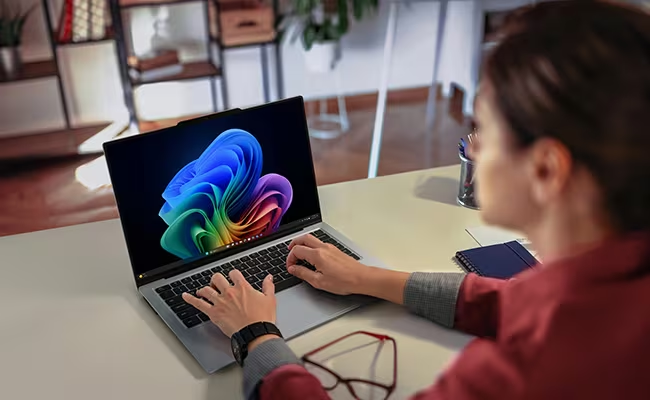
Lenovo ThinkPad X9 14 Aura Edition (14ʺ Intel) Laptop

Summary
ThinkPad X9 14 Aura Edition with Core Ultra 5 offers a sleek aluminum shell, vibrant 14-inch OLED, 15–19-hour battery, AI assistance via NPU, and top-tier portability. Dreams of versatile local AI implementations require heftier hardware. Ports may be too limiting for some.
Lenovo ThinkPad X9 14 Aura Edition (14ʺ Intel) Laptop Review
Lenovo’s ThinkPad line has always carried the weight of legacy. For over thirty years, ThinkPads have been defined as much by their design constraints as their innovations. The red TrackPoint nestled between the G, H, and B keys—affectionately (or dismissively) dubbed the “nipple” or the “nub”—stood as a defiant holdover from an era when touchpads were unreliable and mousing required real estate.
The TrackPoint wasn’t just a navigational tool—it was a statement. The red nub became a symbol of efficiency, mastery, and user control, until it became more of a nostalgic feature than a value proposition component. With the Lenovo ThinkPad X9 14 Aura Edition, Lenovo has finally let it go (as they have with other Lenovo brands like Yoga.)
That move signals more than a cosmetic refresh. It’s a shift in philosophy. The X9 is still unmistakably a ThinkPad, but it no longer clings to the strict visual grammar of its ancestors. The keyboard has been rebalanced, the haptic trackpad stretches comfortably across the palm rest, and the once-sacrosanct trio of physical mouse buttons is gone.
There’s no bump, no red dot, no hint of legacy for legacy’s sake. In its place is something sleeker, quieter, more aligned with modern gesture workflows. This ThinkPad is built for a different kind of confidence, not in muscle memory, but in adaptation.
The X9 also changes out its interior, though not as much as I would like. It leverages the second generation of Intel’s integrated neural processors. It has become an AI PC, though I wish Lenovo had done more to recognize the needs of AI for memory and storage. The review unit runs an Ultra 5 (which as I’ve said before, I’m not sure why Intel still makes purposefully underpowered CPUs), along with 16GB or memory and a 512GB SSD.
I would have preferred that the starting configuration ship with 32GB of RAM and a 1TB SSD. Yes, that would make it more expensive, but it would also make it a more useful AI PC. Though the Ultra 5 will run Microsoft’s Recall, and its adequate for “autonomic” AI, such as camera and performance adjustments, it isn’t the machine you want to run small language models locally.
Small language models will work, but they will respond pretty slowly, especially when processing embedded libraries. Perhaps I’ll have an opportunity to try the maxed-out version with the following specs, soon: Intel® Core™ Ultra 7 268V Processor with vPro® (LPE-core Max 3.70 GHz, P-core Max 5.00 GHz with Turbo Boost, 8 Cores, 8 Threads, 12 MB Cache / 32 GB MOP).
Overall, I like Lenovo’s direction. The new design language is solid, and I’m OK with only two USB-C Thunderbolt ports, a headphone/microphone port and a HDMI 2.1 video port. If those aren’t enough, any number of hubs can instantly add features with lower cost than building them into the chassis.
With the ThinkPad X9 Lenovo is clearly thinking about the future and not the past.
Lenovo ThinkPad X9 14 Aura Edition Specifications
| Specification | Detail |
|---|---|
| Processor Options | Intel Core Ultra 5 226V (2.1 GHz P‑cores / up to 4.5 GHz Turbo; 2.1 GHz LPE‑cores / up to 3.5 GHz; 8 MB cache)• Intel Core Ultra 7 258V• Intel Core Ultra 7 268V vPro (enterprise-grade) |
| Integrated Graphics | Intel Arc Graphics 130V (up to 53 TOPS), Intel AI Boost up to 40 TOPS |
| Memory | 16 GB LPDDR5x (soldered; higher configurations available) |
| Storage | NVMe SSD (256 GB, 512 GB, 1 TB, or 2 TB) |
| Display | 14″ OLED: 1920×1200 non-touch 60 Hz or 2880×1800 touch 120 Hz |
| Audio | Cirrus Logic CS42L43 HD audio, Dolby Atmos stereo speakers, dual-mic array |
| Camera | 4K 8MP Mobile Industry Processor Interface (MIPI), RGB & infrared (IR) with webcam privacy e-shutter (F9) or a 1080p FHD, RGB & infrared (IR) with webcam privacy e-shutter (F9) |
| Networking | Wi-Fi 7 (BE201), Bluetooth 5.4 |
| Ports | 2× Thunderbolt 4, 1× HDMI 2.1, 1× 3.5 mm audio jack |
| Security & Features | Copilot+ PC, Smart Modes, optional fingerprint reader, dTPM, MIL-STD-810H |
| Chassis & Weight | Aluminum design, approx. 1.24 kg (2.7 lb) |
| Battery | 55 Wh |
| Operating System | Windows 11 Pro 64-bit/im |

What does ‘Aura Edition’ mean for a laptop?
When a laptop is branded as an “Aura Edition,” it signals a premium, design-focused variant that blends hardware and software enhancements with a distinctive aesthetic identity. Rather than just a specification bump, Aura Editions often emphasize features like thinner and lighter builds, unique materials, advanced display technology, AI-driven performance tuning, and exclusive personalization options. The “Aura” name suggests an emphasis on user experience—how the device feels, looks, and integrates into daily workflows—positioning it as a flagship or aspirational model that stands apart from standard configurations. It’s shorthand for a laptop designed to be more than functional: it’s meant to embody sophistication, performance, and a sense of ownership that feels special.
What we like
Pros
- Sleek, premium aluminum design with OLED display
- Excellent battery life
- Haptic touchpad and stylish input feel
- Dolby Atmos speakers and good port selection (USB‑C, HDMI)
- Integrated AI (Copilot+, NPU up to ≈40 TOPS)
- Light weight and enhanced sustainability (recycled aluminum, MIL‑STD)
- Durable and resilient
The Lenovo ThinkPad X9 14 Aura Edition sets a new benchmark for mobile business laptops in terms of weight and build quality. At just 1.21–1.24 kg (about 2.66 lbs), the X9 manages to feel substantial without being heavy. Lenovo achieves this balance with a unibody CNC-machined chassis made of 50% post-consumer recycled aluminum.
The premium finish resists fingerprints, and the design retains enough of the ThinkPad language to be recognizable, though it looks decidedly more modern than our previous favorite Lenovo laptop, the X1 Carbon. MIL-STD-810H durability means the lightness doesn’t come at the expense of resilience. It’s the kind of laptop that can travel every day, tucked into a briefcase or backpack, without raising too many concerns about wear. I will say the aluminum exterior does make it feel a bit more “precious” than some of the traditionally black ThinkPads that laughed off the threat of dents.
The Lenovo ThinkPad X9’s OLED display is best-in-class for its segment. Lenovo uses a 2.8K (2880×1800) panel with 120 Hz refresh rate, 100% DCI-P3 color gamut, DisplayHDR 600 certification, and touchscreen capability—all in a matte, anti-glare configuration. Lenovo also offers a 14” WUXGA display. I know price is a factor, but for a flagship device, I would rather see a manufacturer go all-in on the high-performance choice rather than make customers agnoize over tradeoffs.
The 16:10 aspect ratio provides extra vertical space for documents and web content, and it’s both vivid and precise enough for creative professionals working in color-critical environments. Unlike some OLEDs, this one doesn’t oversaturate, and Lenovo’s tuning ensures consistent brightness and contrast across varied lighting conditions. This screen competes directly with Apple’s Liquid Retina and Samsung’s Dynamic AMOLED in both quality and readability.
Battery life exceeds expectations for a laptop this thin and powerful. Lenovo’s quoted figures of 14–19 hours are grounded in real-world use cases. In local video playback tests, the Lenovo ThinkPad X9 typically delivers nearly 15 hours, while a productivity workload—mixed browsing, document editing, some video conferencing—yields closer to 11 hours. Fast-charging support recharges the battery to 80% in under an hour using the included 65W USB-C charger (or as I have it configured, connected to a USB-C dock). Paired with efficient Lunar Lake chips and NPU offloading, the battery performance supports all-day, unplugged work without compromise.
The AI capabilities embedded via Intel’s Lunar Lake Core Ultra processors and onboard NPU mark a step forward. With up to 48 TOPS (depending on the CPU choice) of dedicated AI compute (not performance was not experienced on this Ultra 5 second-gen CPU), the system handles real-time noise suppression, intelligent framing, Copilot+ tasks, and adaptive power optimization without burdening the CPU or GPU.
The result is smoother overall system responsiveness and battery longevity, even when using video conferencing or AI-enhanced productivity tools. I like to think of these as the autonomic AI features, system-level enhancements designed to make hybrid work easier and smarter. And they’re future-facing: as Windows evolves with deeper NPU integration, this hardware is already prepared. This machine, is for instance, able to run the beta of Microsoft Recall AI “memory” tool.

Connectivity covers nearly every modern need despite the compact size. WiFi 7 (802.11be) and Bluetooth 5.4 ensure robust wireless options, with low-latency performance in dense environments and future-ready components for many new standards. The inclusion of two Thunderbolt 4/USB4 ports supports charging, data, and video out, while HDMI 2.1 offers direct display connectivity for conference rooms or home setups.
Though minimal in number, the port selection covers essential functions—especially when paired with a dock for desk work. And on a lightweight computer, I don’t mind bringing a dock to increase its ports, should I need them. Honestly, there is always a dock of some sort in my bag, regardless if I need one or not.
Dual Dolby Atmos speakers, powered by a Cirrus Logic audio chipset, deliver surprising depth and clarity for such a thin device. Voices stay crisp in calls, while music and video benefit from a wide soundstage that resists the tinny character common in ultraportables. These are outstanding portable speakers,.
The redesigned keyboard offers a solid typing experience that honors ThinkPad tradition while modernizing key travel and noise. The 1.35 mm travel may sound short, but it’s tuned well for quick, precise input with tactile feedback. The keyboard is quieter than previous ThinkPad generations, which matters in shared spaces. The large haptic trackpad, finally centered on the chassis, replaces the TrackPoint’s triple-button legacy with a MacBook-style surface. It supports nuanced gestures, firm clicks, and adaptive feedback. For new users or those comfortable moving forward, this is a better daily experience.


Lenovo’s sustainability story is stronger than most in this class. The aluminum chassis uses 50% recycled content, packaging is fully compostable and made with renewable fibers, and the battery cobalt is partially sourced from recycled materials. The company claims a cradle-to-gate carbon footprint of approximately 150 kg CO₂ for this model, aligning it with circular design goals and offering enterprise buyers a quantifiable sustainability metric when evaluating procurement. This is how to step up on sustainability!
A note on price. As you would imagine, a laptop that falls into the “Aura” category will cost more than other laptops. And that is true of the Lenovo ThinkPad X9 14 Aura Edition, which starts at around $1,400. Interestingly, Lenovo seems to have gotten the memo from other reviewers, with all the available models now listing at 32GB of RAM rather than the 16GB in our review unit. High-end unit run just over $2K, but as is typical, the highest end unit, for instance, at the time of this review, was down to $1,659 on Lenovo’s website, which makes it a more attractive purchase at almost $400 off list price.
What could be improved
Cons
- Only two USB‑C ports (one often used for charging)
- Soldered RAM (max 32 GB) and limited SSD (M.2 2242)
- No TrackPoint—alienates ThinkPad purists
- Mediocre CPU performance vs. cost
- Webcam flickering reported
- Fan noise under load (up to ~43 dB)
I don’t see the ports as a negative, but some will. Port selection, while cutting-edge in type, may feel constrained for those who don’t want to travel with a hub or dongle. As mentioned above, I always do. With only two USB-C/Thunderbolt 4 ports, users are often forced to choose between charging and accessory use—unless they carry a hub. There’s no USB-A, no SD card slot, and no Ethernet. For a mobile device, that’s understandable. But for a professional laptop, it introduces friction.
To be so bold, I would suggest a third USB-C port instead of the HDMI port, for added flexibility in higher-tier configurations. Many dongle support dual dispaly output, which is often a more productive, and necessary choice. Sure, a single HDMI port can handle a presentation or a connectioin to display, but it can’t handle a connection to two displays. That means that to connect with two HDMI displays, owners would require a dock or dongle, which would then make the built-in port less relevant.
As it stands, the X9 relies on dongles for many use cases, which some may say undermines its mobility, but I would not agree. And really, how much does a mobile dongle weigh?
The upgradability story is similarly restrictive. RAM is soldered, with a maximum configuration of 32 GB LPDDR5x. That’s plenty for most professionals today, but in three or four years, power users may feel pinched, especially in AI or media-heavy roles. Storage is also limited by the M.2 2242 slot format, which reduces options and generally offers slower performance and less durability than the more common M.2 2280 drives. While Lenovo likely made this trade-off for internal layout and thermal constraints, it limits repairability and lifecycle extension, both for individuals and IT departments.
The removal of the TrackPoint marks a decisive break with ThinkPad tradition. While some users may appreciate the cleaner design and simplified input, many loyal ThinkPad fans rely on the TrackPoint for precise navigation without lifting their hands from the keyboard. The X9 no longer serves that niche. For organizations that have standardized on ThinkPads, this model may require a shift in user expectations or training.
The removal of the TrackPoint is not a design regression—just a disconnect from brand history that may be seen as a misstep by purists. I have been trying to figure out why the TrackPoint persisted for so long. I always found it complicated, even got in the way of cursor flow and mousing buttons. The Lenovo ThinkPad X9 represents a cleaner, clearer design that will appeal to a broader audience, even if it pisses off ThinkPad loyalists.
Performance from the Lunar Lake CPUs, while efficient, doesn’t deliver leadership-level benchmarks. Compared to similar-class devices with AMD’s Strix Halo or Apple’s M3/M4 chips, the Lenovo ThinkPad X9 lags in single-core and multi-core workloads, especially in sustained use, especially with the “entry-level” Intel AI silicon. It handles typical business applications well, but under load—such as running local AI models, editing video, or running large datasets—it will fall behind. This isn’t a workstation, and it shouldn’t be compared to one, but its pricing may create expectations it can’t quite meet.
Some reviews have reported that the Lenovo ThinkPad X9 webcam flickers, particularly in low light on conference calls. It appears to be a driver issue affecting auto-exposure and refresh sync. Lenovo acknowledged the issue and, in my experience, seems to have fixed it with driver and BIOS updates.
Thermal design is generally quiet and well-managed during regular use, but fan noise becomes noticeable under load. Measurements place the fans at 43–44 dB during sustained performance testing. While not a dealbreaker, it’s a contrast to the otherwise quiet, refined demeanor of the laptop. For users in shared or silent workspaces, this might become a minor but persistent distraction.
Lenovo ThinkPad X9 14 Aura Edition (14ʺ Intel) Laptop: The bottom line
The Lenovo ThinkPad X9 14 Aura Edition is a bold pivot for the brand: a lightweight, sustainable, AI-infused business laptop with a premier OLED screen and excellent battery life. It replaces the TrackPoint for a modernized ThinkPad experience and excels in mobility and environmental responsibility. But compromise on ports, upgrade limits, and modest CPU performance,. The Lenovo ThinkPad X9 is ideal for professionals who value style, endurance, and sustainability, but those needing robust expandability or top-tier compute power may find better fits elsewhere.
Lenovo provided the ThinkPad X9 14 Aura Edition (14ʺ Intel) Laptop for review. Images courtesy of Lenovo unless otherwise noted.
Serious Insights is an Amazon Affiliate. Clicking on an Amazon link may result in a payment to Serious Insights.
For more serious insights on hardware and accessories, click here.
If you found value in this Lenovo ThinkPad X9, please like it, leave a comment or share it with friends and colleagues. We appreciate you!
Leave a Reply