

Lenovo ThinkTab X11

Summary
I find the Lenovo ThinkTab X11 a capable industrial Android tablet with good everyday performance, a sharp screen, IP68 protection, a removable battery, front-mounted NFC, and two USB-C ports. Its bulk, consumer app preload, and accessory experience leave room for improvement. It carries a one-year mail-in warranty. List price is $579.99. Buyers should seriously consider purchasing the pen and case configuration to maximize flexibility and value.
Lenovo ThinkTab X11 Review

In my recent Serious Insights reviews of Lenovo’s Yoga Slim 7x, ThinkPad X1 2-in-1, and ViewSonic’s portable monitors, I have considered mobility largely through the experience of carrying work between desks, meetings, and travel. The Lenovo ThinkTab X11 takes that discussion onto the factory floor and into the field, where a tablet’s usefulness depends on more than how thin it looks in a bag. I find its removable battery, IP68 rating, and two USB-C ports more interesting than another attempt to make a tablet disappear when viewed from the side.
I also expect a business tablet’s software and accessories to reflect its intended work. The ThinkTab X11 gets several hardware decisions right, while its consumer app preload and chunky stylus leave me questioning how completely Lenovo has thought through the experience. The review model includes 8GB of memory and256GB of storage. At the time of writing, List price (or Lenovo’s “estimated value”) runs $579.99.
What we like
Pros
- IP68 dust and water resistance
- Removable battery and batteryless operation
- Good everyday performance
- Sharp display with practical touch features
- Two USB-C ports and expandable storage
- Front-mounted NFC
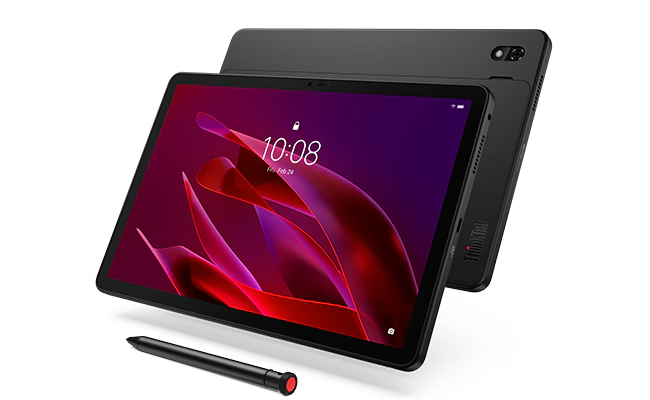
I appreciate the Lenovo ThinkTab X11’s IP68 rating because ruggedness needs a documented foundation beyond a substantial-looking enclosure. Dust and water resistance fit the industrial purpose of this tablet, and I am more willing to accept its bulk when that bulk accompanies useful protection. Lenovo also specifies MIL-STD-810H testing with the protective case, an important qualification when evaluating the complete package. I regard those ratings as evidence of tested protection, and not a guarantee that the tablet will survive every field mishap.
The removable battery is one of my favorite design choices. I value being able to replace a worn battery without treating the tablet as disposable, and the screwless design makes that possibility more tangible. Lenovo also supports operation without the battery when external power is available, an appealing option for a fixed terminal or powered mount. I see these as useful choices about how the device can be maintained and deployed; they do not establish how long my particular workload will run between charges.
I found the Lenovo ThinkTab X11’s performance good for everyday tasks, which is the most relevant starting point for evaluating the ThinkTab X11. The Snapdragon 7s Gen 3 provides a good foundation for that experience, though my observation should not be stretched into a claim about demanding applications I have not evaluated. For this device, I put more weight on whether everyday tasks run smoothly than on the appeal of a flagship processor. The performance I experienced supports the tablet’s practical role without making processing power its defining attraction.
I find the screen resolution comparable to that of the 11-inch iPad Air: Lenovo’s 2560 × 1600 display and Apple’s 2360 × 1640 panel offer a similar level of detail, although their aspect ratios differ. The ThinkTab X11 Gen 1 Lenovo display supports a 90Hz refresh rate and glove-and-wet touch, features I consider appropriate for an industrial tablet. It’s also bright enough to see in daylight, but would benefit from anti-glare and anti-reflective display treatments.
The two USB-C ports give the Lenovo ThinkTab X11 a more useful starting point for field peripherals than the iPad’s single USB-C connection, because power and an accessory do not have to compete for the same socket. The ports differ: one supports USB 5Gbps and DisplayPort output, while the other uses Hi-Speed USB. I like the flexibility while recognizing that these are not interchangeable high-speed connections. The microSD slot adds another practical option, particularly on the 128GB internal-storage model, although its position beneath the battery cover favors planned expansion over frequent card swaps.
I like the Lenovo ThinkTab X11’s front-mounted NFC because its placement makes sense for interactions conducted while the display remains visible. Presenting a card or credential to the front is a thoughtful physical arrangement for transactions and authentication. This is a useful design choice. Actual transaction capability depends on the availability of compatible applications and services. Its value lies in making the interaction easier to accommodate.

What could be improved
Cons
- Thick design outside industrial settings
- Consumer apps on a business device
- Limited Android upgrade horizon
- Chunky stylus and incomplete tether experience
- Wi-Fi 6E and Bluetooth 5.4 rather than newer standards
- No quick display-cover solution in the reviewed setup
- No cellular connectivity or satellite positioning on the linked Wi-Fi model
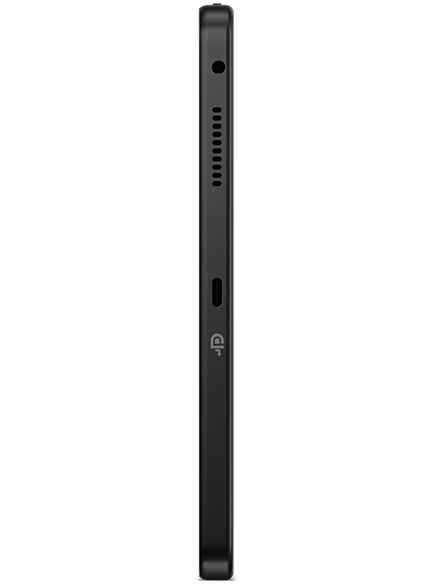
The ThinkTab X11 is thicker than other contemporary mainstream tablets, and I find the difference hard to ignore outside an industrial setting. I can accept a substantial enclosure where protection and maintenance matter, but the same design looks simply thick in an office or at home. That is not a reason to strip away the features that make this tablet useful. It does, however, narrow its appeal: the extra bulk is only justified for industrial use cases.
I had trouble logging into Entertainment Space, which raises a more fundamental question: why it is preloaded on a business tablet at all. I feel the same way about YouTube Kids. These applications make the software feel less deliberately tailored to the device’s intended use, and the login problem adds friction to an experience I already consider unnecessary. I would prefer a cleaner business-oriented starting point, with entertainment and children’s applications available to install when there is a reason for them.
I would like straightforward access to the latest Android releases and a clearer connection between Lenovo’s update promises and what is actually available on the device. Lenovo specifies Android 16 or later, and its published upgrade matrix lists Android 17 and 18 as planned upgrades, with security maintenance ending April 30, 2030. I welcome a stated commitment, but two planned major upgrades feel limited beside hardware designed to remain useful through battery replacement. I also distinguish a published plan from confirmation that a particular update has reached the review unit.
OS upgrades remain a major differentiator between Android devices and Apple tablets. Because Apple owns the experience, owners of compatible devices can download and install the latest OS version on its first day of release. There is no need for third-party UI or compatibility fixes that cause release delays.Android 17 is shipping. I would like to make the choice of using it now, rather than waiting for Lenovo to decide when it’s ready.
As for the stylus, it feels funky and chunky to me, and I expected the accessory experience to make it more obvious how to secure it in the field. Lenovo does describe a hanging-strap hole in the Tab Pen XE’s cap, so an attachment provision exists. My criticism is therefore about a complete, convenient tether arrangement, rather than an absence of any attachment point. I would like the pen, tether, and storage arrangement to feel as deliberately integrated as the rugged tablet itself, especially when work involves moving between locations.
I would also like Wi-Fi 7 (802.11be) and at least Bluetooth 6.0 in a new business tablet intended for extended use. The ThinkTab X11 instead offers Wi-Fi 6E and Bluetooth 5.4. I am concerned about the choice of standards at the beginning of the device’s working life. Durability makes a stronger case when the wireless hardware is positioned to remain current alongside it.
I would like a way to cover the display quickly when the environment becomes harsh, even briefly. The rugged enclosure and water resistance do not resolve my concern about leaving the screen exposed while the tablet is carried or set aside. A protective flap or similarly convenient cover would make the package feel more complete to me. This is a gap in the accessories supplied by Lenovo, rather than a statement that no compatible case is available. Dust is a very different measure of ruggedness than nails or gravel. I’d like an industrial solution that can withstand even more arduous work encounters.
I also find the linked Wi-Fi configuration restrictive for some fieldwork. It has no cellular connectivity, though Lenovo does include Global Navigation Satellite System (GNSS) location services. While Lenovo’s website does not list a cellular model, the B&H site does list a 5G model. Those limitations are important when evaluating a tablet for work away from an established network or for applications that depend on positioning. Check available configurations and select carefully based on the use case requirements.
Lenovo ThinkTab X11: The bottom line

I recommend the Lenovo ThinkTab X11 for work that benefits from rugged construction, replaceable power, front-mounted NFC, and separate connections for charging and peripherals. Its everyday performance and sharp screen support that purpose. My reservations center on how completely Lenovo has finished the business experience: consumer software, a limited Android upgrade horizon, and accessories that could better address field handling. I find the thickness defensible where its practical advantages matter, but much less compelling as an ordinary office or home tablet.
Lenovo provided the ThinkTab X11 for review. Images courtesy of Lenovo unless otherwise noted.
Serious Insights is an Amazon Affiliate. Clicking on an Amazon link may result in a payment to Serious Insights.
For more serious insights on hardware and accessories, click here.
If you found value in this review, please like it, leave a comment, or share it with friends and colleagues. We appreciate you!
Leave a Reply