

Matias nano USB-C Keyboard and Mouse

Summary
The Matias USB-C keyboard and PBT-and-aluminum mouse with nano-receiver deliver durable, driver-free performance and long battery life. Keyboard mimics Apple typing feel affordably. Minor wireless quirks and lack of N-key rollover may irk power users.
Matias nano USB-C Keyboard and Mouse Review
Although we like to see the coolest technology and feature it on our SeriousPop.tech page, most of our hardware reviews don’t chase the flashy or the collectible—they lift up devices that quietly earn their place on desktops through thoughtful design, honest functionality, and a refusal to indulge in gadget theater. In that lineage, the Matias USB-C keyboard paired with the PBT-and-aluminum mouse fits neatly.
The Matias nano USB-C Keyboard and Mouse doesn’t impress with neon lights—though it offers magnetic top covers and a hex wrench for right-click feel—but impresses with substance: driver-free reliability, materials built to outlast most laptop lifespans, and customization that whispers rather than shouts. It’s exactly the grounded, thoughtful gear Serious Insights like not just to review, but to use every day.
Advantages of the nano USB-C Receiver
Connect the Wireless USB-C dongle to a computer for instant keyboard or mouse use.
AES-128 encryption offers strong wireless security, suitable for corporations, governments, or anyone needing high security.
Avoids most wireless interference issues, ensuring greater reliability.
The keyboard is active at start-up, allowing advanced users to use boot key sequences, unlike other wireless tech that need the start-up to finish before the keyboard works.
The small dongle can stay plugged in without snagging or breaking.
What we like
The combination pack received for review included the $79.00 FK418DCS Wireless USB-C Aluminum Keyboard for Mac – Silver and the $79.00 M20DCW Wireless USB-C Pro Mouse – White. It does not appear that the combination package is available on the Mattias site at this time, but both items are available on their own.
Pros
- Minimal‑protrusion USB‑C nano receiver; can be paired across devices
- Built from durable PBT plastic and aluminum components; high wear resistance
- Extended battery life:mouse up to 3 years per charge
- Omron switches rated for up to 50 million clicks (mouse)
- Plug‑and‑play operation with no drivers needed
- Scissor‑switch keyboard with 2 mm key travel; wired USB‑C reliability (keyboard)
- Magnetic swappable top covers to accommodate different hand sizes/orientations
- Click adjustment via included hex click‑adjustment tool
The nano‑receiver is one of those quietly brilliant touches: it pokes out only about 0.125 inch from a USB‑C port, meaning leave it in indefinitely without worrying about accidental snagging or damage. It’s also possible to pair that same receiver with multiple Matias devices—handy for those seeking to maximize the effectiveness of limited USB-C ports. That little piece embodies thoughtful design.
The build materials for the Matias nano USB-C Keyboard and Mouse are unusually solid for peripherals. The mouse uses high‑end PBT plastic—common in aviation for resistance to wear—and pairs it with an aluminum scroll wheel and top button. These materials don’t degrade or become glossy over time. They do pick up liquids from the hand and may turn the white version a bit yellow from elements like hand lotion. Omron switches, rated for 50 million actuations, add a satisfying click that’s both tactile and reliably long‑lasting.
Battery longevity on the mouse is deeply impressive: a single charge lasts up to three years. Recharge time? About five hours via the included USB‑C cable. That means charging becomes an event, not a chore. Make sure to transfer the reminder to new devices, as a phone upgrade will likely happen more frequently than a keyboard recharge.
There’s zero hassle installing drivers. Mouse functions work out of the box, even including security: AES‑128 wireless encryption makes it suitable for sensitive environments.

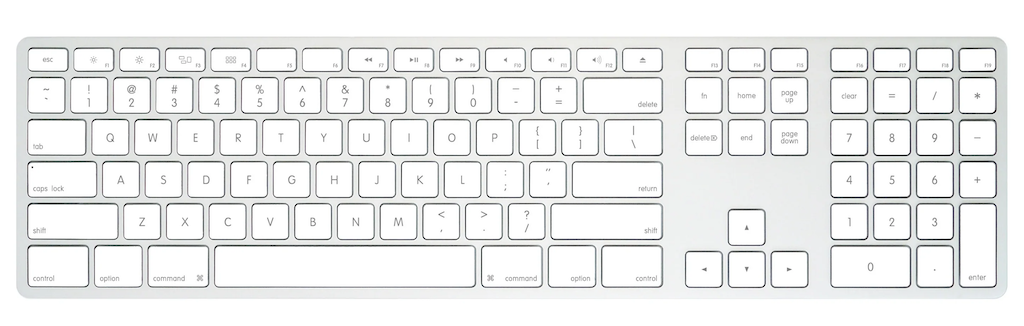
The USB-C keyboard’s scissor mechanism provides 2 mm key travel—feels familiar for those who miss the Apple feel, while delivering reliable wired performance and a numpad. Priced around $74, it’s a budget‑minded way to get that understated, classic Mac typing vibe.
The ability to swap magnetic top covers is a small magic trick that subtly transforms the mouse for different handedness. The mouse uses two magnet‑attached covers in the box, and switching them out takes a second—no screwdriver, just gentle magnetism aligning the fit. It’s the sort of little design flourish that signals someone paid attention: I can tailor the curvature for a taller or flatter grip, which matters after hours of pointing. At $79, buyers receive not just the durable PBT and aluminum build, but a mouse that adapts to personal physiology, rather than the other way around.
Alongside that, there’s a tidy click‑adjustment tool tucked into the package. It’s a little hex wrench that allows owners to fine‑tune the right‑click’s feel. Twist one way to get that satisfying crisp resistance; twist the other, and it softens the stroke to something almost whisper‑light. The presence of this small mechanism speaks of the design philosophy here: personalization without software and precision without hype. It tells buyers Matias trusts what owners feel at their fingertips, and gives owners the means to personalize the mousing experience.
What could be improved
Cons
- Input issues:: mis‑ and double‑keypresses (keyboard)
- Lacks N‑key rollover (keyboard)
- No backlighting
There are times when the keyboard’s sensitivity stumbles, or rather, my fingers don’t connect with it well, leading to occasional double‑keypresses, but more often to missed strokes. I think it is related to the scissor keys and my fingers’ preference for mechanical keyboards.
The keyboard also lacks N‑key rollover, which matters in fast‑typing or gaming contexts. Some gamers may experience the inability to press Shift‑W‑2 simultaneously. This keyboard, however, is not sold as a gaming keyboard, but for those who might use it that way, need to know this before purchase.
I don’t work in a bright space, by design. I like backlit keyboards. To me, at this point, any Bluetooth keyboard at this point should include backlighting. I know it add cost, but it also greatly increases the utility of the keyboard.
Matias nano USB-C Keyboard and Mouse: The bottom line
The Matias nano USB-C Keyboard and Mouse combo quietly champions long-term use over flashy gimmicks. The mouse brings longevity, durability, and secure simplicity. That tiny magnetic cover swap and the hex tool whisper elegant customization. The mouse isn’t a one-shape-fits-all blob; it’s a thoughtful companion that contours to the owner’s palm and click preference. For people who value subtle personalization and tactile comfort, this elevates the experience.
The keyboard delivers that Apple-inspired typing feel—those who require full rollover or want a wired option for connectivity security should look to oher Matias options. This utilitarian keyboard and mouse combo is ideal for buyers who value substance over bells and whistles.
Matias provided the nano USB-C Keyboard and Mouse for review. Images courtesy of Matias unless otherwise noted.
Serious Insights is an Amazon Affiliate. Clicking on an Amazon link may result in a payment to Serious Insights.
For more serious insights on hardware and accessories, click here.
If you found value in this review, please like it, leave a comment or share it with friends and colleagues. We appreciate you!
Leave a Reply