

A few years ago, I wrote a white paper for Cisco on the post-PC world. We haven’t arrived there yet. The personal computer market continues to evolve. Artificial intelligence is on the cusp of driving the next transformative shift, and that shift requires more processing power than a tablet or mobile phone can encompass, though they already leverage their own onboard AI processing and the cloud to incorporate AI into the fix.
For major AI workloads, however, the PC will become a necessary component for local private AI, and the portal into enterprise and cloud AI systems will likely leverage onboard capabilities for pre- and post-processing and for some handoffs during an agentic (I hate that word) interaction.
AI-powered PCs will likely redefine how we interact with technology, unlocking new levels of performance, efficiency, and personalization. Don’t get hung up on the Copilot key; for the most part, Lenovo didn’t. AI PCs aren’t about anything on the outside; they are all about the new chips and memory on the inside.
The Core of AI PCs: Neural Processing Units (NPUs)

At the heart of AI-enabled PCs lies the Neural Processing Unit (NPU), a specialized processor designed to handle the intensive mathematical computations required by AI algorithms. Traditional CPUs and even GPUs have limits in efficiently processing AI workloads, such as deep learning inference, natural language processing, and computer vision. NPUs, however, are designed specifically for these tasks, enabling real-time AI-driven applications to run locally.
For example, Qualcomm’s Snapdragon processors, featured in the latest generation of AI-powered laptops, include built-in NPUs that accelerate tasks like voice recognition, real-time translation, and adaptive power management. Similarly, Apple’s M1 and M2 chips come equipped with dedicated AI engines that deliver machine learning performance at a fraction of the power cost compared to previous architectures. As these NPUs proliferate, PCs are moving beyond being passive devices into ones capable of performing predictive and adaptive computing.
Most AI PCs will not just ship with emergent NPUs but with beefed-up GPUs, some perhaps even with discrete GPUs, which served AI workloads before Apple, Intel, Qualcomm, and others rolled out NPU-powered chips. This will make the new devices even more capable of handling not only verbal intelligence but visual intelligence as well.
On-Device AI: Security, Privacy, and Speed
One of the key advantages of AI PCs is their ability to process AI tasks locally without relying on cloud infrastructure. This shift offers several benefits:
- Security: AI PCs enhance security by keeping sensitive data on the device. For instance, real-time facial recognition for user authentication doesn’t need to be sent to the cloud, reducing the risk of a data breach.
- Privacy: With AI processing handled locally, personal data such as voice, text, and image analysis stays on the user’s device, mitigating privacy concerns that often accompany cloud-based AI systems.
- Speed: Cloud-based AI introduces latency, especially in tasks requiring real-time interaction. By moving AI workloads onto the PC, users experience instant responsiveness, whether it’s in speech-to-text, image editing, or AI-assisted video conferencing.
Microsoft has already begun integrating AI capabilities into its operating system with Windows 11, where AI features like automatic window management, background blur in video calls, and personalized system settings run seamlessly with built-in NPUs.
It is important to differentiate between generative AI (and other forms of AI, such as ruled-based AI, and machine learning) and this class of AI, which I think of as autonomous intelligence, meaning that these PC functions are the equivalent of biological functions that don’t require cognitive functions. You don’t need to think to breathe or blink your eyes, but your brain controls those functions.
AI PCs and the Changing Work Environment
AI PCs are especially relevant to the hybrid work model. (Sorry, Apple, Amazon, J.P. Morgan and many others. See my comments on why back-to-work mandates do little to enhance the standing of tech company marketing promises). Remote and office workers benefit from advanced AI capabilities that boost productivity and creativity.
- Enhanced Collaboration: AI-driven noise cancellation, automatic transcription, and real-time language translation make virtual meetings more inclusive and efficient.
- Content Creation: AI PCs enable professionals to harness advanced editing tools that automate repetitive tasks in video and photo editing, freeing up time for more creative work.
- System Optimization: AI PCs learn user behavior and optimize system performance dynamically. From adjusting power usage based on workload to preloading frequently used apps, these systems aim to boost efficiency with minimal user intervention.
- Local LLM installation: While a high-end gaming device could run local LLMs, their bulk made them inconvenient partners in the quest for experimenting with AI. The new AI PC laptops bring AI capabilities to traditional laptop form factors.
For example, Lenovo’s ThinkPad X1 Carbon now incorporates AI features like intelligent cooling, which adjusts fan speeds based on current tasks, and built-in voice assistants that adapt to individual speech patterns, making it easier for workers to interact with their devices in natural, intuitive ways.
Challenges and Considerations
The advent of AI PCs also brings with it several challenges:
- Cost: Integrating NPUs and other AI-specific components into PCs drives up production costs. Initially, AI PCs may come with a higher price tag compared to traditional machines.
- Battery Life: While NPUs are optimized for power efficiency, their constant use for AI workloads can affect battery life, especially in laptops. Developers are working on ways to mitigate this by dynamically adjusting NPU usage based on task intensity.
- Software Compatibility: Current software ecosystems will need to adapt to fully leverage the power of NPUs. While some applications are already optimized for AI processing, a large portion of legacy software will require updates or new development to take full advantage of AI capabilities.
AI PCs: First Looks
I am currently working with several AI PCs, all of which are laptops. Here are my first thoughts on the HP and Lenovo devices I’m putting through their paces.
Serious Insights is an Amazon Affiliate. Clicks to Amazon may result in payment to Serious Insights LLC.
HP ZBook Firefly 16 G11
The HP ZBook Firefly 16-inch G11 Mobile Workstation is designed for professionals who need a balance of performance and mobility. Powered by the latest Intel® Core™ Ultra processors, it offers options up to the Intel® Core™ Ultra 7 165H with speeds up to 5.0 GHz. This workstation supports up to 64GB DDR5-5600 MHz RAM and offers storage options of up to 2TB PCIe® Gen4 NVMe™ TLC SSD.
The ZBook Firefly features Intel® Arc™ Graphics or NVIDIA® RTX™ A500 4GB for visual performance. While games run fine, a workstation at this price point should include a more capable NVIDIA processor. The 16″ 2.8K display is stunning; however, it shines above a keyboard with a numeric keypad that may be too wide for those primarily concerned with words or code.
The HP ZBook Firefly was my first Ultra 7 laptop, so it became home to GPT4All, a local LLM with the ability to load documents for fine-tuning AI results.

Pros
- Stunning display
- Great battery life
Cons
- It has a very wide keyboard with an off-set trackpad that isn’t comfortable for touch typing.
- Poor design choices of NVIDIA graphics. HP should include much more powerful graphics in a mobile workstation.
Lenovo ThinkPad T14s Gen 6 (Snapdragon)
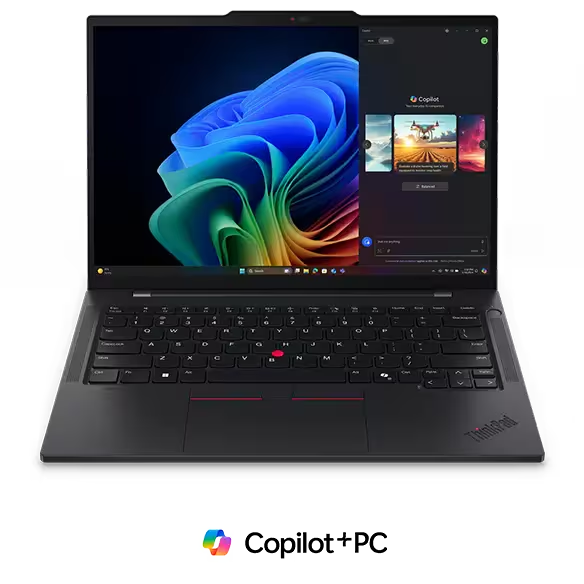
The ThinkPad T14s Gen 6 is powered by the new Qualcomm Snapdragon X Elite processor, enabling the latest AI workloads, including Microsoft’s Copilot+ and access to state-of-the-art language models that run directly on the device. This is the only Lenovo laptop that includes the Copilot key. The ThinkPad T14s Gen 6 has a Snapdragon® X Elite X1E-78-100 Processor (3.40 GHz) and Qualcomm Adreno™ graphics. It supports up to 64GB LPDDR5x 8448MHz soldered, dual channel memory and 1TB M.2 PCIe Gen 4×4 SSD, 2242 compatible storage.
The T14s is constructed with a combination of carbon fiber, magnesium, and aluminum, as well as post-consumer recycled materials. The T14s comes equipped with up to a 14″ 2.8K (2880 x 1800), OLED, Anti-Glare/Anti-Reflection/Anti-Smudge, Non-Touch, HDR 500, 100%DCI-P3, 400 nits, 120Hz, Low Blue Light display—several user serviceable components including memory, SSD and wireless cards.
Pros
- Long battery life
- Slim and light (ultraportable)
- Enough ports for most situations
- Great keyboard
Cons
- Slow to boot
- Midling basic display
Lenovo ThinkPad X1 2-in-1 G9
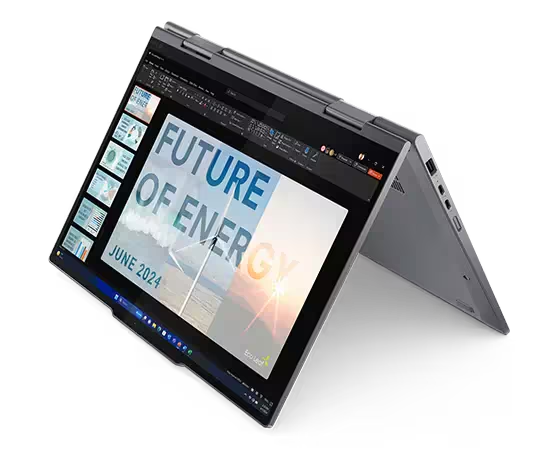
The ThinkPad X1 2-in-1 (Gen 9), is Lenovo’s elegant 2-in-1 that balances power and design around its beautiful aluminum build. Like the other Lenovo laptops reviewed here, the ThinkPad X1 2-in-1 is primed for AI work, with CPUs available up to an Intel® Core™ Ultra 7 165U vPro® Processor (E-cores up to 3.80 GHz P-cores up to 4.90 GHz). Memory runs up to 64GB 6400MHz LPDDR5x with up to 2TB of PCIe Gen4 SSD Performance storage.
The Luna Grey chassis is tonally matched to its keyboard. The new ergonomic, magnetically attached pen improves upon previous versions, but the lack of on-device charging remains a deficiency at this price point. Configuration prices run from about $1,600 to over $3,700. Battery and display compromises are expected in a 2-in-1, but those compromises should be reflected in the price.

Pros
- Elegant, thin 2-in-1 design
- Great keyboard
- Lots of wireless options
Cons
- OK battery life
- The display would benefit from some of the higher-end OLEDs available on other ThinkPad models
Lenovo ThinkPad X1 Carbon Gen 12
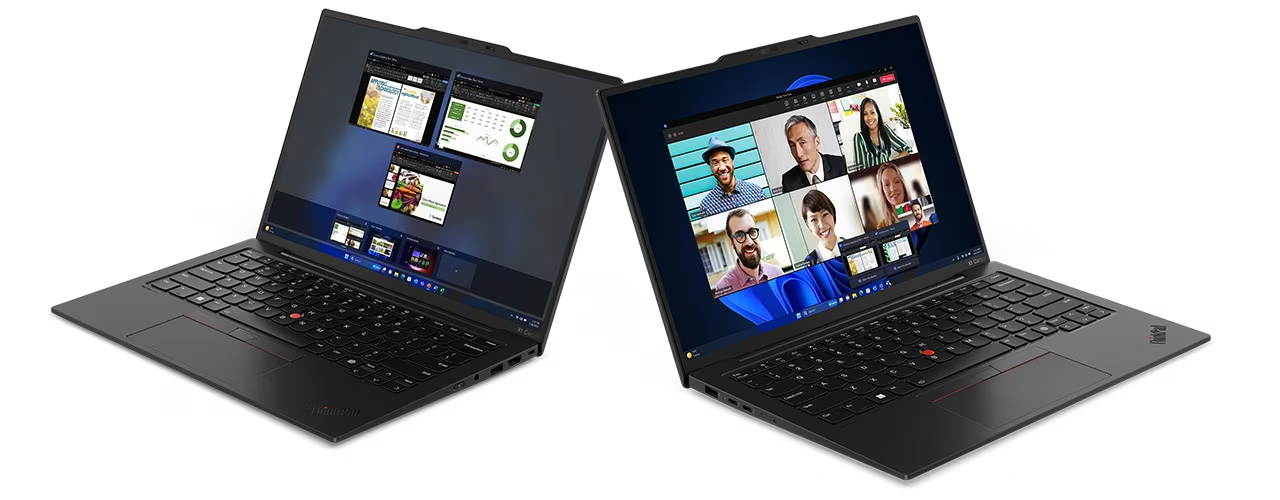
The Lenovo ThinkPad X1 Carbon Gen 12 remains Lenovo’s flagship mobile device. It hasn’t changed much over the years, but that is mostly because it was designed meticulously from the start to serve mobile Microsoft Windows business users, and it continues to project an air of superiority over its peers. CPUs run up to Intel® Core™ Ultra 7 165U Processor with vPro® (E-cores up to 3.80 GHz P-cores up to 4.90 GHz with Turbo Boost, 12 Cores, 14 Threads, 12 MB Cache). Lower-priced units offer the Ultra 5 (but get a 7).
The Gen 12 will sport up to 64GB of LPDDR5X 6400MHz RAM with a 2TB PCIe Gen4 Performance SSD. Displays run from a 14″ WUXGA at 1920×1200 to a gorgeous 14″ 2.8K (2880 x 1800), OLED, Anti-Glare/Anti Reflection/Anti Smudge, Touch, HDR 500, 100%DCI-P3, 400 nits, 120Hz, Low Blue Light stunner. Those with sufficient budget will not be disappointed. While the display may be cramped for development, it easily drives external displays with its USB-C® Thunderbolt™ and HDMI ports.
Pros
- The near-perfect 14″ Windows laptop design
- Top-of-the-line keyboard
- Outstanding display
Cons
- Very expensive
- OK battery life
- It looks better than it performs (but it will serve well for most day-to-day workloads)
Lenovo ThinkPad P1 Gen 7 Mobile Workstation
Lenovo ThinkPad P1 Gen 7 Mobile Workstation, as its name suggests, is indeed a mobile workstation. Front and center is the Intel® Core™ Ultra 7 165H vPro® Processor complemented by NVIDIA RTX™ 1000 Ada Generation Laptop GPU 6GB GDDR6 and 32GB of RAM. The 16″ WQXGA (2560 x 1600), IPS, Anti-Glare, Non-Touch display is a stunner with 100%s RGB and 500 nits of brightness. Top-end units offer the NVIDIA RTX™ 3000 Ada Generation Laptop GPU 8GB GDDR6 (or NVIDIA® GeForce RTX® 4060/070 Laptop GPU 8GB GDDR6), 64GB of RAM and up to 8TB of SSD storage and a 16″ WQUXGA (3840 x 2400), OLED, Anti-Reflection/Anti-Smudge, Dolby Vision™, Touch, 100%DCI-P3, 400 nits, 60Hz, Low Blue Light display.
Prices run from $3,659 to nearly $6,500. Those seeking an AI workhorse in a laptop should seriously consider the P1 Gen 7. For a workstation, stay away from the Ultra 5 to maximize performance and longevity of value. As a bonus for those who like to upgrade, the LPDDR5X memory isn’t soldered on but rather installed as a CAMM2 module.

Pros
- Superior performance in processing and graphics
- Good battery life for a mobile workstation
- Outstanding displays, especially on higher-end models
- Good collection of ports for creators
- Relatively thin relative to power
- Great keyboard
Cons
- It might be too large for those seeking maximum portability
- Expensive
- Requires a non-USB-C power supply
Full reviews of all of these laptops will be available over the next several weeks.
AI PCs: What’s Next?
AI PCs are in their infancy. As NPUs become more powerful and ubiquitous, the line between cloud and local computing will blur, allowing devices to perform increasingly complex tasks on-site. The future of personal computing will be driven by devices that not only process information but understand and anticipate user needs in real time, powered by the full potential of artificial intelligence. The more CPU you buy now, the more likely the machine will last into the next round of Windows updates.
Apple, of course, is only shipping AI PCs at this point as it has migrated all of its Macintosh laptops, desktops, and tablets to M-series chips.
Scenario planning teaches us to look at several possible futures. Small devices pointed to the potential for a post-PC world. AI is not only keeping the PC around; it is fueling a new era of demand that may well reduce the total lifetime of PCs as older chips fail to handle the latest AI workloads. It is too early to forecast the mix of devices as The Cloud, small devices and AI PCs vie for their niches in the new AI-computing ecosystems.
For more serious insights on AI, click here.
For more serious insights on hardware, click here.
All of the hardware mentioned in this article was provided by the respective manufacturer for review.
Serious Insights is an Amazon Affiliate. Clicks to Amazon may result in payment to Serious Insights LLC.
Cover art by meta.ai from a prompt written by the author.
Leave a Reply