
MindManager Professional

Summary
MindManager Professional focuses on turning maps into executable work with project planning, Gantt views, Microsoft integration, cloud storage “Places,” and collaboration features. The official site lists $179/year (incl. VAT) for Professional, with a 30-day money-back guarantee on the initial purchase.
MindManager Professional Review
MindManager Professional sits on the “execution” end of the mind mapping spectrum. It’s built for turning ideas into structured work: plans, deliverables, meeting outputs, and the inevitable sprawl of links, notes, and attachments that orbit modern projects. The map isn’t the artifact—it’s the interface for managing complexity.
The positioning MindManager is important when comparing to the product we have often reviewed: TheBrain. TheBrain isn’t primarily a mind map tool; it’s a relationship database that happens to visualize knowledge. It trades MindManager’s layout polish for richer representational power, especially multiple parents for an idea, which helps resolve the synonym/alias problem and supports non-linear knowledge reuse. We don’t see these as competing products, as much as complementary ones, although on the project management front, they do compete head-to-head.
For those who live in TheBrain, it remains the best choice for managing information and projects. Those who live in Microsoft’s ecosystem, however, will likely find MindManager, particularly the Windows version, an ideal companion for extending the MS365 Office Suite. It remains a wonder to me that Microsoft let Corel acquire MindManager, a product that provides essential adhesion between products that often feel like they have precipitous edges.
And by that, yes, I mean Word, PowerPoint and Excel. MindManager deburs the edges, creating a nearly seamless way to integrate thinking and planning into execution, all with just the human mind.
As a side note, I have used MindManager Professional for years. This review reflects the 2025 version. While I enjoy the product, I find the UI bloated when just using MindManager for mind mapping. I would like to see it get a mind mapping mode that hides all the other features, at least while brainstorming. I would also like to see the license model become simpler. In the old days, it required a code.
Now activation and use require a login. If you aren’t connected to the Internet and the license token expires, then access becomes an issue. Mind mapping, if not the more sophisticated Office integration features, is often an isolated, offline task, and I’d like Corel to remember the origins of their tool.
MindManager has become an ecosystem, covering Mac, PC, Web and Mobile (Apple and Android). This review focuses on the Mac and Windows MindManager Professional applications, not the mobile or web-based applications, which are compatible at the data level but may not support all of the data types in a mind map across platforms due to feature differences.

What we like
Pros
- Strong bridge from brainstorming to execution with task and project planning features (including Gantt views)
- Deep Microsoft ecosystem support (Excel/Word/Project/Outlook + Teams/SharePoint)
- Real-time co-editing and cloud storage “Places” integrations (OneDrive, Google Drive, Dropbox, Box, iCloud, SharePoint)
- Excel Data Mapper and filtering features help tame large datasets
- Flexible outputs for sharing and publishing (including HTML5 export)
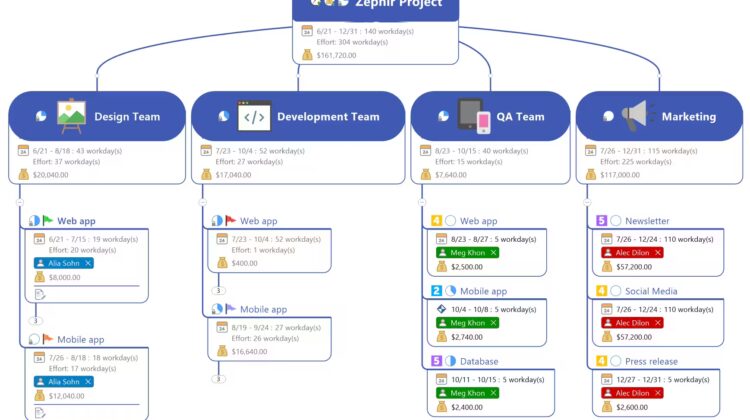
MindManager’s best trait is that it doesn’t stop at idea capture. It supports task management and project planning with Gantt views, which pushes the map from “thinking space” into “work space.” That’s a different posture than TheBrain, which excels at building durable knowledge structures, but isn’t trying to be a project workbench.
The Microsoft integration story is a genuine differentiator. MindManager is designed to ingest, visualize, and synchronize content from tools organizations already live inside, Excel, Word, Outlook, Project, plus Teams and SharePoint. That makes it feel less like a specialized diagram tool and more like a coordination layer for common Office workflows.
Collaboration is handled in a way that fits distributed work: real-time co-editing is supported for maps stored in supported cloud storage services. That’s important because maps are often living documents—updated in bursts, revisited in meetings, then refined into outputs that need to survive outside the author’s desktop.
The “Places” model reduces friction by letting maps live where teams already store work: SharePoint, OneDrive, Google Drive, Dropbox, Box, and iCloud. This is one of MindManager’s practical advantages over TheBrain’s more personal “knowledge base” posture; MindManager leans into shared file ecosystems and team workflow.
For data-heavy work, Excel Data Mapper is the sleeper feature. It turns spreadsheets into navigable structures rather than forcing a manual redraw. TheBrain can absorb and relate lots of information, but MindManager’s strength here is its ability to take tabular business content and make it immediately actionable in a planning context.

What could be improved
Cons
- Pricing is premium for individuals, and plan comparisons can be confusing across sources
- Some capabilities are platform-dependent, with certain features called out as Windows-only
- Feature depth can feel heavy for lightweight, quick mapping needs
- Account/activation requirements add administrative friction in some environments
- Refund policy is time-bound, and renewals are excluded
- Subscription model means signing in, but sign-in isn’t compatible with tools like Apple Passwords
Pricing clarity is the first fix I’d make—not because the cost is indefensible, but because evaluation gets messy fast. MindManager’s own pricing lists Professional at $179/year, Essentials at $99/year, and a one-time purchase option at $369. Other software directories sometimes list Professional at $169/year, likely reflecting regional pricing, VAT handling, or timing differences. Corel also offers educational and enterprise pricing.
Platform variance shows up in the fine print and the experience: MindManager notes that some features are Windows-only. In mixed OS environments, that constraint becomes part of the product decision, not an implementation detail.
Corel hasn’t created a comparison chart (that I could find) since 2018, but some of the features not present on the Mac version include:
- Kanban Board
- Co-Editing
- Content Control
- Critical Path Tracking
- Project Date Calculations/Remove Slack
- MS Project Integration
- Zapier Integration
- Advanced Project Planning Tools and Reports
- Cloud Storage Integration
- MS Office Import and Export, SharePoint
MindManager’s depth is a double-edged sword. It’s excellent when the map is expected to carry a plan forward, but it can feel like too much tool when the goal is fast capture and light organization. That’s one place TheBrain can feel more “always-on” for knowledge work, because it rewards incremental accretion and reuse even when a deliverable isn’t the immediate outcome.
Account and activation requirements create another point of friction for some environments. MindManager’s terms require registering an account for access to software and cloud services, which may matter in more controlled IT setups, and to who travel when the Internet isn’t easily accessible.
The refund policy is strict enough to shape behavior: MindManager offers a 30-day money-back guarantee on the initial purchase, and renewals are excluded (unless cancelled before renewal). That puts pressure on getting a real evaluation done during the early window.
MindManager Professional: The bottom line
MindManager Professional is the right choice when mind mapping is expected to graduate into structured execution: tasks, timelines, Office artifacts, team storage, and shareable outputs. TheBrain remains the better mental model when the priority is building a long-lived, multi-dimensional knowledge base where ideas can have multiple parents and meaning survives reorganization. MindManager is a workbench. TheBrain is a cognitive database with a visual interface.
Corel provided MindManager Professional for review. Images courtesy of Corel unless otherwise noted.
Serious Insights is an Amazon Affiliate. Clicking on an Amazon link may result in a payment to Serious Insights. Serious Insights is not a MindManager or Corel affiliate and receives no compensation for clicks or purchases on those sites.
TheBrain has been a Serious Insights client.
For more serious insights on hardware and accessories, click here.
If you found value in this review, please like it, leave a comment or share it with friends and colleagues. We appreciate you!
Leave a Reply