

Lenovo Yoga Pro 9i (Gen 10) Aura Edition
Summary
The Yoga Pro 9i blends creator-focused performance with a standout OLED display option and a port selection that works in real rooms with real peripherals. Aura Edition features—Smart Modes, Smart Share, Smart Care, and Lenovo X Power—add convenience and performance management, making the system easier to live with over time. The offset trackpad and proprietary power adapter are the two decisions that keep it from being an effortless daily companion.
Lenovo Yoga Pro 9i (Gen 10) Aura Edition Review

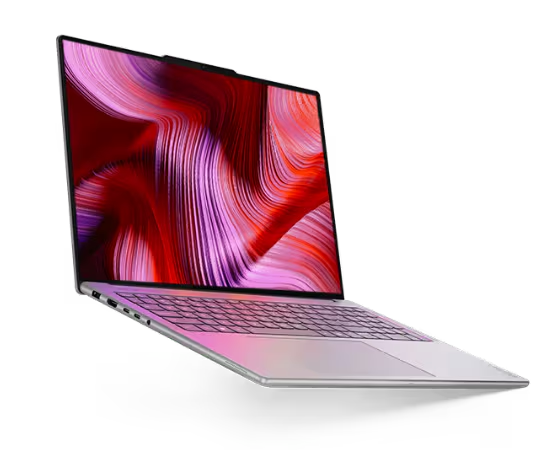
The Lenovo Yoga Pro 9i arrived as a 16-inch reminder that “portable” doesn’t have to mean “fragile.” The first impression is physical: the shell feels solid, the keyboard deck feels deliberate, and the whole machine carries itself like it expects to be moved between desks, conference rooms, and travel days without drama. The design is gorgeous—from the keyboard to the exterior—and it looks like Lenovo had creators in mind when it made choices about materials, finish, and visual flourishes.
The screen is the reason the Lenovo Yoga Pro 9i belongs in a creator conversation. Lenovo’s PureSight Pro Tandem OLED display delivers vivid, accurate colors, and my experience backs up the intent: it’s striking, detailed, and comfortable to work on for anything visually sensitive. And the 2.8K OLED is no slouch either. Lenovo positions the Yoga Pro 9i as “supercharged” for creation with Intel Core Ultra processors and NVIDIA graphics, and that combination shows up responsive creative apps, smooth interaction under load, and enough headroom to keep background tasks from feeling like friction.
Lenovo Yoga Pro 9i (Gen 10) Specifications
| Specification | Lenovo Yoga Pro 9i (Gen 10) Aura Edition (16”) |
|---|---|
| Processor | Intel Core Ultra 7 255H or Core Ultra 9 285H |
| NPU | Intel AI Boost, up to 13 TOPS |
| Graphics | NVIDIA GeForce RTX 5050 / 5060 / 5070 Laptop GPU (8GB GDDR7) |
| Memory | 32GB or 64GB LPDDR5x-8400 (soldered) |
| Storage | Up to 2x M.2 SSD (2242 + 2280 slots); up to 1TB each for M.2 2242 offerings |
| Display options | 16” 2.8K OLED (2880×1800) 120Hz; 16” 3.2K Tandem OLED (3200×2000) 120Hz; touch and non-touch variants |
| Brightness (by panel) | 2.8K OLED: up to 1,100 nits HDR peak / 500 nits SDR typical; 3.2K Tandem OLED: up to 1,600 nits HDR peak / 1,000 nits SDR typical |
| Color calibration | X-Rite factory color calibration |
| Audio | Realtek ALC3306; 6 speakers (2W×4 woofers + 2W×2 tweeters) with Dolby Atmos and Smart AMP |
| Microphones | Quad-microphone array |
| Camera | 5.0MP + IR with E-shutter |
| Wireless | Wi-Fi 7 (802.11be) 2×2 + Bluetooth 5.4 |
| Ports | 2× Thunderbolt 4 (USB PD 65–100W, DisplayPort 2.1), HDMI 2.1 (up to 8K/60Hz), 2× USB-A (USB 5Gbps; one Always On), SD card reader, 3.5mm combo jack, slim-tip power connector |
| Battery | 84Wh; Rapid Charge Express (3 hours runtime from 15-minute charge) |
| Claimed battery life | MobileMark 30 @250 nits: 5.5 hr; local 1080p video @150 nits: 14 hr |
| Power adapter | 170W or 245W slim-tip AC adapter |
| Dimensions | 362.72 × 253.69 × 17.9 mm |
| Weight | Starting at 1.92 kg (non-touch) / 2.07 kg (touch) |
| Materials / colors | Aluminum top and bottom; Luna grey or Tidal teal (though I don’t see Tidal teal on the options list when ordering). |
| Security | Firmware TPM 2.0; IR camera for Windows Hello; no fingerprint reader; E-shutter |
| Warranty | Base warranty: 1-year courier or carry-in service (other regional variants listed) |
What we like
Pros
- Outstanding PureSight Pro Tandem OLED display option for visual work
- Strong creator-oriented performance with NVIDIA RTX laptop GPU options
- Superb, immersive sound for a laptop
- Wide, practical port selection for displays and peripherals
- Aura Edition features: Smart Modes, Smart Share, Smart Care, Lenovo X Power
- Cohesive, creator-friendly industrial design that feels ready for desks, conference rooms, and travel
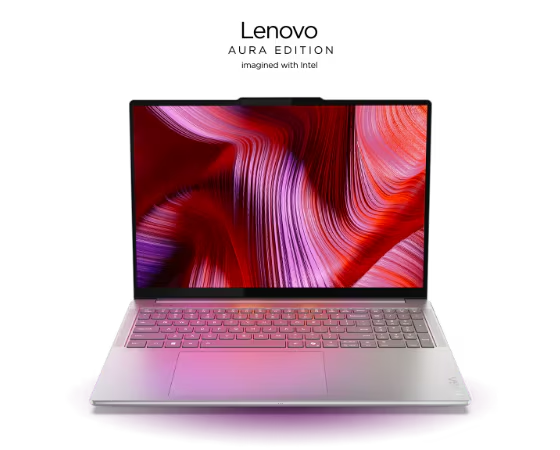
The display changes the relationship with the laptop. In configurations that include the Tandem OLED panel, Lenovo is clearly chasing a “portable reference screen” experience rather than a merely good laptop panel. The 9i’s screen is well-suited to artistic endeavors because it makes small details obvious and color work feel less tentative. In a travel workflow, this can often eliminate the need for an external display, which shifts what goes into the bag and what gets left behind.
While I saw the Tandem OLED, the review unit arrived with the lower-resolution 2.8K OLED display, which proved more than adequate for a variety of graphics and AI tasks, including housing ComfyUI’s extremely detailed workflows for AI graphics work.
The Lenovo Yoga Pro 9i’s performance delivers enough power for most modern creative work, supporting the increasing need for AI acceleration without becoming AI-exclusive. It feels fast on AI-adjacent tasks such as workflows that benefit from GPU and NPU support. I see that as a feature, not a failure. Intel’s Ultra 9 made short work of regular work, like browsing, spreadsheets, presentations and word processing.
This is an AI-light design, ideal for applications that need acceleration but don’t live and die on sustained, dedicated AI throughput. Lenovo’s positioning emphasizes “powerful AI acceleration meets NVIDIA graphics,” which aligns with how the 9i behaves: it’s a capable creator system that also happens to be a competent AI companion. It took days, for instance, to process GPT4ALL embeddings, which was fine overnight work. It cousing, the Lenovo P16 Gen 3, did the same work in minutes. That doesn’t take away from the Yoga Pro 9i’s usefulness, but it does put it into perspective.
Listening to music or consuming video on the Lenovo Yoga Pro 9i demonstrates that Lenovo treated audio as part of the creative toolkit, not a checkbox. The six-speaker, Dolby Atmos-tuned setup delivers real volume with a surprisingly wide image for a laptop. Dialog stays intelligible, music has more body than expected, and the presentation doesn’t collapse into a thin, top-firing hiss. At sane listening levels, it stays clean and balanced, which makes it usable for media playback and rough review work without immediately reaching for external speakers or headphones. Pushing it to maximum volume can introduce a bit of distortion, so the 9i sounds best when it isn’t being asked to impersonate a PA system.
Ports matter more than marketing admits, especially in meeting rooms where the laptop has to fit the cables. Lenovo calls out a left-side power connector, HDMI 2.1, and two Thunderbolt 4/USB4 ports, which is exactly the kind of connectivity that reduces adapter sprawl in shared environments and on the road. The Yoga Pro 9i is one of the rare premium laptops that can walk into a room, connect to what’s there, and keep moving without making the meeting about cables. My only feedback would be to add a USB-C port on each side to accommodate short cables and office configurations that bring power and connectivity to the right side of the setup.
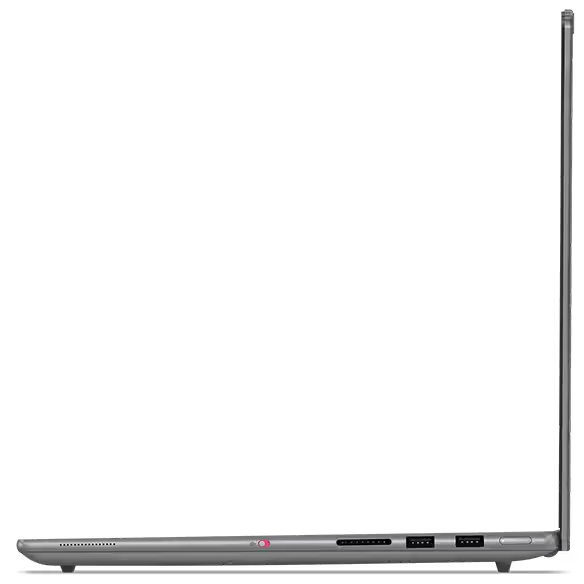

The Lenovo Yoga Pro 9i’s ports running along the left and right of the laptop.
Aura Edition features are not just checkboxes; they are about reducing small frictions that add up over a long review cycle. Lenovo frames Smart Share as quick phone-to-PC connectivity for moving photos and content into creation workflows, Smart Modes as a set of AI-assisted modes to optimize how the system behaves, and Smart Care as a path to real-time troubleshooting with technicians. Lenovo also positions Lenovo X Power as a performance layer that boosts hardware and software acceleration for heavy workloads. Taken together, these features aim for a simple outcome: to keep performance predictable and the machine easier to live with.
Pricing varies by configuration and retailer. Lenovo’s discounted pricing on its sites at the time of this review ran from $1,959.99 to $2,259.99. The NVIDIA® GeForce RTX™ 5060 Laptop GPU 8GB GDDR7 configuration is listed at $2,809.99 before the discount. Buyers can also create custom configurations, with limited options. A high-end system will run around $3,400 (before any discounts).
Buying advice:
- Pick the Tandem OLED configuration if color-critical work outweighs battery anxiety; otherwise, a standard panel will feel less constrained on long travel days.
- The RTX 5060 build targets people doing regular video work or 3D; writers, analysts, and photographers can comfortably step down and save money.
What could be improved
Cons
- Proprietary power connector instead of USB‑C-only charging complicates shared environments and replacements
- Offset trackpad to accommodate numeric keypad creates a persistent left-of-center feel for touch typists
- Battery life varies significantly by workload in creator-class configurations
My only complaint is the Lenovo Yoga Pro 9i’s offset trackpad positioned to accommodate the numeric keypad (which I could do without). This makes typing, as with the design, feel a bit left-of-center mentally (not politically). I want to keep moving my hands to the right, but then I miss the keys. Those who adopt the Yoga Pro 9i as their long-term companion will build mental maps that allow them to ignore this design quirk in daily practice.
The other pain point is the non-USB-C power design. Lenovo explicitly shows a dedicated power connector alongside the other ports on the product page. That choice makes portability more fragile than it needs to be. Losing a proprietary adapter is a bigger deal than losing a USB-C charger, and shared environments become less forgiving because fewer chargers are interchangeable across devices. Lose this adapter in an airport, and you’re not borrowing your neighbor’s charger to get a deck out.
Lenovo Yoga Pro 9i (Gen 10) Aura Edition: The bottom line

The Lenovo Yoga Pro 9i is a confident, creator‑first laptop that favors capability over fashion‑thin design. While not thin and light, it remains portable enough to move between desks, conference rooms, and flights, with a display that often makes an external monitor optional. The offset trackpad remains an ergonomic quirk, and the proprietary charger adds avoidable fragility to life on the road, but neither changes the core story: this is a creator‑class machine with fewer compromises in connectivity and screen quality than most premium laptops orbiting its price and size.
Lenovo provided the Yoga Pro 9i (Gen 10) Aura Edition for review. Images courtesy of Lenovo unless otherwise noted.
Serious Insights is an Amazon Affiliate. Clicking on an Amazon link may result in a payment to Serious Insights.
For more serious insights on hardware and accessories, click here.
If you found value in this review of the Lenovo Yoga Pro 9i, please like it, leave a comment or share it with friends and colleagues. We appreciate you!
Leave a Reply