

Acer Swift 5
Summary
The Acer Swift 5 is a better-than-average laptop that looks great, offers plenty of ports, and has a very nice 16:10 display. Its bloatware should be left on the cutting room floor, and its trackpad needs a rethink, but otherwise, it is a viable Windows 11 laptop that will power through most productivity work even if it occasionally needs to switch on its dual fans to keep the CPU chill.
Acer Swift 5 Review
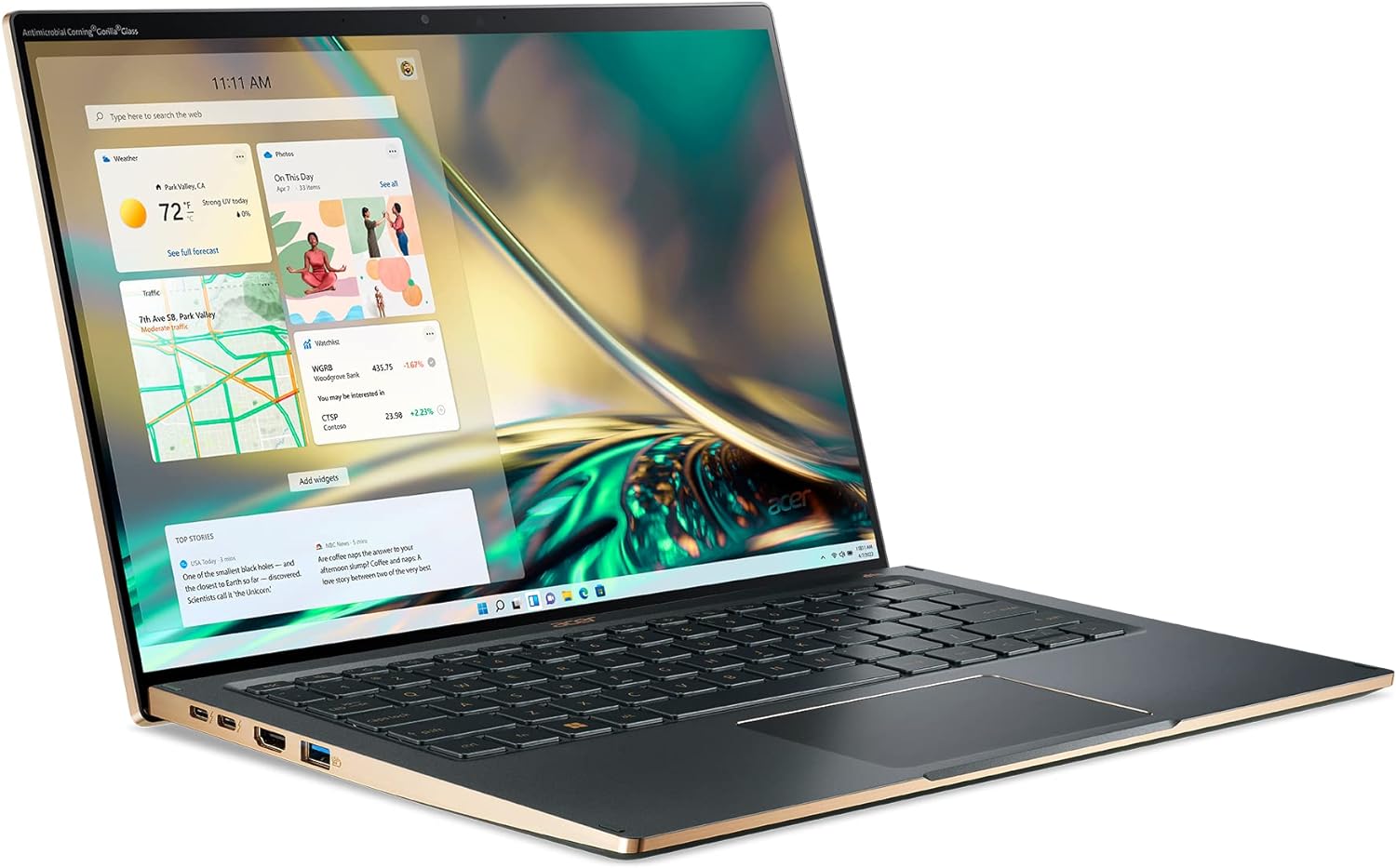
Acer’s roughly $1,500 Swift 5 is an attractive, compact 14-inch ultraportable laptop that leans into the MacBook Air without copying Apple’s aesthetic. The laptop’s bright screen offers plenty of workspace across its 16:10 display despite it being IPS rather than OLED.
The Acer Swift 5 covers all the bases with plenty of memory, storage, ports and display real estate. The 1080p webcam facilitates video conferences.
Screen glare, a less-than-perfect trackpad, and significant bloatware detract from the Swift 5’s otherwise solid hardware credentials.

Specifications
- 14-inch IPS display, WQXGA 2560 x 1600 at 425 nits of brightness
- Intel CoreTM i7-1260P 12-Core Processor, 2.1GHz with Intel Turbo Boost Technology 2.0 up to 4.7 GHz
- 16 GB of onboard LPDDR5 memory
- 1 TB PCIe Gen4 SSD, 16 Gb/s, NVMe
- 1080p Webcam
- Ports: Two USB Type-C, USB4, Thunderbolt 4, USB charging, two USB 3.2 Gen 1, HDMI 2.1, headphone/speaker jack, Kensington lock slot
- Windows Hello fingerprint reader
- Acer PurifiedVoice™ with AI Noise Reduction for audio calls
- Killer Wireless Wi-Fi 6E AX1675 supports dual-stream Wi-Fi in the 2.4GHz, 5GHz and 6GHz, Bluetooth® 5.2
- Fingerprint reader
- Battery capacity: 59.5 Watt-hours
- 2.65 pounds (1.2kg)
- Dimensions: 12.2 x 8.4 x 0.59 inches
What we like
Pros
- Good price-performance ratio with 12th-gen Core i7
- Light, portable and attractive design
- Interesting hinge-stand
- Beautiful 16:10 IPS Antimicrobial Corning Gorilla Glass multi-touch display
- Adequate number of ports
As much as design plays a role in purchasing a laptop, if it isn’t fast, then pretty doesn’t matter. The 12th-gen Core i7 platform allows the Acer Swift 5 to keep up with most non-GPU-intensive applications and personal productivity.

The Acer Swift 5 is a pretty laptop with nice edges and accents; the gold accents look good (even if they restrict light through them, as noted in the keyboard analysis in the What could be improved section). The CNC-machined aerospace-grade aluminum chassis and anodized top and sides contribute to the premium look.
I like that the display, when folded back, lifts the laptop’s base, creating a better working angle.

I like the 16:10 aspect ratio of the Gorilla Glass anti-microbial display, which offers more room than many 14-inch laptops—a move that all but the least expensive units should emulate. The display is bright and detailed, with good color depth. In a dark room, the Swift 5’s display really shines.
The mist green color offers a nice contrast to the silver, black, and grey exteriors of most laptops. The Swift 5 also comes in gold (the mist green trim is cooler looking).
With two USB Type-C, USB4, Thunderbolt 4 ports, the Swift 5 is ready for any type of expansion, but most owners may find a high-power USB-C Thunderbolt hub overkill, as those USB-C ports are joined by two USB 3.2 Gen 1, an HDMI 2.1, and a headphone/speaker jack. The built-in ports may suffice for most situations. For security, Acer included a Kensington lock slot.
Minimalist packaging and Acer’s various sustainability programs rate the Swift 5 four stars for sustainability.
What could be improved
Cons
- Screen glare
- Less than ideal touchpad and keyboard
- OK audio
- Middling battery performance
- Bloatware makes it feel cheap, even though it isn’t cheap
- Fan noise may be annoying for some
- HD camera doesn’t support Windows Hello
Because the screen on a laptop is so prominent in the user experience, glare becomes an immediate caution, and the Acer Swift 5’s display reflects more than it should. The display also includes antimicrobial features to keep germs at bay.
The keyboard isn’t bad, but it isn’t great. The layout and travel is fine. The gold key designators, however, make it hard to read keycaps in poor light. Sitting it next to an Apple keyboard and its clearly glowing white key designators immediately illustrate the poor color choice and lack of significant glow through on the gold-inked keys rather than on their edges.
The fingerprint reader sits on the power button. It works sometimes, but not always. I think the small size of the reader restricts the recognition area, so if it isn’t hit just right, the sensor fails to recognize the fingerprint.
The trackpad proves clicky and is small compared to other laptops, particularly those from Apple. While it supports a wide range of gestures, the mechanical feel of the trackpad seems a holdover from an older design. Push, and then push deeper for a click. The best sensors just sense; they don’t require additional force to act.
The internal speakers are OK for conference calls and aren’t annoying for watching movies and listening to music, but they also aren’t great. They produce a muddled soundscape that, while loud enough, just serves rather than excites. As with most laptops, superior sounds require headphones for the best music, media, or video/audio conference listening experience.
Middling battery life may not make it through an entire day. Though specified at 10 hours, I’m not convinced it will make it that long in my general testing. And while fast charging is claimed, it took a long time via Power Delivery from a USB-C hub to bring a depleted battery back to full charge.
The bloatware makes the Acer Swift 5 feel cheap, with TikTok and Forge of Empires, ClipChamp video editor, and Hearts Deluxe pre-loaded—to name just a few. I thought the rebellion against pre-loaded apps had been won, but Acer still seems to feel like those apps add value. What they add is time for serious users to delete them to free up space for apps they really want.

Sure, on a 1TB drive they may be a rounding error, but they are unnecessary. If Acer wants to offer apps, they should consider the Wacom approach, which is to make apps available for download after registration. We live in a pull economy now, and Acer’s bloatware is a reminder of the poor experiences of the push economy when a CD with AOL showed up in a mailbox, often more than one per day.
In the past, and it may be true to some degree for this unit, apps brought down the price. But for a $1,500 laptop, I find economics a hard argument for bloatware.
Doing all the app deleting can take up the CPU cycles. When the Swift 5 heats up, the fans make themselves known. Fan noise is noticeable and frequent, which may annoy those not wearing active noise cancelation headsets while working on the laptop. On the positive side, it will keep the CPU and motherboard cooler, ensuring a longer life for the investment.
I would also love to see Windows Hello-capable cameras become the standard now that manufacturers have almost universally adopted front-facing HD cameras. Although fingerprint recognition is a good biometric entry deterrent, it isn’t as convenient as just looking at a screen, which is how most people now access their phones.
Acer Swift 5: The bottom line
Acer has made a solid competitor for the Apple MacBook Air, with plenty of hardware to power through a day and connect in most situations without a hub or a dongle. Unfortunately, it doesn’t match Apple’s attention to engineering detail. The clicky trackpad, screen glare, poor keyboard backlighting and loud fan make for a less-than-optimal user experience.
I’m not sure who Acer designed the Swift 5 for. Business users will be unhappy with the bloatware and mediocre battery life; creatives will find it underpowered for many high-end creative tasks, while gamers will probably want a better-than-Intel GPU and bigger, more responsive display.
That leaves the Swift 5 in the pretty expensive, just fine category of laptops that receive OK reviews and sit around until they are discounted, making the design flaws tolerable in light of the high-performance CPU and wealth of storage.

Acer provided the Swift 5 for review. Images courtesy of Acer unless otherwise noted.
Serious Insights is an Amazon Affiliate. Clicking on an Amazon link may result in a payment to Serious Insights.
For more serious insights on hardware and accessories, click here.
Leave a Reply