• Skip to main content
  • Skip to primary sidebar
  • Skip to footer
  • Home
  • Services
    • Vendor Advisory Services
    • IT Advisory Services
    • Business Advisory Services
    • Serious Insights Agile Thinking Workshops
    • Innovation Workshops
    • Serious Insights Keynotes
    • Strategy Advisory Services
    • Thought Leadership & Content Marketing
  • Reviews
    • All Hardware Reviews
    • Headphone Reviews
    • USB-C Hub Reviews
    • SeriousPop.Tech
    • Software Reviews
  • Advisory Research
    • Serious Insights on AI
    • Serious Insights Interviews
    • Strategy & Scenario Planning
    • Serious Insights on Collaboration
    • Hybrid Work
    • Knowledge Management
    • Management
    • Learning Reimagined
    • Serious Insights: The 10s
    • Special Reports
    • Sponsored Research
    • USG Scenario Planning Videos
  • About Us
    • About Serious Insights
    • Daniel W. Rasmus
    • Daniel W. Rasmus Appearances
    • Daniel W. Rasmus Videos
    • Clients
    • Headshots
    • Books
      • Management by Design
      • Listening to the Future
      • Twelve Ways to Escape an Alien
      • Older Books
    • Daniel W. Rasmus World Travel
    • Dan’s Quotes
    • Community
    • Site Disclaimer
    • Privacy Policy
  • News
  • Contact Us
    • Contact Us
    • Book Daniel W. Rasmus
    • Serious Bookkeeping
    • Product Evaluation Request Form
    • Wedding Ceremonies
Serious Insights

Serious Insights

Research and reviews from strategist, futurist and analyst Daniel W. Rasmus

Follow Us

  • Facebook
  • X
  • LinkedIn
  • YouTube
  • Instagram

Belkin Connect Pro Thunderbolt 4 Dock Review: Comprehensive Connectivity for Windows and Mac

April 28, 2025 by Daniel W. Rasmus Leave a Comment

Belkin Connect Pro Thunderbolt 4 Dock Review

Design
Features
Value
Sustainability

Summary

The Belkin Connect Pro Thunderbolt 4 Dock delivers extensive connectivity and robust power delivery in a sleek design, which is ideal for Windows users with its 3-display capabilities (which are limited on MacOS and iPad by hardware restrictions). An internal power supply and a lower price would make the dock more competitive.

3.8
Buy on Amazon

Belkin Connect Pro Thunderbolt 4 Dock Review Review

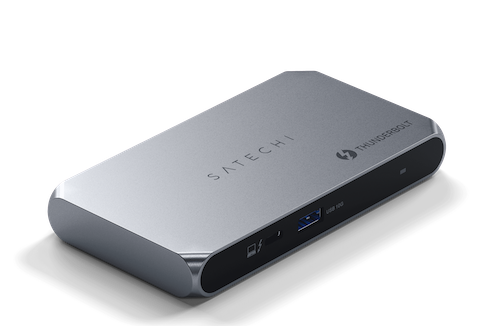
At Serious Insights, we’ve run a lot of USB-C and Thunderbolt hubs through their paces, from the portability of the Satechi Thunderbolt 4 Slim Hub Pro to the all-in-one design of the OWC Thunderbolt Go Dock. We’ve also explored hybrid solutions like the Targus USB-C Quad Dock and everyday workhorses like the CA Essential Universal Docking Station. Each hub brings its own take on balancing ports, power, and price. Belkin’s Connect Pro Thunderbolt 4 Dock arrives with premium ambitions, aiming to sit at the top of that competitive stack, but price and downstream ports challenge its design aspirations.
Depending on the number of peripherals in play, a modern USB-C/Thunderbolt device like the MacBook Pro or the Lenovo Nano X1 may require more than one dock when stationed on a desk. I combined the OWC Thunderbolt Go Dock with the Belkin Connect Pro to create a easy plug-and-play set-up with power that make swapping out my complex set-up a breeze (just two USB-C connections on any device, and I’m off and running with cameras, storage, microphones, scanners and various transmitters for mice, keyboards, and headphones).

What we like

Pros

  • 12 ports including dual HDMI 2.0
  • 90W power delivery
  • Support for up to three 4K displays (Windows)
  • Sleek, premium design
  • Fast UHS-II SD card reader 

The Belkin Connect Pro Thunderbolt 4 Dock offers a comprehensive array of 12 ports, including two HDMI 2.0 ports, a USB-C 3.1 Gen 2 port, two USB-A 3.1 ports, two USB-A 2.0 ports, a UHS-II SD card reader, a 3.5mm audio jack, Gigabit Ethernet, and both upstream and downstream Thunderbolt 4 ports. This extensive connectivity allows users to connect multiple peripherals and displays, enhancing productivity. 

With 90W power delivery, the Belkin Connect Pro Thunderbolt 4 Dock can efficiently charge laptops and other connected devices. This high power output ensures that even power-hungry laptops remain charged during intensive tasks, reducing the need for additional power adapters. 

For Windows users, the dock supports up to three 4K displays simultaneously—two via HDMI and one through the Thunderbolt 4 port. This capability is particularly beneficial for professionals requiring expansive screen real estate for multitasking or detailed work. 

The dock’s sleek, premium design features a curved aluminum enclosure with a glossy plastic front and back. Its aesthetic appeal makes it a stylish addition to any modern office workspace.

The inclusion of a fast UHS-II SD card reader allows for quick data transfer from compatible SD cards, which is advantageous for photographers and videographers who need to move large files swiftly. 

Belkin gets good marks for relatively sustainable packaging with a non-plastic wrapped cardboard box. They could probably drop the plastic protector for the 3-prong plug and the plastic protectors over the shiny black front and back. More importantly, they could message more about this product’s future in the circular economy, and what, if any (and some would be good), could be claimed about reclaiming materials to make this product. Belkin’s corporate sustainability messaging can be found here.

Belkin Connect Pro Thunderbolt 4 Dock ports
Belkin Connect Pro Thunderbolt 4 Dock Ports

What could be improved

Cons

  • Only one downstream Thunderbolt 4 port
  • Dual HDMI not fully supported on macOS
  • Two USB-A ports are USB 2.0
  • High price compared to similar docks
  • External power supply

The dock provides only one downstream Thunderbolt 4 port, limiting the ability to daisy-chain multiple Thunderbolt devices. Users requiring multiple high-speed connections may find this restrictive compared to other docks offering more Thunderbolt 4 ports. 

Mac users may encounter limitations with the dual HDMI ports, as macOS does not support Multi-Stream Transport (MST). This means that only one external display may be usable without additional adapters or software, reducing the dock’s effectiveness for Mac-based multi-monitor setups. 

Two of the USB-A ports are USB 2.0, which offer significantly slower data transfer rates compared to USB 3.1. This could be a bottleneck for users transferring large files or using high-speed peripherals. 

Priced at approximately $299.99, the dock is on the higher end of the market. Considering that other docks offer similar or superior features at a lower cost, potential buyers might question the value proposition of this product. 

While the OWC Thunderbolt Go Dock is heavier, it also sports more downstream Thunderbolt ports and an internal power supply. The internal power supply increases weight, making the dock a more convenient desktop companion and a more portable one. The OWC dock also runs about $100 less than the Belkin Connect Pro, which is reflected in the latter’s value rating.

Close ups of the Belkin Connect Pro Thunderbolt 4 Dock front and back (without labels)

Belkin Connect Pro Thunderbolt 4 Dock Review: The bottom line

The Belkin Connect Pro Thunderbolt 4 Dock is a well-designed docking station offering a wide range of ports and strong power delivery, making it suitable for USB-C-centered laptop and desktop users seeking to expand their workstation capabilities. However, fewer high-speed ports, an external power supply and a higher price may deter some users. Those prioritizing design and brand reputation may find it appealing, but others might consider more Thunderbolt-forward devices or more cost-effective alternatives.

Belkin provided the Connect Pro Thunderbolt 4 Dock for review. Images courtesy of Belkin unless otherwise noted.

Serious Insights is an Amazon Affiliate. Clicking on an Amazon link may result in a payment to Serious Insights.

For more serious insights on hardware and accessories, click here.

Share this post:

  • Share on X (Opens in new window) X
  • Share on LinkedIn (Opens in new window) LinkedIn
  • Share on Facebook (Opens in new window) Facebook
  • Email a link to a friend (Opens in new window) Email
  • Print (Opens in new window) Print
  • Share on WhatsApp (Opens in new window) WhatsApp
  • Share on Bluesky (Opens in new window) Bluesky
  • More
  • Share on Tumblr (Opens in new window) Tumblr
  • Share on Pinterest (Opens in new window) Pinterest

Like this:

Like Loading…

Related

Filed Under: Hardware Review, USB-C Hubs

Reader Interactions

Leave a ReplyCancel reply

This site uses Akismet to reduce spam. Learn how your comment data is processed.

Primary Sidebar

Subscribe to Serious Insights

Enter your email address to subscribe to this blog and receive notifications of new posts by email.

Join 7,849 other subscribers

Download the 2026 State of AI Report

Amazon Associate

As an Amazon Associate, I earn from qualifying purchases.

Hit Amazon Haul for Amazing Discounts.

Also, take a look at these links for additional Amazon discounts.

Today’s Deals.
Up to 80% Off
Crazy Low-Priced Finds
Under $5
Brand Scores

Dan’s poetry. Only on Kindle. Read today!

Top Posts

  • JBL Tour Pro 2 Review: Excellent Headphones That Crush With Their NextGen Case
    JBL Tour Pro 2 Review: Excellent Headphones That Crush With Their NextGen Case
  • JLab Epic Air Sport ANC Gen 2 Review: Sports Earbuds that Go the Extra Mile
    JLab Epic Air Sport ANC Gen 2 Review: Sports Earbuds that Go the Extra Mile
  • Tozo HT2 ANC Headphones Review: Inexpensive Headphones That Impress for the Price
    Tozo HT2 ANC Headphones Review: Inexpensive Headphones That Impress for the Price
  • Jabra Elite 10 Earbuds Review: The Jabra Flagship Continues to Improve on Comfort and Features
    Jabra Elite 10 Earbuds Review: The Jabra Flagship Continues to Improve on Comfort and Features
  • 12 Hybrid Work Fears Managers Must Face
    12 Hybrid Work Fears Managers Must Face

Buy my space adventure only on Kindle.

Recent Comments

  • OWC Thunderbolt Dock (14-Port) Review: One Dock, and One Cable, to Rule Them All on EZQuest USB-C Slim Gen 2 Hub Adapter 6-in-1 Review: A Speedy Modern Hub for Modern Work
  • Lenovo’s Qira is a Bet on Ambient, Cross-device AI—and on a New Kind of Operating System on “The Future of AI Isn’t What You Think” from Foxit Featuring a Daniel W. Rasmus Interview
  • The AI Tax Is Real. Use Design to Get Your Refund. on The AI Tax: 6 Core Ways Artificial Intelligence Creates More Work
  • Replace or Reshape: How AI Could Change the Way We Work – Feed1 on Intelligence Too Cheap to Meter: Sam Altman’s Vision for the AI-Powered Future
  • Nikola Gjorgov on Kodak Slide N Scan Digital Film Scanner Review: Easily Preserve Slides and Film After a Quick Scan

Footer

Sitemap

  • Blogs
  • Book Daniel W. Rasmus
  • About Daniel W. Rasmus
  • Serious Insights LLC Disclaimer
  • Privacy Policy

Archives

Tag Cloud

ABC Apple AR artificial intelligence Big Data Buffy the Vampire Slayer BusinessWeek Cengage CIO Magazine CIOs Cisco context coronavirus Customer Service Dell Disney Disneyland earbud review Enterprise 2.0 facebook Fast Company Feedback loops Harvard Business Review HBR HP IBM Innovation Instagram iPhone case JBL Kindle Knowledge Management life-long learning Logitech Management By Design Microsoft mission statement Netflix New Scientist Nokia scenario planning Star Trek Stephen Elop Thought Leadership VR

Copyright 2009-2026 Serious Insights LLC | Log in

We are using cookies to give you the best experience on our website.

You can find out more about which cookies we are using or switch them off in .

%d
    Powered by  GDPR Cookie Compliance
    Privacy Overview

    This website uses cookies so that we can provide you with the best user experience possible. Cookie information is stored in your browser and performs functions such as recognising you when you return to our website and helping our team to understand which sections of the website you find most interesting and useful.

    Strictly Necessary Cookies

    Strictly Necessary Cookie should be enabled at all times so that we can save your preferences for cookie settings.