

HP Z2 Mini G1a

Summary
The HP Z2 Mini G1a, reviewed with 128GB of memory, an AMD Ryzen AI Max+ PRO 395 CPU, and Radeon 8060S graphics configured with 16GB of graphics memory, delivers compact workstation performance for local AI, creative, development, and 4K workflows. A comparable 128GB/2TB retail configuration was listed at $3,799.99 at Micro Center, while CDW listed a 128GB/2TB configuration at $6,953.99, making channel pricing a major buying variable. HP’s Wolf Pro Security Edition page lists 3-year basic hardware and software warranty coverage, with HP’s technical specification describing 3 years of parts, labor, and on-site repair, though reseller listings may differ by SKU.
Note, the Amazon product is not the same SKU as the reviewed unit (less memory/smaller SSD).
HP Z2 Mini G1a Review

The HP Z2 Mini G1a sits at the intersection Serious Insights has been tracking across AI PCs, portable displays, docks, and workstation-class mobility: computing power is moving into smaller envelopes, but the surrounding workspace still matters. The machine I used brings together the AMD Ryzen AI Max+ PRO 395, 128GB of LPDDR5x memory, Radeon 8060S graphics configured with 16GB of graphics memory, the ViewSonic VX1655-4K-OLED portable display I previously reviewed, and an OWC Thunderbolt 3 Dock.
That setup makes the Z2 Mini G1a less of a conventional desktop and more of a compact compute node for a modular work environment. The ViewSonic’s 15.6-inch 3840 x 2160 OLED panel has already proven itself as a travel-ready premium display, and the HP’s support for up to four 4K displays makes that pairing feel intentional rather than improvised.
Serious Insights hardware reviews have covered PCs, monitors, docks, storage, headphones, mobile accessories, and the connective tissue that makes modern work setups practical. The Z2 Mini G1a belongs in that lineage because it challenges the old assumption that workstation-class work requires a large workstation-class box. HP positions the system around local LLM work, 3D modeling, rendering, video editing, and AI-assisted workflows, with up to 128GB of unified memory, up to 96GB of GPU-assignable memory, up to 50 NPU TOPS, and up to 8TB of dual-NVMe storage, depending on configuration.
What we like
Pros
- Compact workstation-class design
- AMD Ryzen AI Max+ PRO 395 performance foundation
- 128GB shared-memory architecture
- Radeon 8060S graphics fit for local AI and creative workflows
- Strong port mix for docked and portable setups
- 4K display support
- Rackable design
- Solid sustainability disclosures
- HP 3-year workstation warranty on the Wolf Pro Security configuration
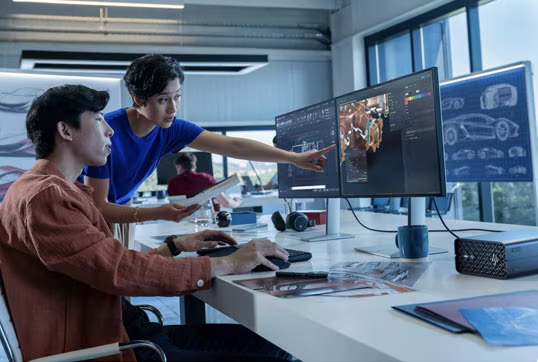
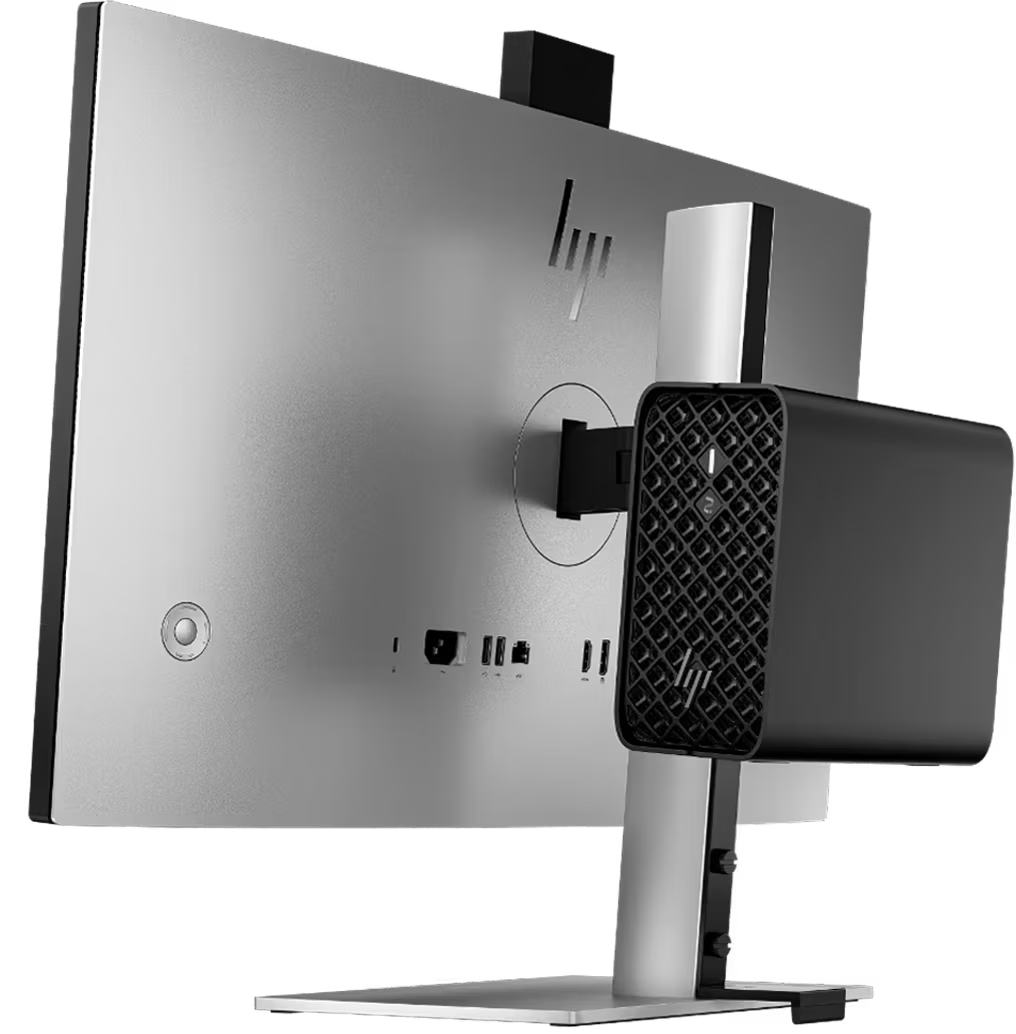
The Z2 Mini G1a compresses a workstation into a chassis measuring 3.4 x 6.6 x 7.9 inches and starting at 5.07 pounds. That makes it small enough to sit beside a dock, hide behind a display, or serve as a compact desk anchor without asking for tower-class space. HP also designs the system for rack use, stating that five units can fit across a 4U rack, aided by an internal power supply rather than external bricks. That density matters less for a single desk than for creative teams, developers, labs, and AI evaluation environments where multiple small workstations can be deployed without turning furniture into infrastructure.
The AMD Ryzen AI Max+ PRO 395 defines the Z2 Mini G1a’s value. HP lists the processor at up to 5.1GHz max boost, with 16 cores, 32 threads, and 64MB of L3 cache. Micro Center’s specification page for a comparable 128GB/2TB configuration identifies the CPU core as Strix Halo and lists 40 graphics cores at 2900MHz alongside up to 50 TOPS from the AMD Ryzen AI NPU. This is not a general-purpose office mini PC with AI branding added to the box. It is a compact workstation built around an APU architecture, with CPU, GPU, NPU, and memory decisions central to the product’s identity.
The 128GB LPDDR5x-8533 memory configuration matters because it changes what the Z2 Mini G1a can plausibly do locally. HP states that the unified memory architecture can assign up to 96GB exclusively to the GPU, which changes the conversation around compact AI workstations. The reviewed configuration used a Radeon 8060S graphics card with 16GB of graphics memory, but the platform’s broader value lies in its memory flexibility rather than a fixed discrete VRAM ceiling. For local AI experimentation, model evaluation, large visual assets, development environments, and multitasking across heavy applications, memory becomes the machine’s strategic advantage.
The Radeon 8060S should not be mistaken for a traditional removable workstation GPU, but in this design, that is partly the point. HP lists the graphics as integrated AMD Radeon 8060S, and Micro Center’s listing confirms shared video memory and integrated GPU architecture. In the review configuration, Radeon 8060S with 16GB assigned graphics memory sat in a system with enough total memory to support broader local workloads. That balance makes the Z2 Mini G1a attractive for AI-assisted creative work, software development, data analysis, 4K display use, and LLM experimentation, rather than for high-end GPU rendering or large-scale AI training, which still belong on bigger systems.
The port mix matches how I used the system. HP includes a side USB-C 10Gbps port with USB Power Delivery and DisplayPort 2.1, a side USB-A 10Gbps charging port, a headset jack, rear USB-A ports, RJ-45 Ethernet, two Thunderbolt 4 USB-C 40Gbps ports with DisplayPort 2.1, two USB-A 480Mbps ports, and two Mini DisplayPort 2.1 ports. That makes the Z2 Mini G1a comfortable as a direct-attached workstation or as the center of a docked setup. The OWC Thunderbolt dock context reinforces the point: OWC’s Thunderbolt dock lineup supports multi-port expansion, Ethernet, card readers, audio, and dual-display workflows, which keeps the HP from becoming a cable nest.

1 headphone/microphone combo
1 USB Type-A 10Gbps signaling rate (1 charging)

1 RJ-45
2 Thunderbolt™ 4 with USB Type-C® 40Gbps signaling rate (USB Power Delivery, DisplayPort™ 2.1)
2 USB Type-A 480Mbps signaling rate
2 Mini DisplayPort™ 2.1
The display support aligns with a flexible workbench. HP states that the Z2 Mini G1a supports up to four 4K displays. The ViewSonic VX1655-4K-OLED I used suggests a mobile model for the HP Z2 Mini G1a, as the relatively light desktop unit pairs well with the 1.5-pound, 15.6-inch OLED panel, making it easy to fit in many backpacks. A workstation without an included display can feel incomplete in a retail box, but in this setup, the absence of a bundled panel becomes a design opening.
The system can run with a premium portable OLED, a large desktop monitor, or a multi-display arrangement without being locked into HP’s display offerings. As an alternative to testing video playback, I ran the HP Z2 Mini G1a with the Benfei wireless HDMI transmitter to my Monoprice 4K display for video streaming — and sat back and enjoyed my movies.
The rackable design extends the HP Z2 Mini G1a beyond the desk. HP states that five units can fit across a 4U rack, and the internal power supply helps avoid the external power-brick clutter that undermines many compact systems when deployed in groups. Labs, classrooms, creative teams, AI evaluation clusters, and edge-like office deployments that require managing compact workstations as infrastructure benefit from this design. The same design that makes the Z2 Mini G1a unobtrusive beside a ViewSonic 4K portable display and an OWC Thunderbolt dock also makes it practical for dense, serviceable deployments where local AI, development, rendering, or workstation workloads need to stay close to users or teams without requiring tower-class space.
HP’s own Wolf Pro Security Edition product page lists a 3-year basic hardware and software warranty as included, and the technical specification states a 3-year limited warranty with 3 years of parts, labor, and on-site repair, with restrictions and country variations. That is the right baseline for a workstation-class device, especially one aimed at professional workloads rather than commodity desktop replacement. Channel listings vary, so the SKU matters, but HP’s own configuration gives the Z2 Mini G1a a more enterprise-appropriate support story than the one-year coverage often associated with consumer mini PCs.
For a deeper dive on specifications and configurations, see the HP Z2 Mini G1a data sheet.
Sustainability
HP gives the Z2 Mini G1a more environmental documentation than many compact PCs. The system is listed as EPEAT-registered and ENERGY STAR-certified. HP also discloses bulk packaging availability, 10% ITE-derived closed-loop plastic, at least 65% post-consumer recycled plastic, and at least 20% post-industrial recycled steel. Those details make the product easier to include in procurement conversations where compactness, energy use, recycled content, and reporting requirements now sit alongside performance and warranty. The sustainability claims do not remove the environmental burden of a high-performance AI workstation, but they improve transparency and give buyers more than a generic green label to evaluate.
What could be improved
Cons
- High and inconsistent channel pricing
- Shared-memory graphics require careful expectations
- Onboard memory limits future upgrades
- Thunderbolt 4, not Thunderbolt 5
- No display included
- Performance modes require BIOS-level changes
- Warranty terms vary by SKU and reseller

Pricing is the HP Z2 Mini G1a’s least elegant feature. Micro Center lists a comparable 128GB LPDDR5x-8533, 2TB SSD, Ryzen AI Max+ PRO 395, Radeon 8060S configuration at $3,799.99 for in-store pickup only. CDW lists a 128GB/2TB Z2 Mini G1a workstation configuration at $6,953.99. That spread may reflect different SKUs, channel structures, business procurement contracts, timing, or warranty/security bundles, but the result is still muddy. A compact workstation should not require detective work to determine whether a configuration is a strong value or a procurement artifact.
The Radeon 8060S architecture deserves careful explanation at purchase time. HP’s product page emphasizes unified memory and up to 96GB assignable to the GPU, while Micro Center lists Radeon 8060S video memory as shared. That flexibility is a strength for local AI and memory-heavy workflows, but it is not the same buying logic as selecting a discrete NVIDIA RTX workstation card with fixed dedicated VRAM, mature CUDA expectations, and a clear upgrade path. The HP Z2 Mini G1a is compelling when its architecture matches the workload. It is less compelling when a workflow depends on software stacks optimized around discrete GPUs.
The 128GB memory ceiling is generous, but HP lists the 128GB LPDDR5x-8533 MT/s memory as onboard, which makes the purchase configuration more consequential. This is not a system for buying low and growing later through DIMM swaps. The memory decision should be made at acquisition, particularly because the GPU allocation model draws from that same memory pool. In the reviewed configuration, 128GB is the right choice; lower-memory variants should be treated as different machines rather than cheaper versions of the same one.
The HP Z2 Mini G1a’s two Thunderbolt 4 ports offer plenty of capability for current docks, displays, and storage, but Thunderbolt 5 is already appearing across newer professional peripherals. OWC’s current connectivity lineup includes Thunderbolt 5 hubs with 80/120 Gbps bandwidth and support for up to 3 8K displays, while the Z2 Mini G1a remains a Thunderbolt 4 system. That is not a flaw for the current review setup with an OWC Thunderbolt 3 Dock and a 4K portable display, but it does place a ceiling on future external storage and display expansion for users buying the machine as a multi-year workstation platform.
The Z2 Mini G1a ships as a workstation without a display, which is normal for the category but worth calling out because the machine’s small size invites comparisons with mini PCs that end up in improvised setups. In my configuration, the ViewSonic VX1655-4K-OLED filled that gap well with a 15.6-inch 4K OLED panel, USB-C, and mini-HDMI connectivity. Without a display plan, the HP’s compact footprint solves only part of the workspace problem. The best version of this product is a system-level purchase: workstation, display, dock, storage, keyboard, pointing device, and cable strategy.
HP includes High Performance Mode as the default and allows Performance Mode, Quiet Mode, or Rack Mode through a BIOS setting. That makes sense for controlled workstation deployments, but it feels less friendly for a single-user desktop that may shift between writing, local AI testing, presentations, and heavy media work during the same day. A more visible utility for mode switching would make the Z2 Mini G1a feel more adaptive without weakening the IT control story that workstations require.
Warranty clarity needs improvement across channels. HP’s own Wolf Pro Security Edition page lists a 3-year basic hardware and software warranty, and HP’s specification text lists a 3-year parts, labor, and on-site repair warranty. Micro Center’s listing for a 128GB/2TB configuration lists 1-year limited parts and labor. That mismatch may be SKU-specific, but buyers should not have to reconcile warranty language across HP, retail, and reseller pages for a professional workstation. The product deserves clean warranty labeling at the point of configuration.
HP Z2 Mini G1a vs. Apple Mac Studio for AI Workloads
The HP Z2 Mini G1a and Apple Mac Studio approach local AI from different assumptions. The Z2 Mini G1a treats AI as a workstation problem inside the Windows enterprise stack: local model experimentation, development, inference testing, data workflows, and deployment environments that need compatibility with Windows applications, AMD PRO manageability, and conventional IT controls. The Mac Studio treats AI as part of Apple’s unified creative and development architecture, where the CPU, GPU, Neural Engine, memory bandwidth, and media engines operate within a tightly controlled macOS environment.
For local AI experimentation, the Z2 Mini G1a’s reviewed configuration has a clear strength: 128GB of shared memory paired with the AMD Ryzen AI Max+ PRO 395 and Radeon 8060S graphics. HP’s architecture allows a large memory pool to be assigned to GPU-oriented work, making the system especially well-suited for running larger local models than would fit comfortably on many small desktops. The 50 TOPS-class NPU supports AI acceleration, but the more important story is the memory architecture, because local AI work often breaks on memory limits before it breaks on raw compute.
The Mac Studio is stronger where Apple’s software stack, GPU architecture, and memory bandwidth are already optimized for the workload. The M4 Max and M3 Ultra configurations offer very high unified-memory bandwidth, strong GPU options, and Apple’s Neural Engine, making the Mac Studio a natural fit for developers and creators working with Core ML, MLX, Apple-optimized local models, media pipelines, and AI-assisted creative tools. It also has Thunderbolt 5 in current configurations, which gives it a forward-looking external storage and peripheral advantage over the Z2 Mini G1a’s Thunderbolt 4 design.
The choice is less about which machine offers a “better at AI” experience and more about the target AI ecosystem for the work. The Mac Studio is the better fit for macOS-native AI development, creative AI workflows, video, imaging, and teams already committed to Apple’s silicon roadmap. The Z2 Mini G1a is the better fit for Windows-based AI evaluation, enterprise pilots, local LLM testing, AI-accelerated tools and development environments tied to Microsoft, AMD, or Windows, and organizations that want a compact workstation without moving users to macOS.
For Serious Insights readers, the comparison reinforces a broader point: AI hardware decisions are now architecture decisions. The Mac Studio offers a polished, high-bandwidth, Apple-optimized local AI platform. The HP Z2 Mini G1a offers a compact, enterprise-oriented Windows AI workstation with unusually generous memory for its size, and a rackable configuration that makes it ideal for labs. The right answer depends on model size, software stack, governance expectations, and whether the machine’s primary role is creative acceleration, local AI development, or enterprise experimentation.
HP Z2 Mini G1a: The bottom line
The HP Z2 Mini G1a is a serious compact workstation, not a decorative mini PC with workstation aspirations. In the 128GB Ryzen AI Max+ PRO 395 configuration with Radeon 8060S graphics, it offers a strong local AI and creative workflow platform in a form factor that works well with a premium portable 4K display and a Thunderbolt dock. Its best audience includes professionals, analysts, developers, creators, and technical teams that want local compute density without committing to a tower.
The weaker points center on pricing clarity, GPU expectations, non-upgradeable onboard memory, and SKU-dependent warranty language. Buy the high-memory configuration, pair it with a deliberate display and dock strategy, and treat it as a workstation architecture choice rather than a small desktop impulse purchase.
HP provided the Z2 Mini G1a for review. Images courtesy of HP unless otherwise noted.
Serious Insights is an Amazon Affiliate. Clicking on an Amazon link may result in a payment to Serious Insights.
For more serious insights on hardware and accessories, click here.
If you found value in this HP Z2 Mini G1a review, please like it, leave a comment or share it with friends and colleagues. We appreciate you!
Leave a Reply