• Skip to main content
  • Skip to primary sidebar
  • Skip to footer
  • Home
  • Services
    • Vendor Advisory Services
    • IT Advisory Services
    • Business Advisory Services
    • Serious Insights Agile Thinking Workshops
    • Innovation Workshops
    • Serious Insights Keynotes
    • Strategy Advisory Services
    • Thought Leadership & Content Marketing
  • Reviews
    • All Hardware Reviews
    • Headphone Reviews
    • USB-C Hub Reviews
    • SeriousPop.Tech
    • Software Reviews
  • Advisory Research
    • Serious Insights on AI
    • Serious Insights Interviews
    • Strategy & Scenario Planning
    • Serious Insights on Collaboration
    • Hybrid Work
    • Knowledge Management
    • Management
    • Learning Reimagined
    • Serious Insights: The 10s
    • Special Reports
    • Sponsored Research
    • USG Scenario Planning Videos
  • About Us
    • About Serious Insights
    • About Daniel W. Rasmus
    • Daniel W. Rasmus Appearances
    • Daniel W. Rasmus Videos
    • Clients
    • Headshots
    • Books
      • Management by Design
      • Listening to the Future
      • Twelve Ways to Escape an Alien
      • Older Books
    • Daniel W. Rasmus World Travel
    • Dan’s Quotes
    • Community
    • Site Disclaimer
    • Privacy Policy
  • News
  • Contact Us
    • Contact Us
    • Book Daniel W. Rasmus
    • Serious Bookkeeping
    • Product Evaluation Request Form
    • Wedding Ceremonies
Serious Insights

Serious Insights

Research and reviews from strategist, futurist and analyst Daniel W. Rasmus

Follow Us

  • Facebook
  • X
  • LinkedIn
  • YouTube
  • Instagram

Kingston Ironkey Vault Privacy 50C 64GB Flash Drive Review: The Light Flash that Keeps Your Stuff Protected

March 13, 2023 by Daniel W. Rasmus 2 Comments

Kingston Ironkey™ Vault Privacy 50C 64GB Flash Drive 

Design
Features
Value
Sustainability

Summary

Improved software makes the Kingston Ironkey Vault Privacy 50C a more powerful encryption device than its predecessors despite its slighter hardware profile. Dual passwords and a USB-C version make for a more compelling value proposition.

3.9

Kingston Ironkey Vault Privacy 50C 64GB Flash Drive Review

USB sticks are commodities. Go to a trade show, and people giving them away filled with product literature (which, yes, increasingly is just a QR code with an ink to a web directory)—are found abandoned on desktops, in hotel rooms, and classrooms.

I should say USB sticks are commodities until they are not commodities, and such is the case with the Kingston Ironkey Vault Privacy 50C 64GB Flash Drive—a standard enough looking USB stick until you stick it into a computer, and it asks for a password.

Kingston Ironkey Vault Privacy 50C 64GB Flash Drive

What we like

Kingston Ironkey USB sticks are not new. What’s new, however, is multiple access levels designed into the Vault Privacy 50C. The drive supports administrator-level support and user support. With both accounts turned on, the device supports password resets and other features.

Also new is the passphrase mode, which supports numeric PINs, sentences with space characters, lists of words, or other phrases (like lyrics, a line of Shakespeare, or a curse)—from 10 to 64 characters long.

The core technology of the Kingston Ironkey Vault Privacy 50C still circles around XTS-AES 256-bit encryption. It only rates FIPS 197 certifications as the hardware is not as robust as earlier versions, like the D3000 series, rated FIPS 140-2 Level 3 certifications based on the enhanced physical attributes. In either case, even if the drive becomes physically compromised, the data won’t be readable by hackers without a key.

Kingston also includes Dual Read-Only (Write-Product) settings to stave off malware attacks in sketchy environments. This feature can be set by users or admins.

DO NOT LOSE YOUR PASSWORD. Although you can reset the flash drive, you will not be able to recover your data. I tested it. After several tries, the drive locks and requires a reset back to factory defaults—which means back to blank. Small and medium businesses can set up password recovery as well.

Because the drive locks, the “eye” icon in the upper right of the screen can be clicked so the user can ensure they entered the password correctly. A virtual keyboard built into the app helps shield keyloggers and screen loggers from capturing the password.

Kingston ships the disk with Mac and PC compatibility facilitated through a directory that contacts software for both and a FAT32 file format. Once I set up the drive, I reformatted it to the exFAT to accommodate larger files. 

A small nylon loop accompanied the version of the drive provided at CES, though the Amazon image does not show that part of the package in its images.

I like that the company now makes USB-C and USB-A versions of the USB-B 3.2 Gen 1 drive that reads at 250MB/s and writes at 180/MBs for 8GB-128GB drives. The 256GB version runs a bit slower. Drive capacities go up to 256GB. Kingston includes a 5-year warranty and free technical support.

The software is straightforward on first use (and after resets). Just create a strong passphrase or password with a hint and get going. Admins can do a lot more, such as managing the drive’s other users, offering one-time password resets, and enabling read-only mode.

What could be improved

For a secure drive labeled as an iron key, I would like to see the Kingston Ironkey Vault Privacy 50C with an environmental rating for water and dust as well as a connected cap (so the cap can’t fall off and be lost, exposing the connector to the elements) or, alternatively, a connection retraction mechanism to help ensure the physical integrity of the drive. 

All the encryption available doesn’t mean much if the USB connector gets bent or smashed (although that is a way to ensure more people can’t access the drive, including its owner). Those looking to secure information want to make sure that security extends beyond the virtual world—but they still want to access it when they need it. The cap security connection suggestion rolls over from our D3000 series review.

While the new Ironkeys are lighter than the D3000 series, the material is also not as robust. I like the Ironkey to feel, well, like iron. This drive, and its FIPS rating, however, clearly inform knowledgeable buyers about what they are and are not getting in terms of physical capabilities.

I’m also not a big fan of the tiny lanyard holes on the drive. I got one to go in, but (a) it wasn’t the one that came with the drive—which was seemingly vacuumed up from the floor of my Las Vegas hotel room after an initial installation tussle, and (b) it took way too long with too many makeshift tools to be worth the effort. Give me a good loop of metal or nylon pre-installed. If it proves too hard and too expensive to pre-install, it’s probably also not a good customer value or experience.

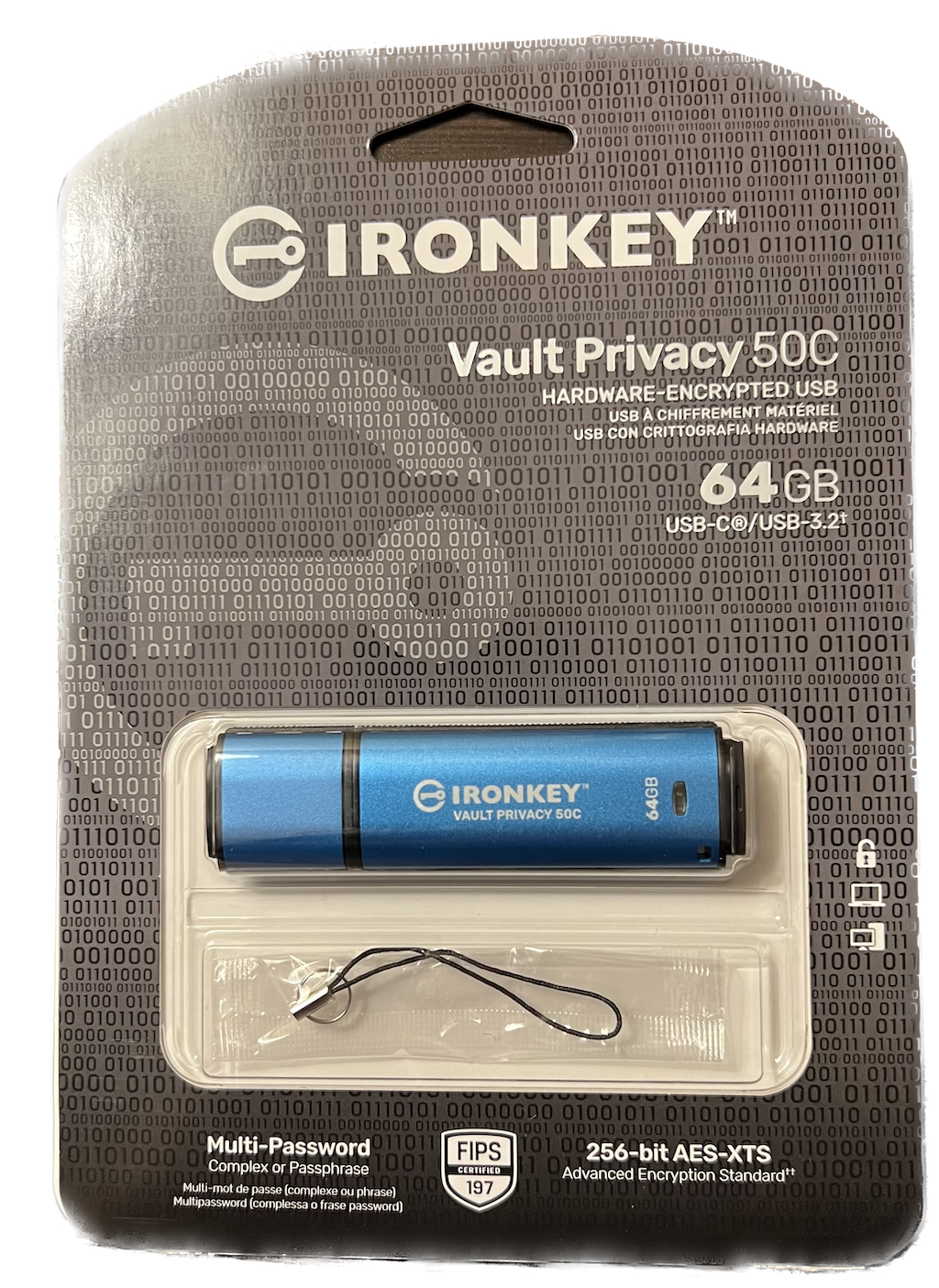
Packaging as seen on Amazon.com.
A picture of the author’s packaging from the evaluation unit (image: Daniel W. Rasmus for Serious Insights LLC).

I also don’t like that the Ironkey ejects from MacOS automatically when it times out, which complicates using it—as it must be remounted, not just have its password re-entered.

Kingston Ironkey Vault Privacy 50C 64GB Flash Drive: The bottom line

Kingston continues to make flash drives aimed at protecting valuable personal and business information. The new dual password system on the Kingston Ironkey Vault Privacy 50C creates a more flexible user environment without overcomplicating the experience or compromising data. 

Those looking for even more physically robust drives should consider the older D3000, which only comes in sizes up to 128GB.


Kingston provided the Kingston Ironkey Vault Privacy 50C for review. Images courtesy of Kingston unless otherwise noted.

Serious Insights is an Amazon Affiliate. Clicking on an Amazon link may result in a payment to Serious Insights.

For more serious insights on hardware and accessories, click here.

Share this post:

  • Share on X (Opens in new window) X
  • Share on LinkedIn (Opens in new window) LinkedIn
  • Share on Facebook (Opens in new window) Facebook
  • Email a link to a friend (Opens in new window) Email
  • Print (Opens in new window) Print
  • Share on WhatsApp (Opens in new window) WhatsApp
  • Share on Bluesky (Opens in new window) Bluesky
  • More
  • Share on Tumblr (Opens in new window) Tumblr
  • Share on Pinterest (Opens in new window) Pinterest

Like this:

Like Loading…

Related

Filed Under: Hardware Review

Reader Interactions

Comments

  1. SteelWolf says

    March 30, 2023 at 9:34 pm

    Left out the most important part i hear in other reviews. Software install. If i go to a friends house i have to install software on his computer to access the drive.

    Reply
    • Daniel W. Rasmus says

      April 3, 2023 at 3:28 pm

      You don’t need software on target computers once configured, just your password. You need software to set-up the drive and manage it.

      Reply

Leave a ReplyCancel reply

This site uses Akismet to reduce spam. Learn how your comment data is processed.

Primary Sidebar

Subscribe to Serious Insights

Enter your email address to subscribe to this blog and receive notifications of new posts by email.

Join 7,849 other subscribers

Download the 2026 State of AI Report

Amazon Associate

As an Amazon Associate, I earn from qualifying purchases.

Hit Amazon Haul for Amazing Discounts.

Also, take a look at these links for additional Amazon discounts.

Today’s Deals.
Up to 80% Off
Crazy Low-Priced Finds
Under $5
Brand Scores

Dan’s poetry. Only on Kindle. Read today!

Top Posts

  • JBL Tour Pro 2 Review: Excellent Headphones That Crush With Their NextGen Case
    JBL Tour Pro 2 Review: Excellent Headphones That Crush With Their NextGen Case
  • JLab Epic Air Sport ANC Gen 2 Review: Sports Earbuds that Go the Extra Mile
    JLab Epic Air Sport ANC Gen 2 Review: Sports Earbuds that Go the Extra Mile
  • Tozo HT2 ANC Headphones Review: Inexpensive Headphones That Impress for the Price
    Tozo HT2 ANC Headphones Review: Inexpensive Headphones That Impress for the Price
  • Jabra Elite 10 Earbuds Review: The Jabra Flagship Continues to Improve on Comfort and Features
    Jabra Elite 10 Earbuds Review: The Jabra Flagship Continues to Improve on Comfort and Features
  • 12 Hybrid Work Fears Managers Must Face
    12 Hybrid Work Fears Managers Must Face

Buy my space adventure only on Kindle.

Recent Comments

  • JBL Tour Pro 2 Review: Worth It? Specs, Comparison & More - Coastal Journal on JBL Tour Pro 2 Review: Excellent Headphones That Crush With Their NextGen Case
  • AI PCs Want Higher Labels Than AI PC – blog.aimactgrow.com on Acer Aspire 16 AI Qualcomm Review: Snapdragon X Value Laptop with Copilot+ Trade-offs
  • AI PCs Need Better Labels Than AI PC on Acer Aspire 16 AI Qualcomm Review: Snapdragon X Value Laptop with Copilot+ Trade-offs
  • OWC Thunderbolt Dock (14-Port) Review: One Dock, and One Cable, to Rule Them All on EZQuest USB-C Slim Gen 2 Hub Adapter 6-in-1 Review: A Speedy Modern Hub for Modern Work
  • Lenovo’s Qira is a Bet on Ambient, Cross-device AI—and on a New Kind of Operating System on “The Future of AI Isn’t What You Think” from Foxit Featuring a Daniel W. Rasmus Interview

Footer

Sitemap

  • Blogs
  • Book Daniel W. Rasmus
  • About Daniel W. Rasmus
  • Serious Insights LLC Disclaimer
  • Privacy Policy

Archives

Tag Cloud

ABC Apple AR artificial intelligence Big Data Buffy the Vampire Slayer BusinessWeek Cengage CIO Magazine CIOs Cisco context coronavirus Customer Service Dell Disney Disneyland earbud review Enterprise 2.0 facebook Fast Company Feedback loops Harvard Business Review HBR HP IBM Innovation Instagram iPhone case JBL Kindle Knowledge Management life-long learning Logitech Management By Design Microsoft mission statement Netflix New Scientist Nokia scenario planning Star Trek Stephen Elop Thought Leadership VR

Copyright 2009-2026 Serious Insights LLC | Log in

We are using cookies to give you the best experience on our website.

You can find out more about which cookies we are using or switch them off in .

%d
    Powered by  GDPR Cookie Compliance
    Privacy Overview

    This website uses cookies so that we can provide you with the best user experience possible. Cookie information is stored in your browser and performs functions such as recognising you when you return to our website and helping our team to understand which sections of the website you find most interesting and useful.

    Strictly Necessary Cookies

    Strictly Necessary Cookie should be enabled at all times so that we can save your preferences for cookie settings.