

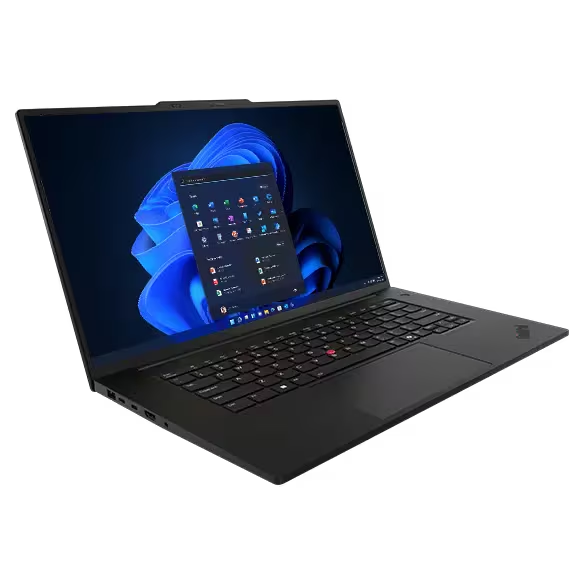
Lenovo Thinkpad P1 Gen 7
| Criteria | Star Rating |
| Design | ⭐⭐⭐ |
| Features | ⭐⭐⭐ |
| Value | ⭐⭐⭐ |
| Sustainability | ⭐⭐⭐⭐⭐ |
| Total (A fully decked out unit would likely have scored much higher) | 3.5 ⭐ |
Summary
Equipped with an Intel® Core™ Ultra 7 165H vPro® Processor, NVIDIA RTX™ 1000 Ada GPU, and a WUXGA IPS display (as reviewed), the ThinkPad P1 Gen 7 balances power and portability. Its performance and build quality are exceptional, but its average display and limited upgradeability warrant consideration.
Pros
- High-performance hardware options, including Intel Core i9 processors and NVIDIA RTX GPUs.
- Up to 64 GB LPDDR5x-7467MT/s memory
- Up to a 16-inch 4K OLED display with excellent color accuracy.
- Lightweight and portable for a workstation-class laptop.
- Exceptional keyboard with tactile feedback and comfortable typing.
- Extensive connectivity options, including Thunderbolt 4 and HDMI 2.1.
- Robust build quality and MIL-STD durability certifications.
- Ample storage options with up to 8TB SSD support.
Cons
- Expensive for the given configuration.
- • Average display resolution and refresh rate for the price.
- • Limited upgradeability for RAM and storage.
- • Runs hot under prolonged heavy workloads.
- • Moderate battery life, especially during intensive tasks.
Lenovo Thinkpad P1 Gen 7

This a workstation-level laptop. Unfortunately, I did not receive a review unit that demonstrated the Lenovo Thinkpad P1 Gen 7 in all its glory. It worked well enough for general business applications, ran local AI models, and drove the Lenovo ThinkVision 3D display, which I’m also reviewing. But when you look at the available specifications, this configuration puts my experience at the low end of the scale.
So I will only, like most of you, be drooling over the 64GB of memory, the 8 TB drive, the Ultra 9 processor or the NVIDIA® GeForce RTX® 4070 Laptop GPU 8GB GDDR6 with its Ada Lovelace architecture and high CUDA core count, nor the 16-inch 3840 x 2400 OLED that would reflect all that graphics power.
As you will see, the specifications show that, while not an entry-level machine, those who want to shell out significant money will be able to create a workstation beast. Those with more modest means may be attracted to the P1 Gen 7 for its 16-inch display, even if only 2560 x 1600 or, in the case of the review unit, only 1920 x 1200. As with most of its laptops, Lenovo offers a veritable smorgasbord of technical options.
My advice, as always, is to buy as much as you can afford. At the high end, the P1 Gen 7 will likely perform for a long while, even when facing challenging AI workloads. With an Ultra 9 185H, jealousy from peers about top-tier laptop performance will be maintained until Intel starts shipping the Ultra Series 2s in volume. And I have seen the Lenovo OLED displays. If you can afford one, include it in your spec list for optimal workspace and engaging media consumption.
Top-of-the-line configurations list for well over $6,300, but street prices run about 40% lower. Lesser configuraitons start at around $4K but also retail for much less.
Lenovo Thinkpad P1 Gen 7 Specifications
| Feature | Max Config | As Reviewed |
|---|---|---|
| CPU | Intel® Core™ Ultra 9 185H Processor with vPro®(E-Core Max 3.80 GHz, P-Core Max 5.10 GHz with Turbo Boost, 16 Cores, 22 Threads, 24 MB Cache) | Intel® Core™ Ultra 7 165H Processor with vPro® (E-Core Max 3.80 GHz, P-Core Max 5.00 GHz with Turbo Boost, 16 Cores, 22 Threads, 24 MB Cache) |
| GPU | NVIDIA® RTX® 1000 Ada Generation Laptop GPU 6GB GDDR6 With processor integrated: Intel® Arc™ Graphics | NVIDIA® RTX® 1000 Ada Generation Laptop GPU 6GB GDDR6 With processor integrated: Intel® Arc™ Graphics |
| Display | 16ʺ WQUXGA (3840 x 2400) OLED, 16:10 aspect ratio, 400nit, antireflective / antismudge, 100% DCIP3, DisplayHDR400, Dolby Vision®, X-Rite Factory Color Calibration (FCC), TÜV Eyesafe®certified for low blue light, touchscreen | 16ʺ WUXGA (1920 x 1200) IPS, 16:10 aspect ratio, 400nit, anti-glare, 100% sRGB, X-Rite FCC, low blue light |
| Webcam | 5MP RGB & infrared (IR) camera with webcam privacy shutter | 5MP RGB & infrared (IR) camera with webcam privacy shutter |
| Memory | Up to 64GB LPDDR5x 7467MT/s (CAMM2) | 32GB LPDDR5x 7467MT/s (CAMM2) |
| Internal Storage (upgradable) | Up to 8 TB M.2 PCIe Gen4 NVMe Performance SSD drives | 1 TB M.2 PCIe Gen4 NVMe Performance SSD drives |
| Keyboard | Backlit keyboard Copilot Key Dual-function Haptic TrackPad: navigate the cursor or double-tap to open TrackPoint Quick Menu Spill-resistant | Backlit keyboard Copilot Key Dual-function Haptic TrackPad: navigate the cursor or double-tap to open TrackPoint Quick Menu Spill-resistant |
| Audio | Dolby Atmos® Dolby Voice® 2 x dual far-field mics 2 x speakers | Dolby Atmos® Dolby Voice® 2 x dual far-field mics 2 x speakers |
| Wireless | Intel® WiFi® 7* BE200 802.11BE (2 x 2) WiFi® & Bluetooth® 5.4 Optional: Near Field Communication (NFC) vPro® : with vPro® processor’s only | Intel® WiFi® 7* BE200 802.11BE (2 x 2) WiFi® & Bluetooth® 5.4 Optional: Near Field Communication (NFC) vPro® : with vPro® processor’s only |
| Broadband | None | None |
| Battery | 90Whr Supports Rapid Charge (60 minutes = 80% capacity) | 90Whr Supports Rapid Charge (60 minutes = 80% capacity) |
| SmartCard Reader | SD Express 7.0 card reader | SD Express 7.0 card reader |
Lenovo Thinkpad P1 Gen 7 Additional Information
- 17.05mm x 354.40mm x 241.20mm / 0.67″ x 13.95″ x 9.49″
- Starting at 1.82kg / 4.03lbs
- ENERGY STAR® (select models only)
- EPEAT® Gold*
- Forest Stewardship Council® (FSC) packaging
- Intel® Evo™ Edition
- RoHS Compliant
- TCO 9.090% recycled magnesium keyboard frame (C)
- 75% recycled aluminum top cover (A)
- 55% recycled aluminum bottom cover (D)
- 50% post-consumer content (PCC) recycled plastic in bottom cover (D)
- 30% PCC recycled plastic in AC adapter
- Low-temperature solder for SSD & fingerprint reader module
- Plastic-free packaging, Forest Stewardship Council® (FSC) certified content*
MIL-STD 810H
TÜV Eyesafe®-certified for low blue light
- Discrete Trusted Platform Module (dTPM) 2.0
- Fingerprint reader integrated with power button (match-on-chip)
- Kensington Nano Security Slot™
- Facial recognition login via Windows Hello
- Optional: Intel vPro® platform security
- Self-healing BIOS
- Ultrasonic human presence detection
- Webcam privacy shutter
What we like
The ThinkPad P1 Gen 7 with its Intel® Core™ Ultra 7 165H vPro® Processor delivers robust performance for professional tasks, including engineering simulations, video editing, and software development. Its powerful P-cores reach up to 5.00 GHz, and 32 GB LPDDR5x memory offers headroom for most workloads.
The NVIDIA RTX™ 1000 Ada Generation Laptop GPU with 6GB GDDR6 is ideal for handling basic creative workloads like 3D modeling, rendering, and machine learning tasks. Higher-end options need to be considered for major AI or creative projects that require more horsepower. The 1TB PCIe Gen4 SSD provides generous storage space with solid read and write speeds for file access and on-device app storage, but video teams and AI teams with large or many models will want the 8TB option.
Even with a modest CPU and a lower-end dedicated GPU, the P1 Gen 7 managed local AI with GPT4All, including embeddings of PDFs. The embedding wasn’t fast (an hour or so for 35 PDFs, with the fan loudly swirling to counteract the thoughtful heat from the NPUs and GPUs), but it worked. Query results are not ChatGPT fast, but they are fast enough for experimentation.
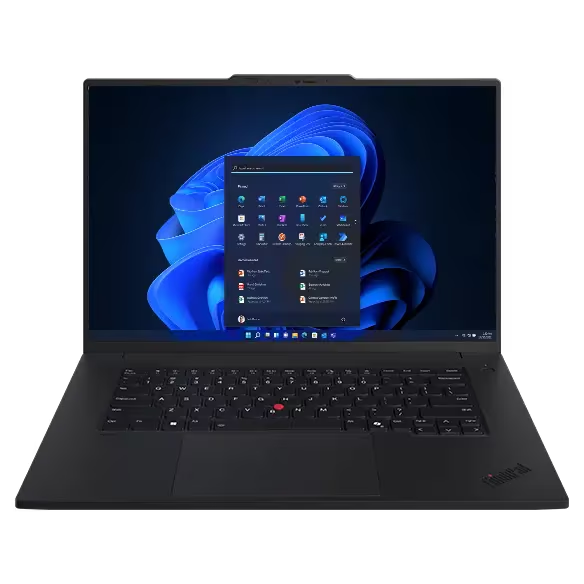
The 16” WUXGA display, while not 4K, features IPS technology with 100% sRGB coverage and 400 nits of brightness. This ensures accurate colors and sharp visuals, making it suitable for professional use cases where color fidelity is critical. The low blue light feature enhances comfort during late working hours.
Despite its powerful components, the ThinkPad P1 Gen 7 is lightweight and highly portable, with exceptional build quality that meets MIL-STD durability standards. Its comprehensive connectivity options, including Thunderbolt 4 and HDMI 2.1, provide flexibility for attaching peripherals and external monitors.
Lenovo Thinkpad P1 Gen 7 Ports
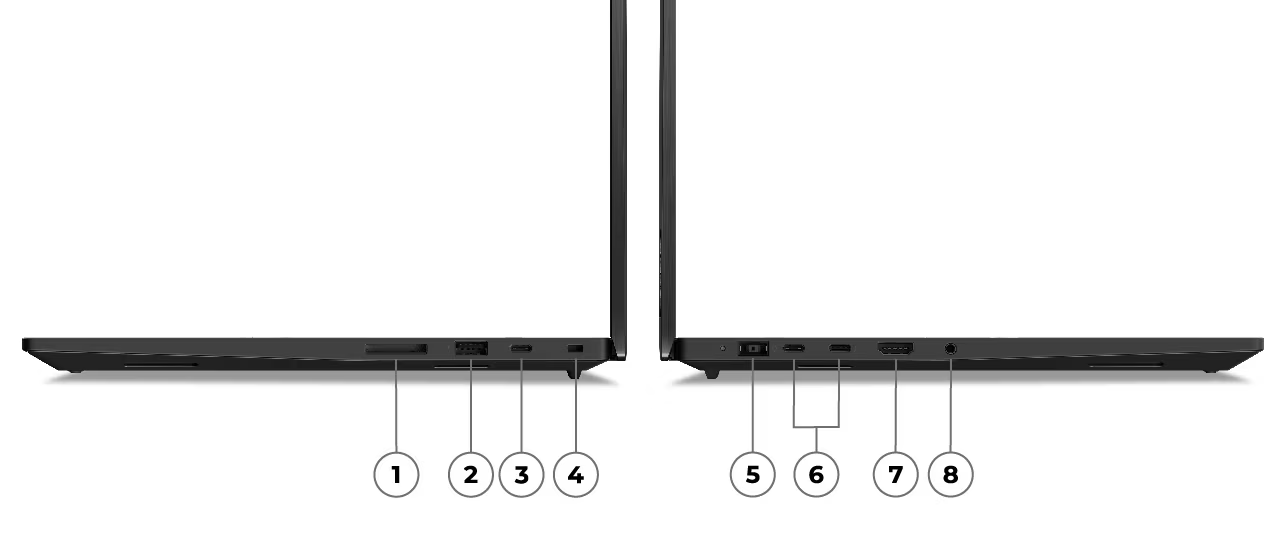
- SD Express 7.0 card reader
- USB-A (USB 5Gbps, always on)
- USB-C® (USB 10Gbps)
- Kensington Nano Security Slot™
- Power In
- 2 x USB-C® (Thunderbolt™ 4, USB 40Gbps) with power delivery & DisplayPort 2.1
- HDMI® 2.1 (supports resolution up to 4K@60Hz)
- Headphone / microphone combo
What could be improved
While the WUXGA display is functional and offers good color accuracy, its 1920 x 1200 resolution and 60Hz refresh rate may feel underwhelming for professionals accustomed to higher resolutions and smoother visuals. The lack of touch capability also limits its versatility for creative tasks.
Battery life on the Lenovo Thinkpad P1 Gen 7 remains a challenge, particularly when running heavy workloads, which can drain the battery quickly. Thermal performance is another concern, as the laptop tends to heat up during prolonged usage, which may affect comfort and longevity.
Upgradeability is limited, with memory soldered onto the board, reducing flexibility for future enhancements.
Lenovo Thinkpad P1 Gen 7: The bottom line
The ThinkPad P1 Gen 7 is a well-rounded workstation offering excellent performance, solid graphics capabilities, and a high-quality display suitable for professional work. While the display and battery life could be better, it remains a powerful and portable option for demanding users.
Lenovo provided the Lenovo Thinkpad P1 Gen 7 Laptop for review. Images courtesy of Lenovo unless otherwise noted.
Serious Insights is an Amazon Affiliate. Clicking on an Amazon link may result in a payment to Serious Insights.
For more serious insights on hardware and accessories, click here.
Leave a Reply