

Lenovo ThinkPad X12 Detachable:

Summary
Lenovo’s ThinkPad Detachable delivers great performance for general work in an appealingly light and well-designed package. Great keyboard and solid performance as a Windows tablet. Would benefit from an improved webcam.
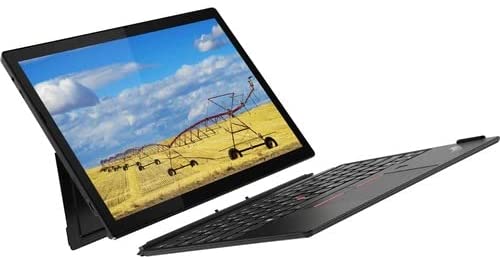
Lenovo’s ThinkPad X12 Detachable leans its 12.3-inch display against a kickstand. The ThinkPad-worthy detachable keyboard makes typing and other data entry a pleasure. And unlike most Surface Pro 7+ configurations, the X12 Detachable includes a pen and a keyboard in most configurations.
The ThinkPad X12 Detachable was evaluated with Windows 10, though it should easily upgrade to Windows 11.
Evaluation Criteria
Display
The 12.3-inch, 3:2 display offers more vertical workspace than 16:9 FHD displays. It covers 100% of the sRGB color gamut. It rates at 400 nits of brightness with a 1500:1 contrast ratio.
Corning® Gorilla® Glass 5 protects the display from scratches, glare and smudges.
Input
The Lenovo ThinkPad X12 Detachable includes the word “detachable” in the product name, so yes, the keyboard is an optional component—and it comes with a pen. Both of which are excellent. Lenovo did not skimp on the keyboard despite the need to keep the overall design light. It weighs only about 2.5 pounds with the keyboard and pen.
Typing is a pleasure. Good click and a good feel on the sculpted keys which borrow their design language from the X1 Carbon. Because this is only a 12-inch device, the keys might feel a bit cramped at first, but I easily adjusted to their spacing. The clean layout (lack of any key in funky places) reduced acclimation time,
The Digital Pen is the right size for a stylus, offering 4096 levels of pressure sensitivity. The pen requires a AAAA alkaline battery. Lenovo should consider a rechargeable digital pen that charges on the device. One option offers magnetic attachment but still appears to include a battery. The higher-end Digital Pen runs 400 days on a battery and supports tilt for shading.
As always, I could do without the TrackPoint, as I think the multiple modes of trackpad could confuse those not familiar with this legacy design.
Performance
The review unit arrived with a middle of the road 11th Generation Intel® Core™ i5-1130G7 which worked well in all the test use cases from content creation to web development, video conferences, social media management, browsing, class administration (in Canvas), drawing, basic spreadsheets, and presentation development and delivery. I wouldn’t recommend graphic intensive games, but even with only an i5, the Lenovo ThinkPad X12 Detachable was snappy—though if you can afford the i7, consider it instead.
Some might argue the i7 is overkill given the unlikely use of the X12 Detachable for gaming or media editing. But the minor incremental cost will not only extend the X12’s useful life, but it will also provide enough power if you do occasionally need to stretch beyond your usual workflows.
Memory maxes out at 16GB, which puts the X12 in the average range for business laptops.
Security
A Kensington ®Nano Security Slot. The Glance app (noted in Software below) offers some security features but not without the patience to get them working well. The Lenovo Commercial Vantage app also includes Wi-Fi security that warns users of dangerous networks.
A manual lens cover can be used to block the webcam.
Biometrics included both fingerprint and camera-powered “Hello” support from Windows.
Collaboration
Voice over IP keys support answering and rejecting calls, but the Lenovo Commercial Vantage app reports they only work with Microsoft Teams.
According to the specifications, the microphones are more tuned to digital assistants than to video conferencing (far-field for Cortana, near-field for Alexa). There are no notes about world-facing microphones and collaboration.
The cameras are adequate, with a 5-megapixel front-facing, with IR for Hello support and a privacy shutter. An 8-megapixel read-camera is also available. It isn’t clear why the X12 needs a rear-facing camera, except that all tablets have them.
The front-facing camera washes out in lowlight and remains grainy even with good lighting. The rear camera is of higher quality. It may take some bezel rearranging, but I would rather they include a better front-facing camera and drop the one on the back.
Audio is a weak spot, despite the Dolby affiliation. The X12 Detachable only includes stereo speakers (compared to the iPad Pro’s 4 speakers). While adequate for non-audio intensive tasks or alerts, good audio for video conferencing or content consumption will require a good pair of headphones. The X12 Detachable does retain a standard headphone jack for high-quality sound.
Connectivity
The Lenovo X12 Detachable includes only 2 USB-C ports. One is type 2 with Thunderbolt™ 4, the other is a 3.2 Gen 2 Type-C port. Radio hardware includes Bluetooth® 5.1 and Wi-Fi 6 802.11AX. 4G LTE is available as an option in some regions.
Rather than worry about which ports a laptop includes, if they offer 2 USB-C ports, that should be plenty. The owner can then acquire a dock that works for them—and they are plentiful and powerful. I regularly shift my USB-C docks between devices with few issues.

Aesthetics
Lenovo makes beautiful hardware. The thin computer, the complementary keyboard, all look great. I would prefer a magnetic pen that charges while attached to the device like Apple’s Pencil 2, as the pen dangling off the keyboard presents the only mar in an otherwise visually appealing package.
And while a kickstand is a practical choice for a tablet, it doesn’t work well on laps. Fortunately, the X12’s tablet configuration makes up for that deficiency, unless the situation calls for text entry—then you will need to move to a flat surface.
Sustainability
The X12 Detachable is certified Energy Star® 8.0 and EPEAT® Gold. The boxes and packaging are also lightweight and mostly recyclable.
Software
Lenovo doesn’t pre-install a lot of infrastructure-related software, but they do include a few interesting features like mirametrix Glance, which includes detection of people looking over your shoulder during a video conference, the blurring of the screen for privacy and other video conferencing and in-room security measures. In the single display configuration, Glance may be a bit much, so it snoozes by default.
When connected to multiple monitors in a semicircle, with the X12 as the outlier to the left, Glance became annoying. Every time I looked away from the X12’s monitor, the others blurred. I’m sure there is a way to configure Glance that isn’t frustrating, but I could not find it. I ended up telling Glance not to launch at start-up.
As open-source, Glance does not integrate as well with the OS as it could, and its UI and big overly look, are very 1990s. Lenovo would benefit from branching off and building a much more integrated version of the Glance feature set.
Also included is the Dolby Audio Premium for sound profiles. More interesting is the downloadable Dolby Access that brings Dolby Atmos to speakers and headphones, but not without a subscription. A feature like this should be included in the price.

What we like
This is one of my favorite laptops of all time. Lenovo delivers a solid build that retains lightness and a degree of ruggedness from its magnesium alloy shell. Overall the ThinkPad X12 Detachable appears sturdier than a Microsoft Surface Pro, though the devices are otherwise comparable.
Starting at $2,219, the ThinkPad X12 Detachable runs a little less money than a similarly configured Surface Pro. Lenovo is likely to be found at a discounted price more often than its Microsoft cousin. It is currently sitting at $999 on Lenovo’s website for the reviewed configuration.
My review unit arrived with 11th Generation Intel® Core™ 15-1130G7 with Integrated Iris® Xe Graphics and 16GB of LPRDDR4x memory. Optional configurations can include the i7 and the i3.

The 42Wh battery brings an all-day charge. Rapid charging will crank a dead X12 up to 80% in an hour using the included 65W AC adapter.
The ThinkPad X12 looks like a device that wants to excel at work. It is pretty in an industrial way, which is a good thing.
What could be improved
As with all Windows PCs that act as standalone tablets, Windows remains a poor experience compared to Apple’s iPad. While more powerful, Windows isn’t designed for the pen. That’s not Lenovo’s issue. They have delivered a solid tablet despite Windows’ limitations.
Some reviews see the USB-C-only ports as a problem. I don’t mind them. Purchasing the mobile and desktop docks that work for my use case makes more sense than paying extra for ports that I don’t use.
There must be some way for a tablet detachable to reconcile with the common practice of typing on one’s lap. The magnet between the X12 and the keyboard isn’t strong enough to keep it connected on the contours of a lap. I end up using a lap desk.
I would also like to see both the USB-C ports lower to the unit’s base—the one high on the tablet when in “laptop mode” can prove out of reach for some cabling.
Put the 8MP camera on the front and drop the rear camera.

ThinkPad X12 Detachable: The Bottom Line
I love Lenovo’s little tablet. It is a Windows tablet I don’t mind using as a tablet in certain circumstances. Media consumption, yes. Web browsing, yes. Almost everything else reverts me to a keyboard. But luckily, this multiple-personality-proud laptop pairs with an outstanding keyboard. A great display with a 3:2 aspect ratio and a range of CPUs makes this lightweight convertible a good choice for people who like choices.
A subpar webcam is the most important fault that can’t be fixed easily, though you can always add a third-party camera for video conferencing—I would just prefer not to. Other items, such as poor speakers give way to any headphones you like, USB-C ports expand easily with docks and dongles, and lap desks make up for the wobbliness of the kickstand on a lap.
If you want the versatility of a real tablet with the power of a laptop, the only choices are Surface and the Lenovo X12 Detachable. Lenovo’s built quality, pre-configured bundles and lower street pricing will out-compete Microsoft’s Surface in most circumstances.

Lenovo provided the ThinkPad X12 Detachable for review. Images courtesy of Lenovo.
Serious Insights is an Amazon Affiliate. Clicking on an Amazon link may result in a payment to Serious Insights.
For more serious insights on hardware and accessories click here.
Leave a Reply