• Skip to main content
  • Skip to primary sidebar
  • Skip to footer
  • Home
  • Services
    • Vendor Advisory Services
    • IT Advisory Services
    • Business Advisory Services
    • Serious Insights Agile Thinking Workshops
    • Innovation Workshops
    • Serious Insights Keynotes
    • Strategy Advisory Services
    • Thought Leadership & Content Marketing
  • Reviews
    • All Hardware Reviews
    • Headphone Reviews
    • USB-C Hub Reviews
    • SeriousPop.Tech
    • Software Reviews
  • Advisory Research
    • Serious Insights on AI
    • Serious Insights Interviews
    • Strategy & Scenario Planning
    • Serious Insights on Collaboration
    • Hybrid Work
    • Knowledge Management
    • Management
    • Learning Reimagined
    • Serious Insights: The 10s
    • Special Reports
    • Sponsored Research
    • USG Scenario Planning Videos
  • About Us
    • About Serious Insights
    • About Daniel W. Rasmus
    • Daniel W. Rasmus Appearances
    • Daniel W. Rasmus Videos
    • Clients
    • Headshots
    • Books
      • Management by Design
      • Listening to the Future
      • Twelve Ways to Escape an Alien
      • Older Books
    • Daniel W. Rasmus World Travel
    • Dan’s Quotes
    • Community
    • Site Disclaimer
    • Privacy Policy
  • News
  • Contact Us
    • Contact Us
    • Book Daniel W. Rasmus
    • Serious Bookkeeping
    • Product Evaluation Request Form
    • Wedding Ceremonies
Serious Insights

Serious Insights

Research and reviews from strategist, futurist and analyst Daniel W. Rasmus

Follow Us

  • Facebook
  • X
  • LinkedIn
  • YouTube
  • Instagram

Monoprice 15-in-1 Triple-Display MST Docking Station Review: 15 Powerful Ports on Universal Connection

October 20, 2023 by Daniel W. Rasmus Leave a Comment

Monoprice 15-in-1 Triple-Display MST Docking Station

Design
Features
Value
Sustainability

Summary

The Monoprice 15-in-1 Triple-Display MST Docking Station transforms a laptop or PC into a well-connected workstation at a reasonable price. A single USB-C (with DP Alt Modes) or Thunderbolt port unleashes a wealth of display and connectivity options with 6 USB ports, Gigabit Ethernet and dual SD card readers.

4.3

Monoprice 15-in-1 Triple-Display MST Docking Station Review

The idea of docking stations has changed dramatically with USB-C. The once clunky desktop anchors that clasped onto a laptop via wide, proprietary connections are largely relics of the past. Current docking stations transform a single USB-C connection into a wealth of ports. And few docking stations define “wealth of ports” more than the $139.99 Monoprice 15-in-1 Triple-Display MST Docking Station. My MacBook Pro or other laptops under review, tether to this dock via a single USB-C cable that powers the laptop and greatly expands its connectivity capabilities.

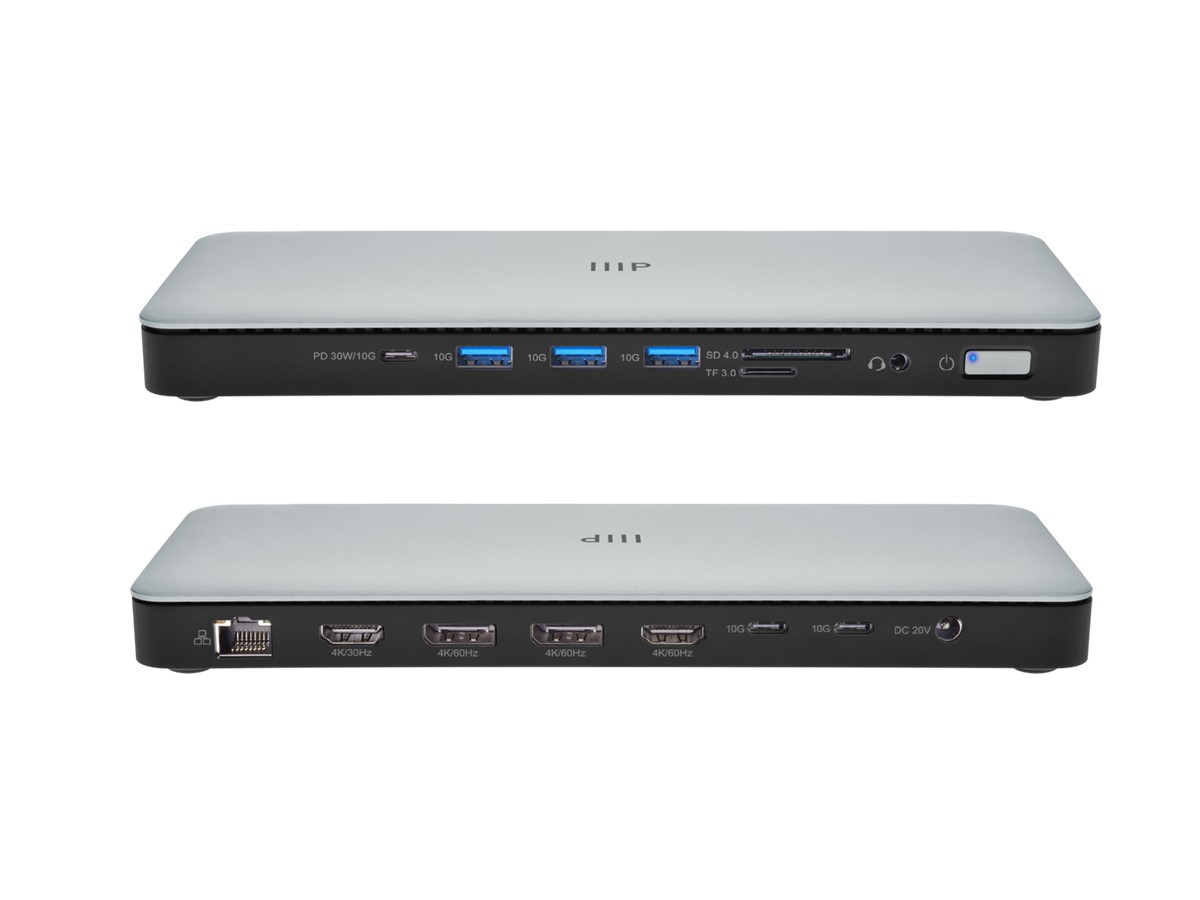
Monoprice 15-in-1 Triple-Display MST Docking Station hero image.
A picture worth a thousand words, or 15 ports.

Specifications

  • Supports 4x video outputs, 6 ultra‑fast USB ports (10Gbps), Gigabit Ethernet, 3.5mm audio/microphone jack
  • Supports up to 3x high‑resolution external displays (any combination of HDMI & DP across the 4 ports)
  • 3 USB Type-A 3.2 Gen2 ports with 10Gbps transfer speed, one with 7.5W downstream charging
  • 3 USB Type-C 3.2 Gen2 ports with 10Gbps transfer speed, one with 30W PD downstream charging
  • 150W distributed power supply with max 96W for host charging
  • RJ45 Gigabit Ethernet
  • 3.5mm audio/microphone jack
  • SD/MicroSD card readers
  • Plug‑and‑play
  • Supports Windows, MacOS, and Thunderbolt
  • Kensington and micro security slots

What we like

Pros

  • Huge number of ports
  • Charging options for laptops and devices via 150W of distributed power

The specification section kind of says it all. There are plenty of ports for most routine work situations, and except for high-end creators, perhaps enough for even the occassional unexpected use case.

My dock covers Bluetooth® connection dongles for workplace headsets like the Jabra Evolve 2 Buds, a Drop keyboard, a Seagate HD, and an external web cam. The dock also handles the HDMI output to my monitor, even though my personal device, and many of the review units, include HDMI. The single USB-C cable is more convenient.
On the technical side, laptops need to support DP Alt Modes, Thunderbolt or Multi-Stream Transport (MTS). Apple devices do not support MST, though they do support the other standards. Unfortunately, that means they can’t push different outputs across an array of connected monitors. The Monoprice website offers an excellent connectivity illustration that shows what works with macOS and Windows.

Minimalist packaging gets Monoprice a high score for sustainability, though I would love to see a more corporate commitment to sustainability and what it means for them on the company’s website.

What could be improved

Cons

  • Supports Thunderbolt but isn’t a Thunderbolt dock

Being a licensed technology, Thunderbolt docks tend to be more expensive. This dock falls into the category of powered USB-C docks. There are many differences, but the biggest one is daisy-chaining hubs together. This dock does not support daisy chaining Thunderbolt hubs, though it effectively connects to Thunderbolt ports and leverages their video, audio and I/O capabilities.

For all but the most I/O intensive tasks, this docking station will suffice.

Monoprice 15-in-1 Triple-Display MST Docking Station: The bottom line

The world of docking stations has changed dramatically, and the Monoprice 15-in-1 Triple-Display MST Docking Station offers a versatile expansion profile that turns modern laptops and desktops into multi-port wonders. Sure, high-end laptops have started to spring up with legacy ports, but those are mostly for the convenience of connecting on the road. At home, or in an office, the ideal docking station requires only one USB-C port for power and connectivity, and that is exactly what the Monoprice 15-in-1 Triple-Display MST Docking Station provides.


Monoprice provided the 15-in-1 Triple-Display MST Docking Station for review. Images courtesy of Monoprice unless otherwise noted.

Serious Insights is an Amazon Affiliate. Clicking on an Amazon link may result in a payment to Serious Insights.

For more serious insights on hardware and accessories, click here.

Share this post:

  • Share on X (Opens in new window) X
  • Share on LinkedIn (Opens in new window) LinkedIn
  • Share on Facebook (Opens in new window) Facebook
  • Email a link to a friend (Opens in new window) Email
  • Print (Opens in new window) Print
  • Share on WhatsApp (Opens in new window) WhatsApp
  • Share on Bluesky (Opens in new window) Bluesky
  • More
  • Share on Tumblr (Opens in new window) Tumblr
  • Share on Pinterest (Opens in new window) Pinterest

Like this:

Like Loading…

Related

Filed Under: Hardware Review

Reader Interactions

Leave a ReplyCancel reply

This site uses Akismet to reduce spam. Learn how your comment data is processed.

Primary Sidebar

Subscribe to Serious Insights

Enter your email address to subscribe to this blog and receive notifications of new posts by email.

Join 7,849 other subscribers

Download the 2026 State of AI Report

Amazon Associate

As an Amazon Associate, I earn from qualifying purchases.

Hit Amazon Haul for Amazing Discounts.

Also, take a look at these links for additional Amazon discounts.

Today’s Deals.
Up to 80% Off
Crazy Low-Priced Finds
Under $5
Brand Scores

Dan’s poetry. Only on Kindle. Read today!

Top Posts

  • JBL Tour Pro 2 Review: Excellent Headphones That Crush With Their NextGen Case
    JBL Tour Pro 2 Review: Excellent Headphones That Crush With Their NextGen Case
  • JLab Epic Air Sport ANC Gen 2 Review: Sports Earbuds that Go the Extra Mile
    JLab Epic Air Sport ANC Gen 2 Review: Sports Earbuds that Go the Extra Mile
  • Tozo HT2 ANC Headphones Review: Inexpensive Headphones That Impress for the Price
    Tozo HT2 ANC Headphones Review: Inexpensive Headphones That Impress for the Price
  • Jabra Elite 10 Earbuds Review: The Jabra Flagship Continues to Improve on Comfort and Features
    Jabra Elite 10 Earbuds Review: The Jabra Flagship Continues to Improve on Comfort and Features
  • 12 Hybrid Work Fears Managers Must Face
    12 Hybrid Work Fears Managers Must Face

Buy my space adventure only on Kindle.

Recent Comments

  • JBL Tour Pro 2 Review: Worth It? Specs, Comparison & More - Coastal Journal on JBL Tour Pro 2 Review: Excellent Headphones That Crush With Their NextGen Case
  • AI PCs Want Higher Labels Than AI PC – blog.aimactgrow.com on Acer Aspire 16 AI Qualcomm Review: Snapdragon X Value Laptop with Copilot+ Trade-offs
  • AI PCs Need Better Labels Than AI PC on Acer Aspire 16 AI Qualcomm Review: Snapdragon X Value Laptop with Copilot+ Trade-offs
  • OWC Thunderbolt Dock (14-Port) Review: One Dock, and One Cable, to Rule Them All on EZQuest USB-C Slim Gen 2 Hub Adapter 6-in-1 Review: A Speedy Modern Hub for Modern Work
  • Lenovo’s Qira is a Bet on Ambient, Cross-device AI—and on a New Kind of Operating System on “The Future of AI Isn’t What You Think” from Foxit Featuring a Daniel W. Rasmus Interview

Footer

Sitemap

  • Blogs
  • Book Daniel W. Rasmus
  • About Daniel W. Rasmus
  • Serious Insights LLC Disclaimer
  • Privacy Policy

Archives

Tag Cloud

ABC Apple AR artificial intelligence Big Data Buffy the Vampire Slayer BusinessWeek Cengage CIO Magazine CIOs Cisco context coronavirus Customer Service Dell Disney Disneyland earbud review Enterprise 2.0 facebook Fast Company Feedback loops Harvard Business Review HBR HP IBM Innovation Instagram iPhone case JBL Kindle Knowledge Management life-long learning Logitech Management By Design Microsoft mission statement Netflix New Scientist Nokia scenario planning Star Trek Stephen Elop Thought Leadership VR

Copyright 2009-2026 Serious Insights LLC | Log in

We are using cookies to give you the best experience on our website.

You can find out more about which cookies we are using or switch them off in .

%d
    Powered by  GDPR Cookie Compliance
    Privacy Overview

    This website uses cookies so that we can provide you with the best user experience possible. Cookie information is stored in your browser and performs functions such as recognising you when you return to our website and helping our team to understand which sections of the website you find most interesting and useful.

    Strictly Necessary Cookies

    Strictly Necessary Cookie should be enabled at all times so that we can save your preferences for cookie settings.