

ThinkPad T14s Gen 6 (14″ Snapdragon) Laptop

| Criteria | Star Rating |
| Design | ⭐⭐⭐ |
| Features | ⭐⭐⭐ |
| Value | ⭐⭐⭐ |
| Sustainability | ⭐⭐⭐⭐⭐ |
| Total | 3.5 ⭐ |
Summary
The ThinkPad T14s Gen 6 (14″ Snapdragon) offers excellent portability, long battery life, and fanless operation, making it ideal for professionals on the go. Its lightweight design, optional 5G connectivity, and evolving Windows on ARM compatibility enhance its appeal for mobile productivity. However, it faces notable challenges, including software compatibility issues, inconsistent update behavior, and limited performance for demanding tasks. Priced at approximately $1,700, the laptop feels expensive given its constraints, such as average display quality, soldered RAM, and lack of Thunderbolt support. While it excels in sustainability and mobility, the T14s Gen 6 may not meet the needs of power users or those seeking broader compatibility and raw performance.
Pros
- Long-lasting battery life
- Lightweight and portable
- Optional 5G connectivity
- Evolving Windows on ARM support
Cons
- Software compatibility gaps
- Odd update behavior
- Sub-par performance for demanding tasks
- Expensive for its class
- Limited upgradability
- Lack of Thunderbolt support
- Average display options
ThinkPad T14s Gen 6 (14″ Snapdragon) Laptop
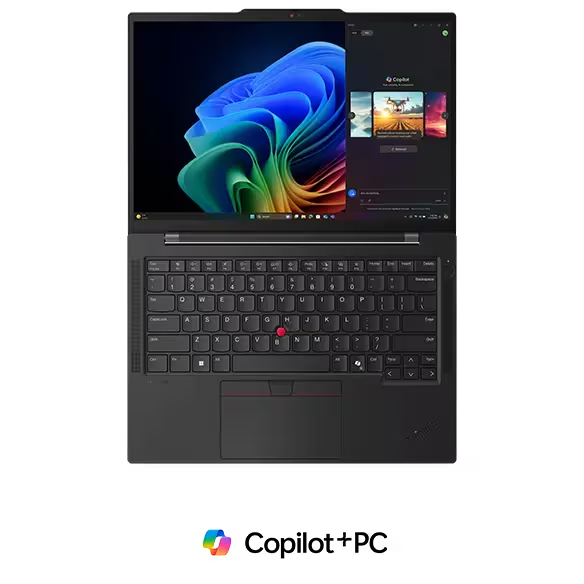
The move to ARM is underway, and Qualcomm’s Snapdragon leads the way. Snapdragon makes for efficient, powerful, thin laptops like Lenovo’s 14-inch ThinkPad T14s Gen 6. However, ARM-based Windows devices also introduce application compatibility concerns and other issues, like power management. From a design perspective, I like the ThinkPad T14s Gen 6 very much.
I faced serious frustrations when the T14s paused, with no feedback, multiple times during software updates that would have moved from frustration to anger had the unit been my primary computer. Computers can’t just turn off and look bricked during an update reboot, and this one did more than once. Lenovo, Microsoft, and other manufacturers who want to launch the new era of RISC-based Windows devices must ensure they are fit and finish worthy of their price and reputation.
ThinkPad T14s Gen 6 (14″ Snapdragon) Specifications
| Feature | Max Config | As Reviewed |
|---|---|---|
| CPU | Snapdragon® X Elite X1E-78-100 Processor (3.40 GHz) | Snapdragon® X Elite X1E-78-100 Processor (3.40 GHz) |
| GPU | Qualcomm Adreno™ | Qualcomm Adreno™ |
| Display | 14″ 2.8K (2880 x 1800), OLED, Anti-Glare/Anti-Reflection/Anti-Smudge, Non-Touch, HDR 500, 100%DCI-P3, 400 nits, 120Hz, Low Blue Light | 14″ WUXGA (1920 x 1200) IPS, low power, 400nit, 100% sRGB, antiglare, TÜV Eyesafe®-certified low blue light |
| Webcam | 1080p FHD & infrared (IR) Mobile Industry Processor Interface (MIPI) with Computer Vision & webcam privacy shutter | 1080p FHD & infrared (IR) Mobile Industry Processor Interface (MIPI) with Computer Vision & webcam privacy shutter |
| Memory | 32GB LPDDR5x 8448MHz soldered, dual-channel | 32GB LPDDR5x 8448MHz soldered, dual channel |
| Internal Storage (upgradable) | Up to 1TB M.2 PCIe Gen 4×4 SSD, 2242 compatible | 1TB M.2 PCIe Gen 4×4 SSD, 2242 compatible |
| Keyboard | Dual-function TrackPoint: navigate the cursor or double-tap to open TrackPoint Quick Menu Optional: Backlit with white LED lighting Spill-resistant TrackPad with 3 buttons (115mm x 74.3 / 4.52″ x 2.92″) ThinkPad TrackPoint Keyboard (1.5mm travel) | Dual-function TrackPoint: navigate the cursor or double-tap to open TrackPoint Quick Menu Optional: Backlit with white LED lighting Spill-resistant TrackPad with 3 buttons (115mm x 74.3 / 4.52″ x 2.92″) ThinkPad TrackPoint Keyboard (1.5mm travel) |
| Audio | 2 x 2W speakers (user facing) 2 x dual-array mics Dolby Audio™ Microsoft Voice Focus for noise cancellation | 2 x 2W speakers (user-facing) 2 x dual-array mics Dolby Audio™ Microsoft Voice Focus for noise cancellation |
| Wireless | Qualcomm® WiFi 7 802.11BE (2 x 2) Bluetooth® 5.3 | Qualcomm® WiFi 7 802.11BE (2 x 2) Bluetooth® 5.3 |
| Broadband | Optional: Nano SIM slot | None |
| Battery | 58Whr supporting Supports Rapid Charge (60 minutes = 80% capacity) with 65W or higher adapter | 58Whr supporting Supports Rapid Charge (60 minutes = 80% capacity) with 65W or higher adapter |
| SmartCard Reader | None | None |
ThinkPad T14s Gen 6 (14″ Snapdragon)
- 16.9mm x 313.6mm x 219.4mm / .67″ x 12.35″ x 8.64″
- Starting at 1.24kg / 2.72lbs
- ENERGY STAR® 8.0
- EPEAT® Gold, where applicable*
- TCO 9.0
- 95% post-consumer content (PCC) recycled plastic used in cable holders
- 90% PCC recycled plastic used in speaker enclosure
- 90% PCC recycled plastic used in battery enclosure
- 90% PCC recycled plastic used in adapter
- 90% recycled magnesium used in keyboard frame (C)
- 55% recycled aluminum used in bottom cover (D)
- 50% recycled carbon fiber reinforced polymer used in top cover (A)
- 100% plastic-free, recyclable packaging
MIL-STD 810H
TÜV Eyesafe®-certified for low blue light
What we like
The ThinkPad T14s Gen 6 (14″ Snapdragon) delivers outstanding battery life thanks to the efficient Snapdragon 8cx Gen 3 processor. With over 20 hours of light use on a single charge, it’s a game-changer for professionals who need extended productivity without worrying about frequent recharges. This long-lasting battery life is especially appealing for travelers and remote workers who may not always have access to a power source.
Weighing approximately 2.7 pounds and designed with a sleek, durable chassis, the T14s Gen 6 strikes a good balance between ThinkPad’s durability and modern lightweight convenience. Like other black-matt ThinkPads, the T14s doesn’t feel precious like some with finely honed edges and shiny surfaces. Its compact form makes it ideal for those constantly on the go, offering mobility without sacrificing build quality.
The addition of optional 5G connectivity elevates the laptop’s functionality, especially for professionals who rely on consistent internet access while travelling. It enables fast, secure connections without depending on public Wi-Fi, ensuring seamless work performance from virtually anywhere with network coverage.
Windows on ARM has also matured significantly, and the T14s Gen 6 benefits from this progress. It supports a growing library of native ARM applications alongside x86 emulation, making it a versatile device for mainstream productivity. The optimized compatibility ensures that most daily tasks, from document editing to video calls, run smoothly, allowing the laptop to meet the needs of many users.
ThinkPad T14s Gen 6 (14″ Snapdragon) Ports


Ports on the ThinkPad T14s Gen 6 (14″ Snapdragon) include 2 x USB-C® 4, 40Gbps (supports power delivery & DisplayPort), 2 x USB-A, 5Gbps (1 always on)
HDMI® 2.1 (supports resolution up to 4K@60Hz) and a headphone/microphone combo jack.
What could be improved

The ThinkPad T14s Gen 6 (14″ Snapdragon) still faces challenges with software compatibility. While Windows on ARM has made significant strides, certain professional applications, especially those in niche industries like 3D modelling or legacy enterprise software, remain unsupported or run sub-optimally. This limitation can frustrate users who rely on specialized tools and need seamless workflow functionality.
The ThinkPad T14s Gen 6 (14″ Snapdragon) experiences power management issues, leading to unexpected behavior during system updates. Additionally, the laptop may not enter sleep mode properly, resulting in battery drain even when the laptop is not in use. Additionally, some updates intended to address these power management concerns have not fully resolved the issues, frustrating users with the device’s inconsistent performance.
The restart issues cannot be underestimated as an irritant. When I went through the end-of-review ritual of resetting PCs before returning them to their manufacturer, the T14s would not reset, or at least it would not reset in a reasonable amount of time compared to the three Intel laptops I also reset the same day. It started fine and then signaled a reboot, from which it did not return. Had I waited a couple of hours, perhaps the Snapdragon-based laptop would startup with a fresh installation of Windows 11.
Alas, after an hour or so, I gave up. I held the power button down until the power light went out. When I turned it back on, it said the disk needed to be repaired. A “blue screen of death.” I turned it off and restarted it again. Windows 11 started, stating that the reset ran into issues and that no changes had been made. I went through this a couple of times. I stopped wasting my time, and visited my Microsoft account, disassociated my ID with this device, powered down the laptop and boxed it up.
While it was running, however, the performance of the Snapdragon Elite X processor, while sufficient for light productivity tasks, falls short when handling intensive workloads. Multitasking, rendering, and other processor-demanding tasks can reveal the chip’s limitations compared to Intel or AMD processors in the same class. This compromises the laptop’s utility for power users or professionals needing robust performance.
The premium price of the T14s Gen 6, starting at around $1,700, is another drawback. For the cost, buyers may expect a broader set of features or higher performance capabilities. Competing devices with similar or lower price points often deliver more in terms of processing power or display quality, making the T14s feel expensive for what it offers.
The lack of upgradability further limits the device’s appeal. With soldered RAM and storage maxing out at 1TB, the laptop cannot adapt to evolving user needs. This is particularly disappointing for professionals who prioritize future-proofing their investments and expect more flexibility in their device configurations.
The display options, while serviceable, are underwhelming for a laptop at this price point. The 14-inch FHD and WQHD panels offer good clarity and brightness but lack the vibrancy and enhanced visual experience of higher refresh rates or OLED technology. In a competitive market, a more advanced display could have made the T14s Gen 6 stand out more prominently.
The performance of the Snapdragon 8cx Gen 3 processor, while sufficient for light productivity tasks, falls short when handling intensive workloads. Multitasking, rendering, and other processor-demanding tasks can reveal the chip’s limitations compared to Intel or AMD processors in the same class. This compromises the laptop’s utility for power users or professionals needing robust performance.
Living outside the Intel ecosystem (and Apple ecosystem, which co-owns Thunderbold) means no Thunderbolt support for the T14s Gen 6, which limits its expandability and may deter users with high-performance peripheral needs from buying the laptop.
The premium price of the T14s Gen 6, starting at around $1,700, is another drawback. For the cost, buyers may expect a broader set of features or higher performance capabilities. Competing devices with similar or lower price points often deliver more in terms of processing power or display quality, making the T14s feel expensive for what it offers.
The lack of upgradability further limits the device’s appeal. With soldered RAM and storage maxing out at 1TB, the laptop cannot adapt to evolving user needs. This is particularly disappointing for professionals who prioritize future-proofing their investments and expect more flexibility in their device configurations.
The display options, while serviceable, are underwhelming for a laptop at this price point. The 14-inch FHD and WQHD panels offer good clarity and brightness but lack the vibrancy and enhanced visual experience provided by higher refresh rates or OLED technology. In a competitive market, a more advanced display could differentiate or even make the T14s Gen 6 appear more competitive.
ThinkPad T14s Gen 6 (14″ Snapdragon) Laptop: The bottom line
The ThinkPad T14s Gen 6 (14″ Snapdragon)’s design touts portability, AI-readiness and incredible battery life, making it a compelling choice for professionals who value mobility and light productivity. However, the premium price, software limitations, and modest performance mean it’s not for everyone. Those seeking more raw power or broader compatibility may want to explore other options.
What about AI?
I’m leaving AI in the middle between “Pro” and “Con” at this point. This “AI-ready” laptop sports a copilot key, but this unit lacks the recently announced Lenovo AI features, so Copilot and other AI is limited on-device, meaning most AI compute will take place in. the cloud. The AI camera and presence sensing may use the X Elite neural processors, but those are autonomic functions, not information processing or organizational functions. Until AI becomes a differentiating feature, it should live in the domain of Windows reviews. It is only worthy as a footnote in reviews of Windows laptops that arrive only with a copilot key.
Lenovo provided the ThinkPad T14s Gen 6 (14″ Snapdragon) Laptop for review. Images courtesy of Lenovo unless otherwise noted.
Serious Insights is an Amazon Affiliate. Clicking on an Amazon link may result in a payment to Serious Insights.
For more serious insights on hardware and accessories, click here.
Leave a Reply