
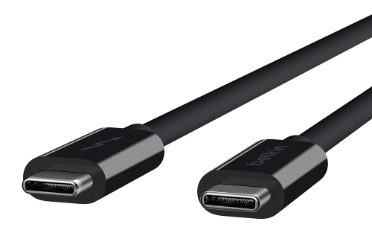
Featured Image: Belkin USB Type-C Thunderbolt™ 3 Cable
The recent arrival of a Dell XPS 13 promoted a deep inquiry into the benefits and future of USB Type-C and the various protocols that run through the new connector. What I discovered was a new connector that will likely replace all existing USB connectors at some point in the not too distant future. I also found a connector still struggling to establish a stable identity as it continues to evolve into the Swiss Army Knife of wired connectivity.
USB Type-C: An Overview

USB Type-C offers relatively small, very fast, reversible port support for PCs, smart phones and other devices. While previous versions of USB connectors could be coaxed into a wide variety of applications, Type-C was designed for every currently conceivable connectivity scenario from charging to networking. Perhaps most importantly, Type-C offers a single port that can manage as a hub that can offer a wide variety of functions simultaneously.
But not all USB Type-C ports are the same. You can’t plug a monitor into a Type-C connector that doesn’t support video, and you can’t charge a PC from a Type-C port not configured for power. The port may be standard but the choices about what the port delivers on a particular device are much more variable.
The Type-C Connector

USB Type-C creates a new version of USB, and it refers to the plug itself, not the protocols it is capable of handling. USB does not replace Type-A or Type-B, but its design benefits will likely make it more appealing to those looking to shrink the size of devices, and do more with fewer connectors. Unlike older connectors, however, Type-C tightly ties to USB 3.1, but not exclusively so. USB 3.1 can be implemented on older connector types as well, but Type-C connectors won’t often come limited by older USB protocols (though the specification permits older USB protocols over Type-C).
Unlike older versions of USB, which differentiated ends to help avoid confusion about hosts and targets, USB-C assumes smarter technology that will sense what the connections are cable of providing. If, however, someone plugs a USB Type-C connector into a device that can’t deliver a service, nothing will happen, which will still create frustration on the part of device owners.
Power and confusion
Data transfer speeds up to 10Gbps are but one advantage to Type-C. That translates into a Terabyte copied in about 20 minutes. This speed boost reveals itself quickly. A recent evaluation found that full HD movies copy within seconds over USB-C to a Le Cie USB Type-C hard drive (see the table below for USB speed comparisons).
Driving a suite of connections from a single port comes via the 100W bi-directional Power Delivery specification. Type-C with Power Delivery will power devices directly from a PC port. Its power throughput will greatly reduce charging times for connected mobile devices. Hard drives, printers, smartphones, and monitors could in theory all receive power simultaneously from a single USB Type-C connector, which can, in a way, be thought of as a greatly simplified docking port.
The real miracle in Type-C comes from the ability to push other protocols over USB Type-C. Some devices already support protocols like HDMI, DisplayPort, Mobile High-Definition Link (MHL)and DisplayLink via the specifications Alternate Mode. This will reduce cable variations in the long-term but will force many PC owners to purchase new cables at least on the outbound side for those who own existing devices. The support for these protocols won’t necessarily be clear. A smartphone with a USB Type-C connector, may not be able to output its video to a DisplayPort monitor, let alone power it. The same is true for PCs with Type-C connectors. While they may be able to charge a smartphone or tablet, they won’t likely be configured to power, say a laptop—though offering up a PC power supply with an extra 100Ws of power is possible, it won’t be commonplace.
USB speeds by type
USB 3.1 supports 10Gbps. Several Gigabytes of music transfers in 10 minutes. An entire HD movie takes around 30 seconds.
- USB 2.0 = 480 Mbps
- USB 3.0 = 5Gbps
- USB 3.1 = 10Gbps
And don’t forget Thunderbolt. At Computex 2015 Intel asserted that “Thunderbolt 3 acts as a “superset” host for USB 3.1 (at full 10Gbps speed), DisplayPort 1.2, PCI Express Gen 3 and its own Thunderbolt standard,” as reported by C|Net. Active cables will be required to fully leverage Thunderbolt 3 at 40Gps data rates. Thunderbolt devices won’t work with generic USC-C ports. Yet another twist pushed through the Type-C connector.
Look for SuperSpeed+ (or SS), 10 Gbps (or 10) and the USB Trident or I/O logo to indicate top speed device interfaces. Manufacturers need not include meaningful icons on hardware, however, so read device specifications for the most accurate information.
USB Type-C and its various incarnations virtually (or actually) eliminate the need for any other connector on a modern PC.
The likely evolution of USB Type-C
As USB Type-C and its adopters mature, the specification will stabilize and the specification will achieve dominance. In the meantime, several evolutionary developments will occur over the next several years. These include:
- Type-C hubs will likely not only provide power but may well provide switching between various connected devices, allowing them to talk to one another across the hub.
- Alternatively, and concurrently, devices will end up with more than one Type-C port to the demise of Type-A. In many cases, Type-C accessories already interfere with existing ports because they might be designed for a specific unit. A beautiful Satechi USB Type-C hub made for the MacBook works fine on a Dell XPS, except putting it in one-way blocks power, and inverting blocks sound. Fortunately, Accell and other manufacturers offer a variety of Type-C converters for single and multi-purpose. A new Belkin Type-C powered USB hub offers four ports 3.0 off a single Type-C port.
- The USB Implementers Forum, the owners of the USB standard, promises futureproofing in the USB Type-C design. So far that looks like a fair prognostication for at least the next decade. Local speeds of 10 Gbps will handle even the most demanding apps, including mobile VR, likely viable on 5G networks, which will also offer 10 Gbps speeds (5G networks will start to appear by 2020 based on estimates from the Next Generation Mobile Network – NGMN – alliance).
- Some speculated USB Type-C would be dominant by Q4 2016. That hasn’t happened. It is highly likely that CES 2017 will deliver Type-C in most designs, with shipments taking place in the second half of 2017.
- Confusion will likely abound around Alternate Mode for some time. USB Type-C devices using Alternate Mode may not work as owners of devices expect. Devices on both ends of an Alternate Mode connection need not only a compatible connector, but a compatible protocol to work.
- For device owners, the increasing use of USB Type-C will mean smaller devices with standardized interfaces. The evolution will also mean replacing USB Type-A cables with Type-C cables, and in many cases, also replacing HDMI, VGA, DVI, DisplayPort and other ports as Type-C subsumes them.
- USB Type-C might one day become the new wired standard for homes, as outlets support connections to devices through wall wiring, not just charging via the increasingly common Type-A connector.
- Existing devices will proliferate in Type-C configurations, including printers, hard drives, flash drives and the like. The continuing evolution of the standard and its Alternate Mode features may mean, however, early adopters will find some early purchases of limited use in the future.
Apple laid down the gauntlet with the MacBook’s Type-C only design. Its close rival, the Dell XPS 13, offers more ports and in an enterprise device that will keep near-term costs down because organizations won’t have to spring for new adapters as quickly. Ultimately the Type-C connector will prove an unstoppable juggernaut that will crush the competition like a light-weight running back blowing through a big and beefy defensive line. Sometimes small and fast is just the right answer.
A sampling of USB-C products
Accell USB Type-C adapters ($18.99 – $34.99)
Accell offers a wide variety of adapters including HDMI (1.4 and 2.0), Gigabit Ethernet, USB 3, DVI and VGA. I have tried their entire suite and found the work effectively in as single transformation solutions. These single cables can reduce clutter and weight. While the multi-port solutions work well for people who just miss all of the ports, or actually need them, if all one requires is HDMI output, with Accell’s solutions one needs to carry only that adapter. And if you aren’t sure, these light weight products are compact so you can easily carry several. The downside comes if you do find you need more than one adapter but only have one port. In that case, bring a USB-C to USB-A hub (like the one from Belkin described below) and older USB Type-A adapters, which work well driven off the single Type-C port. Eventually, the Type-A hubs will give way to Type-C hubs.

LeCie LaCie Porsche Design Mobile Drive ($239.99)
The LeCie USB Type-C hard drives are wicked fast. Serious Insights evaluated the 4 Terabyte drive and found it copied full HD feature-length videos in a matter of seconds. The drive is small and sleek. It requires no power outside of the Type-C connection. Unlike some older mobile drives that provided the option, and therefore the cost of components for external power, this is a pure USB Type-C device which means it is simple. Plug it in and go.

Belkin USB-C Accessories ($19.99-$89.99)
Belkin traditionally offers cables of almost everything one can imagine. Serious Insights evaluated the powered 4 port USB 3.0 Hub+USB C Cable and the Thunderbolt™ 3 Cable. Both are very well made and offer high-end capabilities for those seeking to extend their USB Type-C arsenal. The cable works to the 20 Gbps if you can find a device that will pump that much data through it. Belkin also offers a variety of adapters, charging solutions and other cables.
Satechi USB Type-C Hub ($39.99)
I only evaluated a single Satechi product but found it exceedingly well manufactured and beautifully designed. As stated in the main article, it is clear this adapter was meant for a single port MacBook. While it works just fine on other devices like the Dell XPS 13, it does cover other ports. Satechi does sell other devices, like their $79.99 Aluminum Multi-Port 4K HDMI Adapter which is much less platform-specific in its design.

Leave a Reply